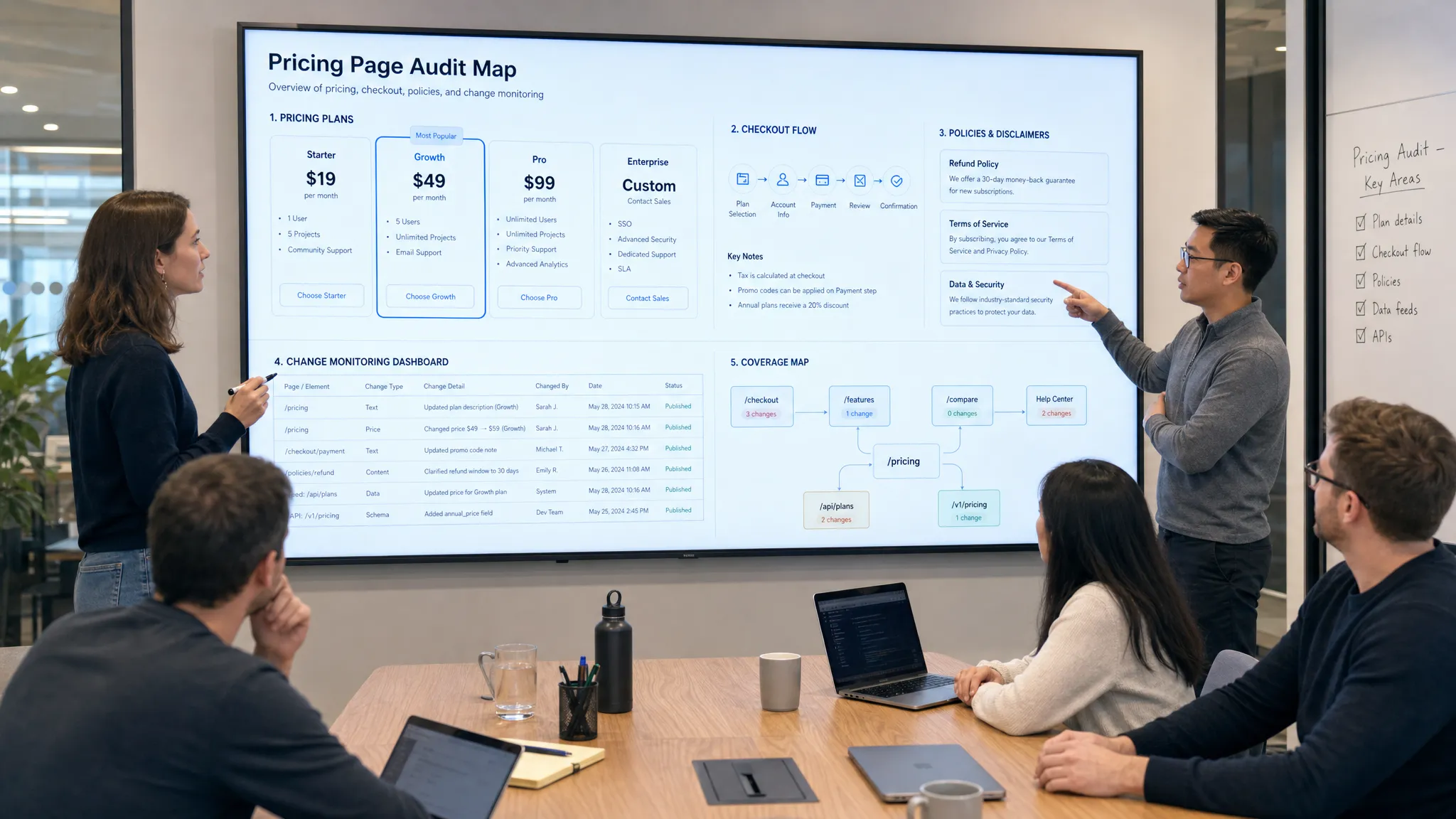
Your pricing website is not just a marketing asset. It is a revenue control surface. A wrong number, broken annual toggle, outdated discount, mismatched checkout price, or unclear cancellation term can quietly reduce conversion, create support escalations, and expose the business to compliance risk.
That risk is easy to underestimate because pricing pages often change in small ways. A product marketer edits plan copy. A developer adjusts a calculator. A sales ops team updates packaging. A CMS block is reused on a campaign landing page. A tax or billing rule changes downstream. Each change may look harmless in isolation, but if the public page no longer matches what customers expect or what internal teams have approved, revenue can leak fast.
A strong audit of a pricing website answers one practical question: can a buyer see, understand, trust, and act on the right price everywhere it appears?
Below is a repeatable audit process you can use before a pricing mistake affects revenue, conversion, compliance, or customer trust.
Why pricing website audits matter
Pricing errors are not cosmetic. They influence buyer behavior at the exact moment a prospect is evaluating value and deciding whether to continue.
Pricing is also one of the most sensitive growth levers. McKinsey has long noted that small pricing improvements can have an outsized impact on operating profit, assuming volume remains stable, because price changes flow directly into revenue. That makes pricing accuracy on your website more than a web operations task. It is a commercial risk management practice.
A pricing website audit helps teams prevent four common problems:
- Revenue leakage from expired discounts, incorrect currency conversions, broken usage calculators, or checkout mismatches.
- Conversion friction caused by unclear plan differences, hidden fees, confusing toggles, or CTAs that route buyers to the wrong flow.
- Compliance exposure from unclear disclosures around renewals, cancellation, taxes, fees, trials, or promotional terms.
- Operational blind spots when pricing changes are published without sales, support, finance, legal, or RevOps knowing.
The goal is not to slow down pricing experiments. It is to make pricing changes visible, controlled, and recoverable.
Start with a complete map of every pricing surface
Most audits fail because teams only check the main pricing page. Buyers rarely experience pricing in one place. They may see a paid ad, visit a landing page, compare plans, read documentation, open a quote form, enter checkout, receive an email, then ask support about a policy.
Before checking details, create an inventory of every public or semi-public surface where price, packaging, billing terms, or plan eligibility appears.
| Pricing surface | What to verify | Revenue risk if wrong |
|---|
| Main pricing page | Plan names, prices, billing frequency, CTAs, feature limits | Buyers choose the wrong plan or abandon due to confusion |
| Product and landing pages | Promotional claims, plan references, discount language | Campaigns promise terms that checkout does not honor |
| Checkout and cart | Final price, taxes, fees, coupon behavior, currency | Customers are overcharged, undercharged, or surprised |
| Help center and docs | Billing policies, plan limits, upgrade rules | Support escalations and customer trust issues increase |
| Terms, refund, and cancellation pages | Renewal language, cancellation steps, refund conditions | Compliance and dispute risk rises |
| In-app upgrade screens | Entitlements, upgrade paths, annual or monthly options | Existing users fail to expand or downgrade unintentionally |
| Feeds, APIs, or partner listings | Pricing data, product availability, plan metadata | External channels publish stale or incorrect offers |
| Sales decks and quote request forms | Enterprise language, minimums, contact routing | Sales receives poorly qualified or misinformed leads |
Do not assume pages are easy to find from navigation. Search your CMS, analytics, sitemap, ad destinations, help center, documentation, and customer emails. If a buyer or partner can see it, include it.
Compare every page against a single source of truth
A pricing website audit needs a reference point. Without one, the audit becomes subjective: one person thinks the page is correct, another remembers a previous packaging version, and a third checks against a billing system that may have its own legacy logic.
Define a source of truth before reviewing pages. For many teams, that may be a pricing operations spreadsheet, product catalog, billing system, CPQ configuration, or approved pricing memo. The exact tool matters less than the discipline: one approved reference must define the current price, packaging, limits, billing rules, and exceptions.
Your source of truth should answer:
- What are the current plan names and descriptions?
- What is the approved price for each billing term, currency, and market?
- Which features, limits, and usage units belong to each plan?
- Which discounts, coupons, or promotional offers are active?
- What taxes, fees, or disclaimers must be shown before purchase?
- Which buyers should be routed to self-serve checkout versus sales?
- Which policies apply to trials, renewals, refunds, cancellations, and downgrades?
Once this is defined, evaluate the website against it line by line. Avoid relying on screenshots from a previous launch, because those often preserve the mistake you are trying to find.
Audit pricing math, toggles, and conversion logic
Pricing mistakes often hide in interactive elements, not static text. Monthly and annual toggles, seat calculators, usage sliders, bundles, coupons, geo-location, and tax estimates can all create discrepancies.
Check the visible price and the computed price. A page may show “$99/month” but pass a different plan ID to checkout. A discount may display correctly on the pricing page but fail at cart. An annual plan may claim “save 20%” while the actual math reflects a different discount.
Use this audit table to structure the review:
| Element | Questions to ask | Common failure mode |
|---|
| Monthly and annual toggle | Does the price, savings claim, URL, and CTA all update correctly? | Toggle changes text but not checkout destination |
| Currency selector | Are symbols, exchange rates, rounding, and local taxes correct? | Page shows localized price while cart reverts to default currency |
| Usage calculator | Are units, tiers, overages, and minimums explained clearly? | Calculator estimate differs from billing rules |
| Discounts and coupons | Are promo dates, eligibility, and exclusions visible? | Expired offers remain live on landing pages |
| Seat or quantity selector | Does the total scale correctly across thresholds? | Quantity updates price but not plan recommendation |
| Plan comparison table | Do feature limits match product entitlements? | Sales promises differ from product access |
| CTA routing | Does each button send the buyer to the right checkout, trial, or sales flow? | High-intent traffic lands on a generic contact page |
Test on desktop and mobile. Many pricing pages are carefully reviewed on large screens but break on mobile, where plan cards stack, disclaimers collapse, and comparison tables become harder to interpret.
Review messaging for buyer clarity, not just accuracy
A technically accurate pricing page can still hurt revenue if buyers cannot understand it quickly. The audit should evaluate whether the page answers the buyer’s decision-making questions without forcing them to contact support or sales.
Look closely at plan differentiation. If three plans use similar language, buyers may default to the cheapest option or abandon because they cannot identify the right fit. If an enterprise plan says “custom” without explaining what triggers custom pricing, qualified buyers may hesitate.
Strong pricing messaging usually makes these points clear:
- Who each plan is for.
- What changes as a customer upgrades.
- Which usage limits matter most.
- Whether prices are per user, per workspace, per transaction, per location, or usage-based.
- Whether taxes, fees, or overages may apply.
- What happens after a trial or promotion ends.
- How buyers can change, cancel, upgrade, or talk to sales.
This is also the right moment to check internal alignment. If sales reps explain packages differently than the website, the website will create objection-handling work instead of reducing it.
Check compliance, disclosure, and policy consistency
Pricing pages sit at the intersection of marketing, legal, and billing. That makes disclosure quality essential.
The U.S. Federal Trade Commission’s guidance on digital disclosures emphasizes that important information should be clear and conspicuous, especially when a claim requires qualification. The FTC’s .com Disclosures guide is a useful reference for teams reviewing how online pricing claims, conditions, and limitations are presented.
Your legal and compliance review should focus on whether a reasonable buyer can understand the commercial commitment before converting. Pay special attention to:
| Area | What to check |
|---|
| Renewal terms | Are recurring charges and renewal timing clearly described? |
| Trial terms | Is the post-trial price, billing date, and cancellation requirement easy to find? |
| Promotional pricing | Are eligibility, expiration, and renewal price disclosed? |
| Fees and taxes | Are mandatory fees, taxes, and estimates handled consistently? |
| Cancellation | Are cancellation steps consistent across pricing, terms, and help pages? |
| Refunds | Do refund claims match the formal refund policy? |
| Availability | Are regional restrictions or plan eligibility rules stated where relevant? |
Do not bury critical terms in a footer if they materially affect the buyer’s decision. A pricing page should reduce ambiguity, not transfer it to the terms page.
Inspect technical SEO and performance issues
Because pricing pages often receive high-intent traffic, technical issues can directly affect pipeline and revenue. An audit should include more than visible content.
Check page speed, especially on mobile. Google’s Core Web Vitals documentation explains the performance signals that affect user experience, including loading speed, interactivity, and layout stability. A pricing page with shifting plan cards or delayed buttons can create distrust at the moment of purchase.
Also review:
- Indexability and canonical tags, especially if you use localized or campaign-specific pricing pages.
- Broken internal links from product, comparison, help center, and footer pages.
- Redirects from old pricing URLs after packaging changes.
- Structured data, if used, to ensure it does not expose stale prices.
- Analytics events for plan toggle clicks, CTA clicks, checkout starts, and form submissions.
- Consent banner behavior, since it can cover important pricing details or CTAs.
- Accessibility basics, including keyboard navigation, contrast, readable tables, and descriptive button labels.
Pricing pages should be easy for humans to use and easy for internal teams to measure. If analytics events are broken, you may not notice a conversion drop until revenue reports arrive later.
Validate checkout and downstream systems
A pricing website audit is incomplete until you follow the buyer journey into checkout, billing, CRM, and support handoff.
For each plan or offer, test the path from pricing page to conversion. Confirm that the selected plan, billing term, discount, quantity, and currency carry through correctly. If the pricing page routes some buyers to sales, submit test forms and verify that lead source, plan interest, region, company size, and campaign information reach the CRM as expected.
The most damaging pricing issues often happen at handoff points:
| Handoff | What can break |
|---|
| Pricing page to checkout | Wrong plan ID, missing coupon, incorrect billing term |
| Checkout to billing | Tax, renewal, discount, or quantity mismatch |
| Pricing page to sales form | Lost plan intent or poor lead routing |
| Website to CRM | Missing attribution or campaign context |
| Help center to support | Outdated policy creates avoidable tickets |
| Public page to partner feed | External listings show stale offers |
If possible, use test accounts and sandbox transactions. Capture screenshots or logs for each path so issues can be reproduced and fixed quickly.
Set a pricing audit cadence based on risk
Not every team needs the same audit frequency. A small company with one pricing page and rare changes may run a monthly or quarterly audit. A marketplace, ecommerce business, SaaS company with frequent packaging experiments, or regulated industry may need continuous monitoring.
A practical cadence looks like this:
| Trigger | Recommended action |
|---|
| Before a pricing launch | Full audit of all pricing surfaces and checkout flows |
| After CMS, billing, or product catalog changes | Targeted regression test of affected pages and paths |
| During promotions | Daily or automated checks for prices, dates, disclaimers, and coupons |
| Quarterly | Full inventory review to find stale pages and policy drift |
| After support or sales complaints | Incident review and root-cause check across related pages |
| Continuously | Automated monitoring for unexpected price, policy, page, feed, or API changes |
The key is to separate planned changes from unplanned changes. Planned changes should go through approval. Unplanned changes should trigger immediate investigation.
Turn the audit into an alerting workflow
A one-time audit reduces today’s risk. Continuous monitoring reduces tomorrow’s risk.
Pricing pages are dynamic. CMS editors publish updates, competitors react, promotional pages expire, API responses change, and third-party tools can alter rendered content. If your team only discovers those changes during the next manual audit, the damage may already be done.
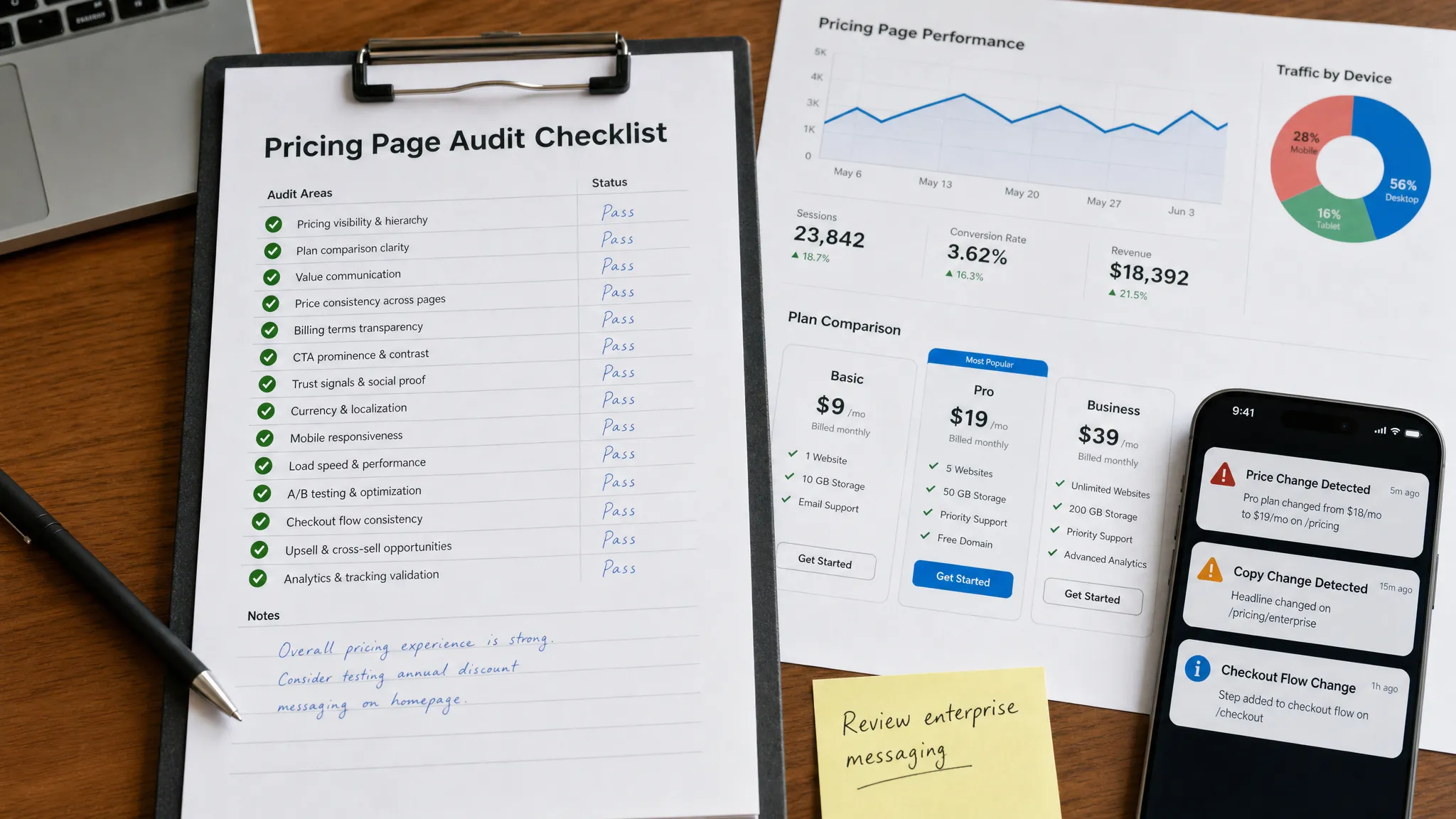
This is where a website change monitoring platform like DiffHook fits into the process. DiffHook monitors pages, prices, policies, feeds, and APIs, then alerts teams when important changes happen. For pricing operations, that means you can track critical pricing surfaces and receive fast alerts through channels such as Slack, email, webhooks, and workflow integrations.
For a pricing website, monitoring is most useful when it is specific. Instead of alerting every time a timestamp or rotating testimonial changes, configure monitoring around business-critical elements: price blocks, plan names, discounts, policy language, checkout links, feed values, and API responses. Smart noise filtering helps teams focus on changes that matter, while full change history and audit trails make it easier to investigate what changed and when.
A strong alerting workflow should define:
- Which pages, feeds, and APIs are monitored.
- Which changes require immediate escalation.
- Who owns pricing, policy, checkout, and technical incidents.
- Where alerts are delivered.
- How approved changes are distinguished from unexpected changes.
- How change history is retained for audits and post-incident reviews.
This turns your pricing website from a risky static asset into an observable revenue system.
A practical pricing website audit checklist
Use this checklist before major launches, after pricing updates, and during quarterly reviews.
| Audit area | Pass criteria |
|---|
| Inventory | Every pricing-related page, checkout flow, help article, feed, and API is listed |
| Source of truth | Current prices, plans, terms, discounts, and policies are approved in one reference |
| Price display | Prices, currencies, billing periods, discounts, and savings claims are accurate |
| Plan packaging | Feature limits, entitlements, and upgrade paths match the product and sales motion |
| CTAs | Buttons route to the correct checkout, trial, sales, or contact flow |
| Checkout | Final price, tax, coupon, quantity, and billing term match the website claim |
| Policies | Renewal, cancellation, refund, trial, fee, and tax language is consistent |
| Mobile UX | Pricing cards, tables, toggles, and disclosures are readable and usable |
| Analytics | CTA clicks, plan selections, checkout starts, and form submissions are tracked |
| SEO and technical | Pages are indexable where appropriate, fast, accessible, and free of broken links |
| Monitoring | Critical pricing, policy, feed, and API changes trigger alerts with change history |
| Ownership | Revenue, legal, marketing, product, and operations owners know their responsibilities |
If an item fails, classify it by revenue impact and fix priority. A typo in supporting copy is not the same as a wrong price passed to checkout. Prioritize issues that affect buyer commitment, payment, legal obligations, or high-traffic acquisition paths.
Common pricing website audit mistakes to avoid
The biggest mistake is treating the pricing page as a single web page instead of a connected system. A buyer’s understanding of price is shaped by ads, landing pages, comparison tables, checkout, policies, emails, and support content.
Another common mistake is auditing only the intended experience. Pricing issues often affect edge cases: expired coupons, old URLs, unusual currencies, annual toggles, mobile layouts, returning customers, or users coming from partner pages. Include these paths in your review.
Finally, many teams audit only after something goes wrong. That creates a reactive culture where pricing errors are discovered by customers, sales reps, or finance reports. A healthier approach combines pre-launch review, scheduled audits, and real-time monitoring so changes are caught as they happen.
Frequently Asked Questions
How often should we audit a pricing website? Audit before every major pricing or packaging change, then run a full review at least quarterly. If your prices change frequently, promotions run often, or pricing data appears in feeds and APIs, use continuous monitoring in addition to manual audits.
Who should own the pricing website audit? Ownership usually sits with RevOps, product marketing, growth, ecommerce, or pricing operations, but the audit should include legal, finance, product, sales, support, and web teams. Pricing touches too many functions to be reviewed in isolation.
What is the most common pricing page issue? One of the most common issues is inconsistency between the pricing page and checkout. The public page may show the right offer, but the cart, coupon, plan ID, tax estimate, or billing term may not match.
Should we monitor competitor pricing websites too? If competitor pricing affects your positioning, sales objections, or category messaging, monitoring public competitor pages can be useful. Focus on meaningful changes such as plan structure, public prices, promotional language, or policy updates rather than every minor page edit.
How does change monitoring support pricing audits? Change monitoring alerts your team when important pricing, policy, page, feed, or API changes happen. It helps you catch unexpected edits quickly, maintain change history, and route incidents to the right team before they affect revenue.
Make pricing changes visible before they become revenue problems
A pricing website audit protects more than a page. It protects conversion, customer trust, sales alignment, policy compliance, and revenue operations.
Manual reviews are essential before launches, but they are not enough for a pricing environment that changes constantly. With DiffHook, teams can monitor pricing pages, policies, feeds, and APIs in real time, filter out noise, receive alerts in their workflows, and keep a full history of changes.
If your pricing website drives revenue, do not wait for a customer, competitor, or finance report to reveal that something changed. Start monitoring critical pricing changes with DiffHook and know the moment the web changes.