An alert is a notification. An API is infrastructure.
For simple monitoring jobs, an email or Slack message is enough. A product page changed, a policy was updated, a competitor adjusted a price, and the right person gets notified. That is useful when a human needs to look, decide, and move on.
But many web changes are not isolated events anymore. They affect pricing engines, compliance workflows, support scripts, product catalogs, sales enablement, procurement decisions, and executive reporting. In those cases, a message in a channel is only the beginning. The real need is structured, reliable, machine-readable change data.
That is when teams start looking for an API for websites, not just alerts.
What an API for websites really means
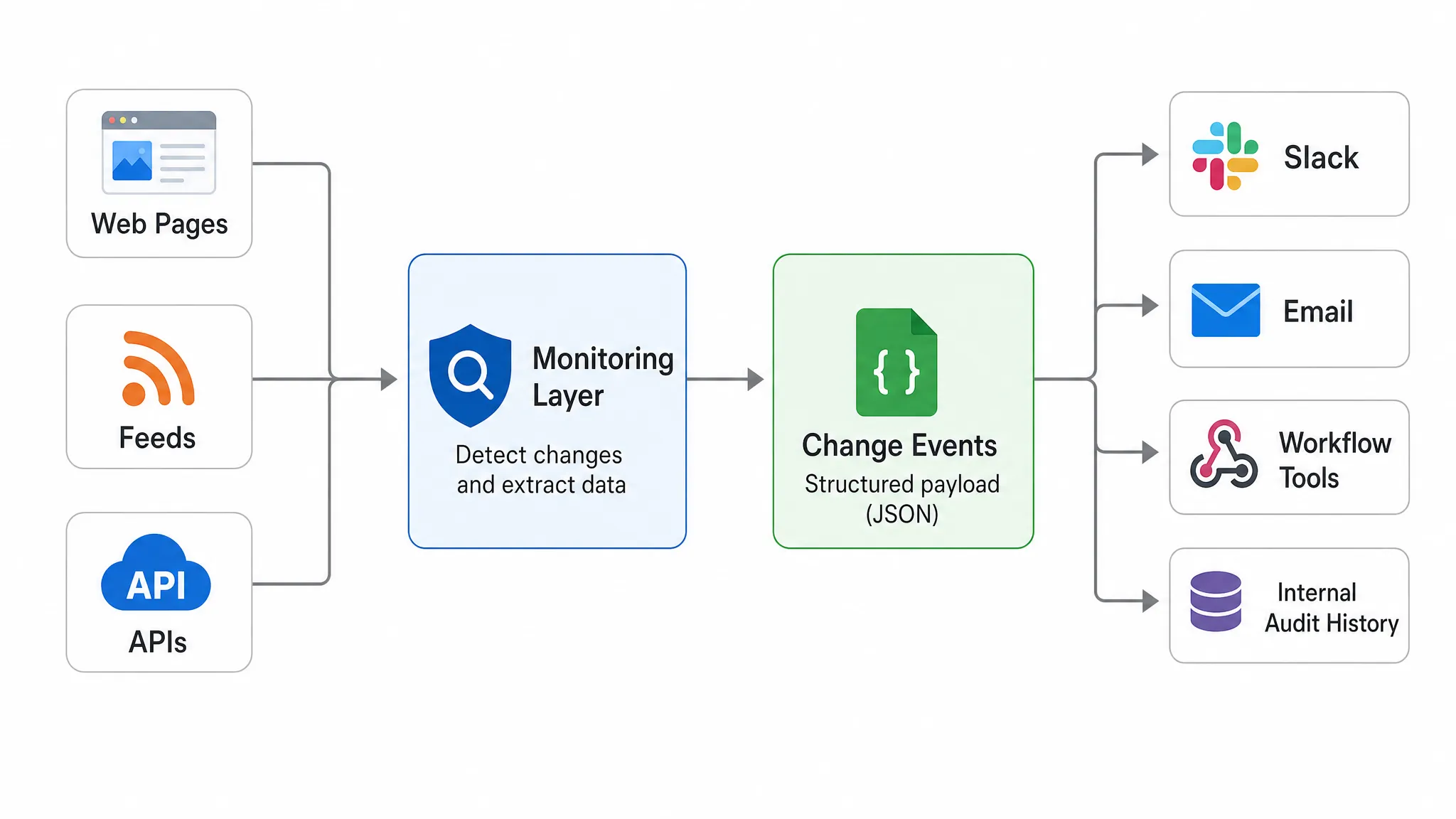
The phrase “API for websites” can mean a few things. Sometimes it refers to a scraping API that fetches page content on demand. Sometimes it means a site’s own public API. But for teams that need to monitor external change, it usually means something more specific: a way to turn pages, feeds, and third-party endpoints into structured change events that other systems can consume.
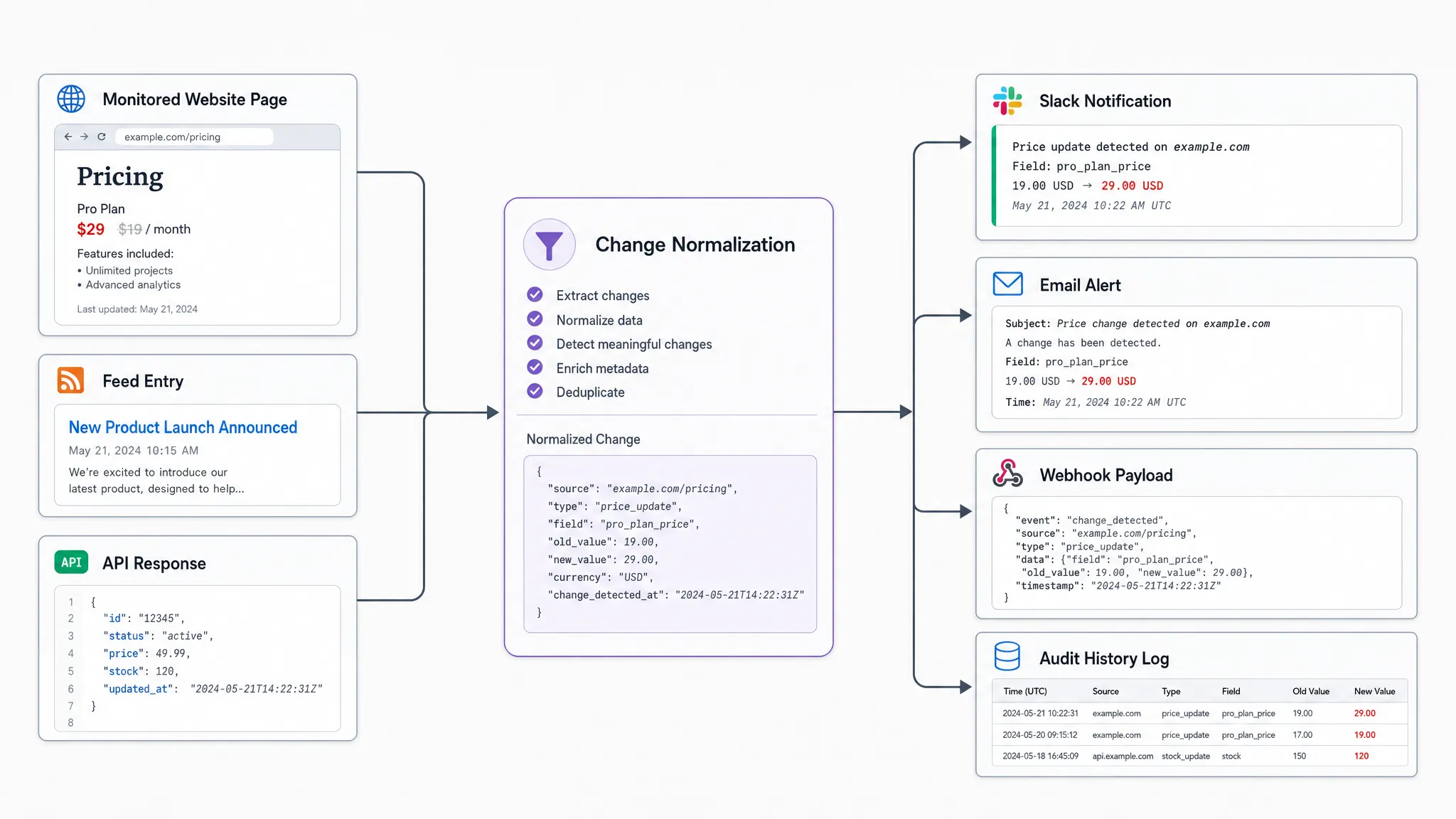
In other words, the website becomes a monitored source. The API or webhook layer becomes the delivery mechanism. Your internal tools receive a clean signal that says what changed, where it changed, when it changed, and why it matters.
That distinction matters because a raw page fetch does not solve the business problem. If a competitor page changes 40 times because of rotating banners, tracking pixels, or minor layout changes, your team does not need 40 interruptions. They need the one event that says the price moved, the policy language changed, or the availability status flipped.
If you are still defining which sources matter, start by building a source map across pages, feeds, and APIs. Once you know what to monitor, the next question is how that change should move through your organization.
Alerts are for people, APIs are for systems
Alerts are still valuable. They give teams visibility and urgency. The problem appears when every critical process depends on someone seeing, interpreting, copying, and forwarding an alert manually.
An API or webhook turns a change into an event that can flow into the systems where work already happens. That might be a ticketing queue, a CRM, a pricing database, a compliance archive, a BI dashboard, or a workflow automation tool.
| Situation | Alert is usually enough | API or webhook is better |
|---|
| One person needs to review a low-volume change | Yes | Not always necessary |
| A price change must update an internal model | No | Yes |
| A legal or policy edit needs an audit trail | Sometimes | Yes |
| Multiple teams need the same signal in different tools | No | Yes |
| High-volume changes need filtering and enrichment | No | Yes |
| A change should trigger a workflow automatically | No | Yes |
The practical difference is ownership. Alerts depend on human ownership. APIs support system ownership.
That does not mean humans disappear from the loop. It means people review the right events, in the right context, after the repetitive routing and formatting work has already been handled.
Signs you have outgrown alert-only monitoring
Most teams do not wake up one day and decide they need a website change API. They discover it after alerting starts to break down. The symptoms are usually easy to spot.
- Alerts are being forwarded manually between teams.
- People copy change details from emails into spreadsheets, tickets, or internal systems.
- The same website change matters to pricing, legal, operations, and support at once.
- Your team needs to compare a new value against internal data before deciding what to do.
- You need a record of what changed, not just a message that it changed.
- Alerts are noisy enough that people mute them or stop trusting them.
- A delayed response could create revenue loss, compliance exposure, or customer confusion.
The last point is especially important. Many critical web updates are small. A new shipping threshold, a modified refund clause, a changed API response, or a removed product variant may not look dramatic in isolation. Yet these small updates can quietly affect revenue and risk, especially when no one notices until customers, regulators, or partners react first.
When alerts become a manual data transport mechanism, they are being asked to do the job of an integration layer.
Use cases where an API matters more than a notification
Pricing is one of the clearest examples. A retailer, marketplace, SaaS vendor, or travel company may need to monitor competitor prices, promotions, fees, or plan limits. A Slack alert can tell an analyst that a price changed. An API can pass the new price into an internal comparison model, attach the relevant SKU or plan, trigger a review workflow, and preserve the previous value for analysis.
Compliance and legal teams have a different problem. They may need to monitor privacy policies, terms of service, claims language, partner requirements, or regulatory pages. In that environment, the change itself is evidence. A structured event with timestamped history is more useful than an inbox notification that may be deleted, missed, or stripped of context.
Operations teams often need visibility across vendor pages, status pages, documentation, public APIs, data feeds, and procurement portals. If a supplier changes availability, a logistics provider updates a service notice, or a third-party API changes its behavior, the signal should land where operational decisions are made.
Growth and brand teams are also expanding what they monitor. Search results, marketplace pages, review profiles, and AI answer surfaces increasingly influence demand. For example, teams working on AI discovery may combine web monitoring with an AI search visibility platform like CapstonAI to understand how brand mentions, metadata, and content gaps change across emerging discovery channels.
In each case, the point is not simply “tell me something changed.” The point is “give my systems a dependable input so we can respond correctly.”
What a good website change API should expose
A useful API for websites should not force your team to reconstruct context from a vague message. The payload should help downstream systems understand the event without extra detective work.
At minimum, teams usually need a few core elements: the monitored source, the type of change, the previous and current values when available, the detection time, a summary of what changed, and a reference to the full change history. Depending on the use case, they may also need tags, ownership metadata, severity, and routing information.
A conceptual change event might include fields like this:
{
  "source": "competitor-pricing-page",
  "change_type": "price_changed",
  "previous_value": "$129",
  "current_value": "$119",
  "detected_at": "2026-06-29T18:42:00Z",
  "diff_summary": "Monthly plan price decreased from $129 to $119",
  "owner": "pricing-operations"
}
That example is intentionally simple. The best format depends on what your systems need to do next. A compliance team might care more about text diffs and evidence. A revenue team might care more about SKUs, regions, currencies, and thresholds. An operations team might care more about status, severity, and service owner.
The architecture: from web change to business action
When you move from alerts to an API-driven approach, the workflow becomes more deliberate. You are no longer asking, “Who should see this message?” You are asking, “What should happen when this type of change is detected?”
A practical architecture usually follows five steps.
- Map the sources: Identify the pages, feeds, APIs, and documents that influence revenue, compliance, customer experience, or operations.
- Define meaningful change: Decide which changes matter and which should be ignored, such as cosmetic page edits, rotating modules, or timestamp noise.
- Normalize the event: Convert the change into a predictable structure with source, timestamp, change type, summary, and relevant values.
- Route by outcome: Send the event to the right tool, such as Slack for human review, email for stakeholder visibility, webhooks for automation, or workflow integrations for action.
- Keep the history: Preserve a record of changes so teams can audit decisions, investigate incidents, and measure trends over time.
This is where a platform like DiffHook fits. DiffHook monitors pages, prices, policies, feeds, and APIs, then helps teams receive fast alerts through Slack and email or connect changes into workflows through webhooks and integrations. It also supports full change history, which matters when teams need to know not only that something changed, but what changed over time.
How to evaluate an API for websites
Before choosing a monitoring setup, separate the “nice to have” features from the requirements that protect the workflow. A tool that works for watching one page may fail when you need to monitor hundreds of sources or support multiple teams.
| Evaluation question | Why it matters |
|---|
| Can it monitor pages, feeds, and APIs? | Critical changes may not live in one source type. |
| Can it filter noise intelligently? | Too many false positives reduce trust and adoption. |
| Does it support Slack, email, webhooks, and workflow tools? | Different teams need different delivery paths. |
| Is change history available? | Audits, investigations, and trend analysis depend on records. |
| Can it deliver alerts quickly? | Some changes lose value if they are detected too late. |
| Does it support access controls such as SSO and roles? | Larger teams need governance around sensitive monitoring data. |
| Are hosting options aligned with your requirements? | Data residency and compliance expectations can affect vendor choice. |
Security and governance deserve special attention. Website monitoring can touch competitive intelligence, legal review, pricing strategy, and operational dependencies. If those signals are routed into internal systems, access controls and reliable delivery are not afterthoughts.
The same is true for noise filtering. An API that faithfully sends every irrelevant DOM change is not helpful. The goal is not maximum event volume. The goal is trusted, actionable signal.
When alerts are still the right answer
Not every monitoring use case needs an API. If you watch a handful of low-risk pages, only one person needs to know, and the next step is always manual review, alerts may be the simplest and best option.
Alerts also work well for early discovery. Many teams begin by monitoring pages through email or Slack, then graduate to webhooks and structured workflows once they understand which changes happen frequently and which ones drive action.
A useful rule of thumb is this: if the alert is the final destination, notification is enough. If the alert is just the first step in a repeatable process, you probably need an API or webhook.
FAQ
What is an API for websites? An API for websites is a way to access or receive structured data from website activity. In change monitoring, it usually means turning external pages, feeds, or APIs into machine-readable change events that internal systems can use.
How is this different from a website alert? A website alert notifies a person that something changed. An API or webhook sends structured change data to another system so it can trigger workflows, update records, create tickets, or support audits.
Do I still need Slack or email alerts if I use an API? Often, yes. Many teams use both. Slack and email keep people informed, while webhooks and APIs move the same change data into systems that need to act on it.
Is a website change API the same as web scraping? Not exactly. Scraping fetches content from a page. Website change monitoring detects meaningful differences over time, filters noise, stores history, and delivers events when something important changes.
Which teams benefit most from API-based website monitoring? Pricing, compliance, revenue operations, ecommerce, procurement, support, and operations teams often benefit because they need website changes to feed repeatable workflows, not just inbox notifications.
Turn website changes into usable data
If web changes affect your revenue, compliance, or operations, alerts are only part of the solution. The bigger advantage comes from turning those changes into structured events your tools and teams can act on.
DiffHook helps teams monitor the web that drives their business, including pages, prices, policies, feeds, and APIs, with fast notifications, smart noise filtering, webhook and workflow integrations, and full change history. To see practical examples, explore the DiffHook use cases and consider where your current alerting process should become a connected workflow.