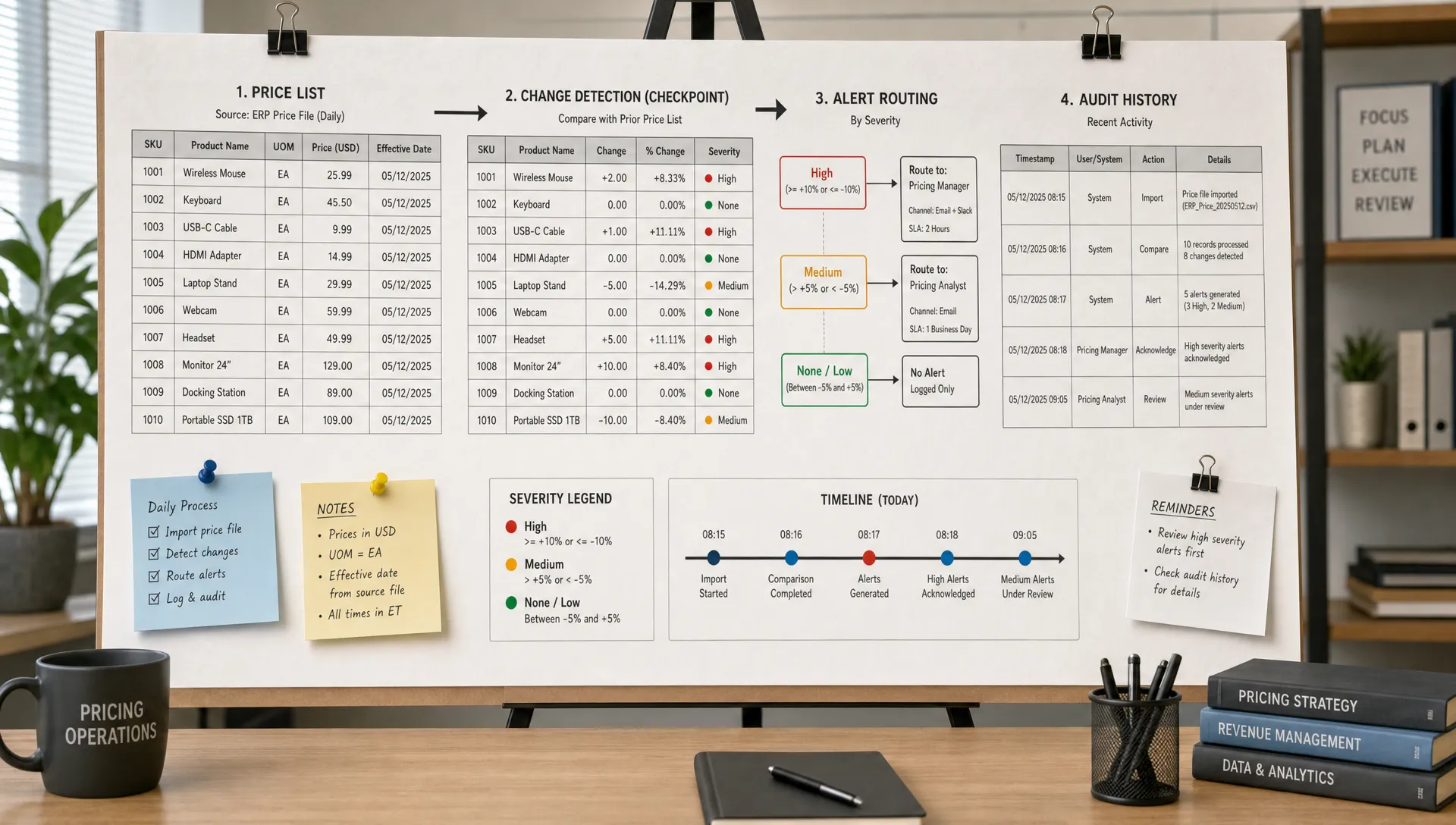
Price lists change faster than most teams can manually check them. A supplier updates a bulk discount overnight. A competitor removes a free tier. A marketplace seller changes a minimum advertised price. A public fee schedule gets revised quietly. If nobody sees the change until a customer, sales rep, or finance team notices, the damage is already in motion.
Tracking a web price list for instant alerts is not just about watching numbers on a page. It is about building a repeatable monitoring workflow that detects the right pricing changes, filters out layout noise, routes alerts to the right owner, and preserves proof of what changed.
That matters whether you monitor competitor pricing, supplier catalogs, partner rate cards, public policy fee pages, or your own pricing surfaces. The goal is simple: know when a price list changes early enough to act.
What counts as a web price list?
A web price list is any online source where prices, rates, fees, discounts, surcharges, or commercial terms are published. It might be a clean HTML table, a pricing page, a product grid, an RSS feed, a PDF linked from a page, or a structured API response.
The key is that the source affects decisions. If a team uses the information to quote customers, adjust margins, approve purchases, enforce policy, or benchmark the market, it should not depend on someone remembering to check a browser tab.
Common examples include:
- Competitor SaaS pricing pages and plan comparison tables
- Supplier price lists, wholesale catalogs, and distributor rate cards
- Marketplace product listings with visible prices and availability
- Public tariff, tax, fee, or regulatory pricing pages
- Your own pricing pages, checkout pages, feeds, and APIs
The best monitoring setups do not treat every page change as equally important. They separate meaningful price signals from noise such as banners, timestamps, cookie notices, personalization, or rotating recommendations.
Why instant price list alerts matter
Pricing changes create risk because they are both small and high impact. A single digit change can affect conversion, margin, procurement, compliance, or sales enablement. Yet many price changes are visually subtle, especially when they happen inside tables, plan cards, dropdowns, or feeds.
Instant alerts help teams respond before downstream systems drift out of sync. Sales can update talk tracks. Finance can validate margin exposure. RevOps can check whether a quote template still matches the public page. Procurement can renegotiate or pause an order. Compliance can preserve evidence of a published change.
| Price list change | Why it matters | Typical owner |
|---|
| Base price changes | Affects margin, quotes, and competitive positioning | Pricing, finance, sales ops |
| Discount or promo changes | Can create campaign mismatch or missed savings | Marketing, ecommerce, procurement |
| Plan feature changes tied to price | Changes perceived value and positioning | Product marketing, revenue teams |
| Minimum order or contract terms change | Affects purchasing and eligibility | Procurement, legal, operations |
| Currency, tax, or fee updates | Can create compliance or billing issues | Finance, compliance |
| Availability changes | Can affect fulfillment, campaign claims, or sales promises | Operations, customer teams |
If your team already tracks individual pricing pages, a web price list workflow is the next level of discipline: instead of checking one page at a time, you define a portfolio of commercial surfaces and monitor them continuously.
Start by deciding what should trigger an alert
The biggest mistake in price monitoring is starting with the tool before defining the signal. If the monitor watches the entire page, you may get too many false positives. If it watches too narrow a selector, you may miss relevant context.
Before configuring alerts, define the fields that matter. For a price table, that might include product name, plan name, monthly price, annual price, currency, discount text, usage limits, setup fees, shipping terms, or effective date. For a supplier catalog, it might include SKU, unit price, minimum quantity, stock status, and tier threshold.
A useful trigger rule answers three questions:
- What value changed?
- How much did it change?
- Who needs to know?
For example, a 1 cent formatting shift may not require an urgent alert. A 10 percent increase on a high-volume supplier SKU should. A competitor changing a plan name might matter only if it affects sales positioning. A government fee schedule update might always require review, even if the amount changed only slightly.
This is where thresholds and context matter. Instead of alerting on every character difference, configure alerts around meaningful patterns: price amounts, table rows, plan labels, structured fields, or API keys.
Choose the right tracking method
There are several ways to track a web price list, but they are not equal. The right method depends on how the source is published, how often it changes, and how much reliability you need.
| Method | Best for | Limitations |
|---|
| Manual checks | Very low-value or rarely changed pages | Slow, inconsistent, hard to audit |
| Browser extensions | Personal monitoring of simple pages | Not ideal for team workflows or critical pricing |
| Custom scripts | Structured pages, APIs, or internal engineering use cases | Requires maintenance, alerting, and error handling |
| Feed or API monitoring | Catalogs, rate feeds, and machine-readable sources | Only works when the source exposes reliable data |
| Website change monitoring platform | Business-critical pages, price lists, policies, feeds, and APIs | Requires thoughtful setup to avoid noisy alerts |
For most revenue, procurement, and compliance use cases, a dedicated monitoring platform is safer because it combines detection, filtering, routing, and history. If you need a broader primer on single-page price monitoring, DiffHook’s guide to tracking web page price changes automatically covers the core approach in more detail.
A web price list often needs more structure than a single page alert. You may need to watch multiple URLs, compare rows over time, track a feed, or monitor an API response alongside a public page. This is where source coverage becomes important. The monitor should handle the way the price list is actually published, not force every source into one page-only workflow.
Configure the monitor around stable price elements
Once you know what matters, configure the monitor to watch the most stable version of the price list. The stable source is the one least likely to create noise while still reflecting the published truth.
For an HTML page, this might mean selecting the pricing table, plan cards, or product list instead of the full page. For a feed, it might mean watching specific item fields. For an API, it might mean monitoring keys such as price, currency, availability, or updated_at. For a PDF-linked price list, it may mean watching the page for a new file link and separately tracking the document content if your workflow supports it.
Do not rely only on visual changes if structured data is available. If a site exposes a product feed or API, the machine-readable source may be cleaner and faster to compare. However, the public page still matters if customers, competitors, or regulators can see it. In many cases, the best setup monitors both.
You should also decide how fast is fast enough. Instant alerts are valuable, but checking every source every minute is not always necessary. A competitor pricing page might need frequent checks during launch week. A quarterly government fee page might need less frequent checks but very reliable alert delivery when something changes.
If you are monitoring your own pricing surfaces, pair external monitoring with internal release controls. A public page can drift from billing configuration, help center language, or sales collateral. DiffHook’s article on how to monitor pricing pages without manual checks explains how to connect pricing page monitoring to team workflows.
Reduce noise before it reaches the team
Instant alerts are only useful if people trust them. If every layout tweak, cookie banner, or carousel refresh creates a notification, teams will mute the channel and miss the change that matters.
Smart filtering is the difference between monitoring and alert fatigue. Good price list alerts ignore irrelevant page movement and focus on commercial signals. For example, a monitor can watch a product table while ignoring navigation, ads, dynamic timestamps, or recommendation widgets.
Filtering should also account for expected volatility. Marketplace listings may change often. Supplier catalogs may update in batches. Competitor pages may run A/B tests. Your alert rules should reflect the normal behavior of each source.
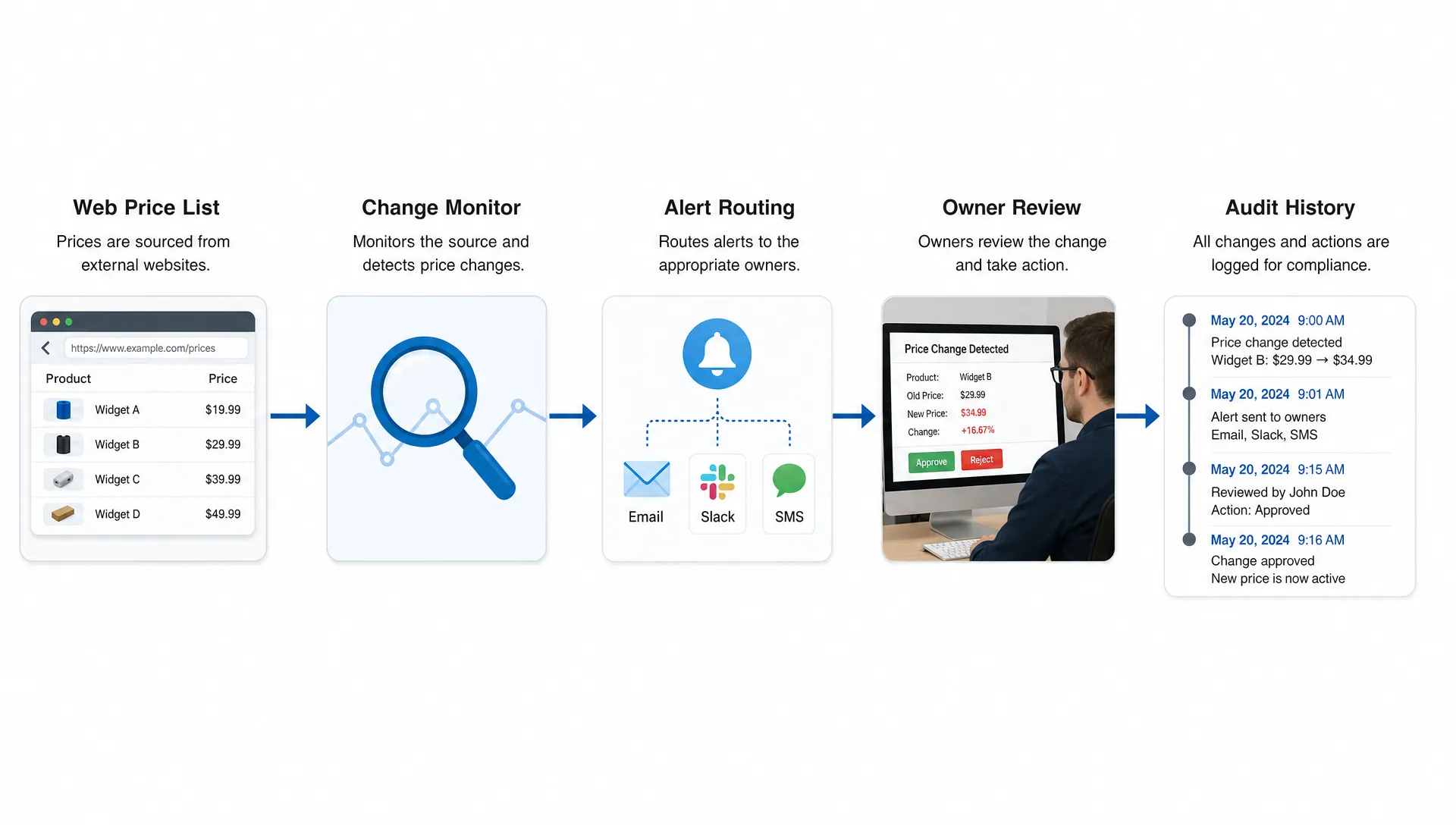
Noise reduction does not mean hiding uncertainty. If a monitor cannot confidently interpret a change, it should still preserve the before and after view so a human can review it. The point is to reduce low-value interruptions while keeping enough context for fast decisions.
Route alerts to the right people and systems
A price alert is not complete when it lands in an inbox. It needs to reach the owner who can act. Finance may care about margin changes. Sales ops may care about quote templates. Procurement may care about supplier increases. Legal or compliance may care about policy-linked fees.
The best workflow routes alerts based on source and severity. A critical supplier increase could go to Slack and email immediately. A minor competitor copy change might create a lower-priority notification. A change to a regulated fee schedule may need a ticket, audit record, and reviewer assignment.
For operational teams, webhook and workflow integrations are especially useful because they connect monitoring to existing systems. Instead of asking people to manually forward alerts, the change can trigger a workflow in the tools where decisions already happen.
Some teams also add AI-assisted triage, such as summarizing what changed or classifying severity. That can be useful, but it should be designed with trust and adoption in mind. If your product team is building AI-assisted review flows, the AI Product Adoption Deck is a practical resource for thinking through where AI workflows break down and how to make them more usable.
Keep a full change history for audit and learning
Instant visibility solves the immediate problem. Change history solves the long-term one.
When you track a web price list, you should be able to answer when a price changed, what it changed from, what it changed to, which source published it, and who was notified. That history is valuable for audits, dispute resolution, vendor negotiations, and postmortems.
For example, if a supplier price increase affects margin, a historical record helps finance understand exactly when exposure began. If your own public pricing page changed unexpectedly, history helps identify whether the issue came from a CMS edit, deployment, feed update, or manual content change. If a competitor introduces a new tier, historical tracking lets product marketing compare positioning over time instead of relying on screenshots scattered across inboxes.
This is also useful for auditing your own site. A pricing page is rarely just one page. It often connects to checkout, help docs, sales decks, plan comparison tables, and terms pages. DiffHook’s guide to auditing a pricing website before it hurts revenue is a helpful next step if you want to map every pricing surface that can create risk.
A practical setup for web price list alerts
A simple, reliable setup usually looks like this:
- Map the sources that influence revenue, cost, compliance, or operations.
- Label each source by owner, business impact, and required response time.
- Select the stable price region, feed field, or API key to monitor.
- Add filters for layout noise, timestamps, banners, and unrelated content.
- Set alert thresholds based on price change size, field type, or source priority.
- Route alerts to Slack, email, webhooks, or workflow tools.
- Review change history periodically to improve rules and catch missed surfaces.
Start with the highest-risk sources first. For most teams, that means your own pricing pages, top competitor pricing pages, high-spend supplier lists, and any public fee or policy pages tied to compliance obligations.
Then expand gradually. A small number of trusted alerts is better than a large number of noisy monitors. Once people trust the signal, it becomes easier to add more sources and more automation.
Common mistakes to avoid
The first mistake is monitoring only the homepage or a top-level pricing page. Many important price changes happen deeper in product tables, regional pages, quote request flows, help center pages, PDFs, feeds, or APIs.
The second mistake is ignoring context. A price changed, but for which plan, SKU, currency, region, or quantity tier? Without context, the alert creates work instead of reducing it.
The third mistake is treating all alerts as urgent. If every change pages the same people, teams become desensitized. Use severity levels and routing rules so urgent changes stand out.
The fourth mistake is skipping ownership. Every monitored source should have a clear owner. If nobody is responsible for reviewing the alert, the alert is just noise with a timestamp.
The fifth mistake is failing to preserve history. Screenshots in chat are not enough for audits or negotiations. Keep a reliable record of before and after changes, especially for pricing and policy-related sources.
Frequently Asked Questions
How often should I check a web price list? It depends on business impact. High-risk competitor, supplier, or internal pricing pages may need near real-time monitoring. Lower-risk sources can be checked less often, as long as alerts are reliable when changes happen.
Can I track price lists that are not simple web pages? Yes. Many price lists live in feeds, APIs, PDFs, or linked documents. The best monitoring approach depends on the format, but critical pricing sources should be tracked wherever they are published.
How do I avoid false alerts from dynamic web pages? Monitor the specific price area or structured field instead of the entire page. Use filters to ignore timestamps, banners, recommendations, ads, and other elements that change without affecting pricing.
Who should receive price list alerts? Route alerts based on the source and impact. Pricing, finance, sales ops, procurement, compliance, and operations may all need different alerts. The monitor should support team workflows, not just send one generic notification.
Do I need change history if I already get instant alerts? Yes. Instant alerts help you respond quickly, while change history helps you prove what happened, investigate issues, compare trends, and improve your monitoring rules over time.
Turn web price list monitoring into a reliable workflow
Tracking a web price list for instant alerts is not about watching more pages manually. It is about replacing guesswork with a system that detects important changes, filters noise, routes alerts, and keeps a complete record.
DiffHook monitors pages, prices, policies, feeds, and APIs with fast alert delivery, smart noise filtering, Slack and email notifications, webhook integrations, full change history, SSO and role access, and an EU hosting option. If pricing changes affect your revenue, compliance, or operations, set up monitoring before the next quiet change becomes an expensive surprise.