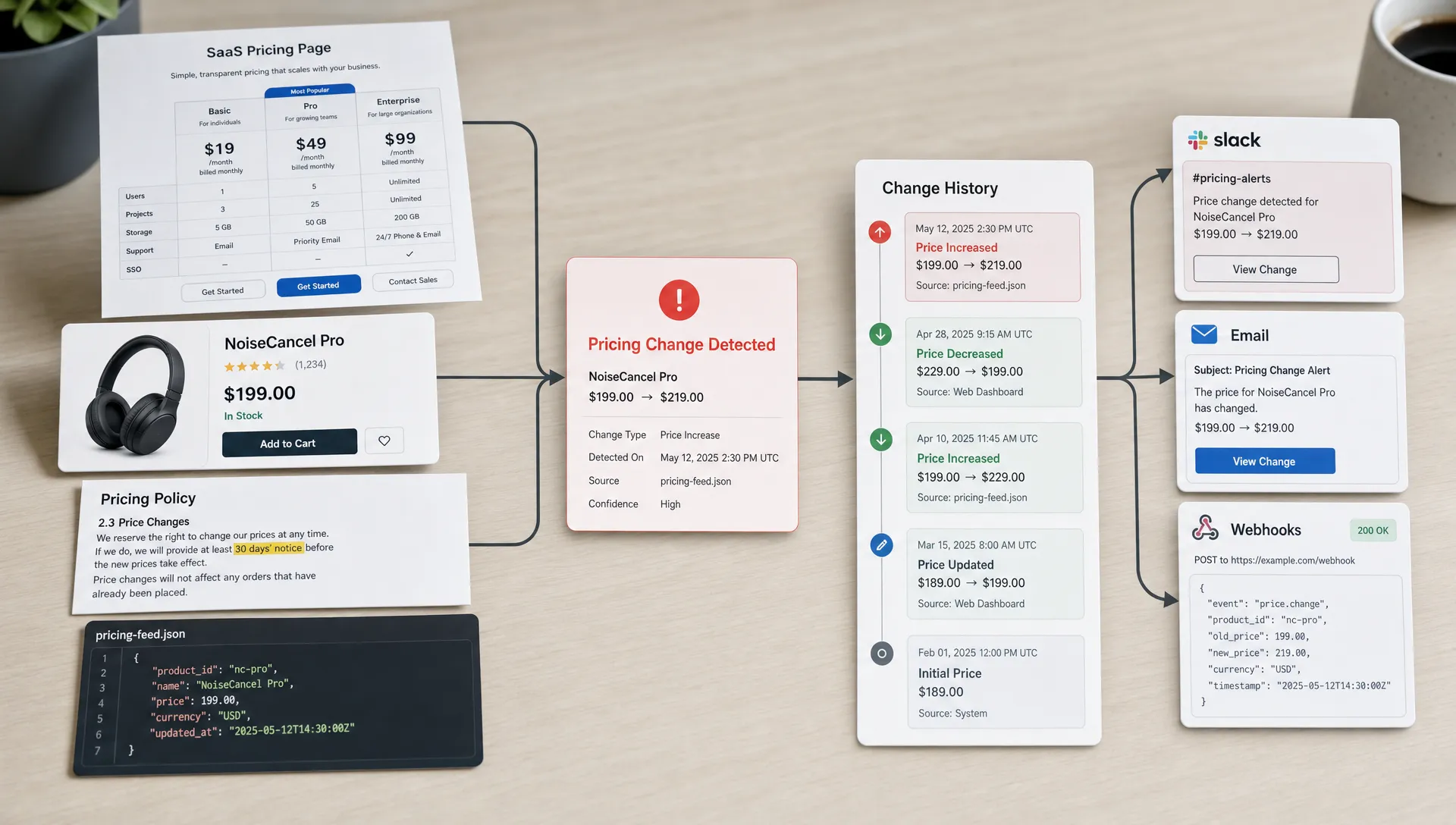
Monitoring one pricing page is useful. Monitoring every web product price that can affect revenue, margins, compliance, or customer trust is a different discipline.
A modern price can live almost anywhere: a SaaS pricing table, an ecommerce product detail page, a reseller catalog, a public API, a feed, a checkout step, a discount banner, or a policy page that defines eligibility. If your team relies on manual checks, browser bookmarks, spreadsheets, or “someone will notice,” you are already late by the time a meaningful change reaches sales, finance, legal, or operations.
Real-time web product price monitoring gives teams a repeatable way to detect changes as they happen, filter out noise, preserve evidence, and route alerts to the people who can act. The goal is not to refresh every page every second. The goal is to know the moment a price change becomes operationally important.
What counts as a web product price?
Before you monitor every web product price, define what “price” means for your business. A visible dollar amount is only one version of pricing data. Many revenue-impacting changes happen around the price, not directly inside it.
For example, a product price can include:
- A base price, list price, sale price, or “starts at” price.
- A subscription tier, billing cadence, seat minimum, usage unit, or overage rate.
- A discount, coupon, promotion, bundle, free trial, or limited-time offer.
- Shipping, installation, service, or platform fees.
- Regional currency, tax wording, eligibility language, or insurance/payment coverage claims.
- API, feed, or marketplace values that power downstream systems.
That broader definition matters. A health, fitness, or services business may not lead with a simple cart price. A page for personal training covered by insurance, for instance, can communicate pricing through eligibility, out-of-pocket cost expectations, and service coverage language. For monitoring purposes, those claims are part of the commercial promise.
The same logic applies to SaaS pricing pages, grocery delivery fees, airline baggage charges, marketplace seller offers, financial product rates, or B2B “contact sales” packaging. If a change can affect buyer expectations, competitive positioning, margin, or compliance, it belongs in your monitoring scope.
Build a complete inventory of price sources
The biggest mistake is starting with tools before building the inventory. You cannot monitor every web product price if you do not know where those prices appear.
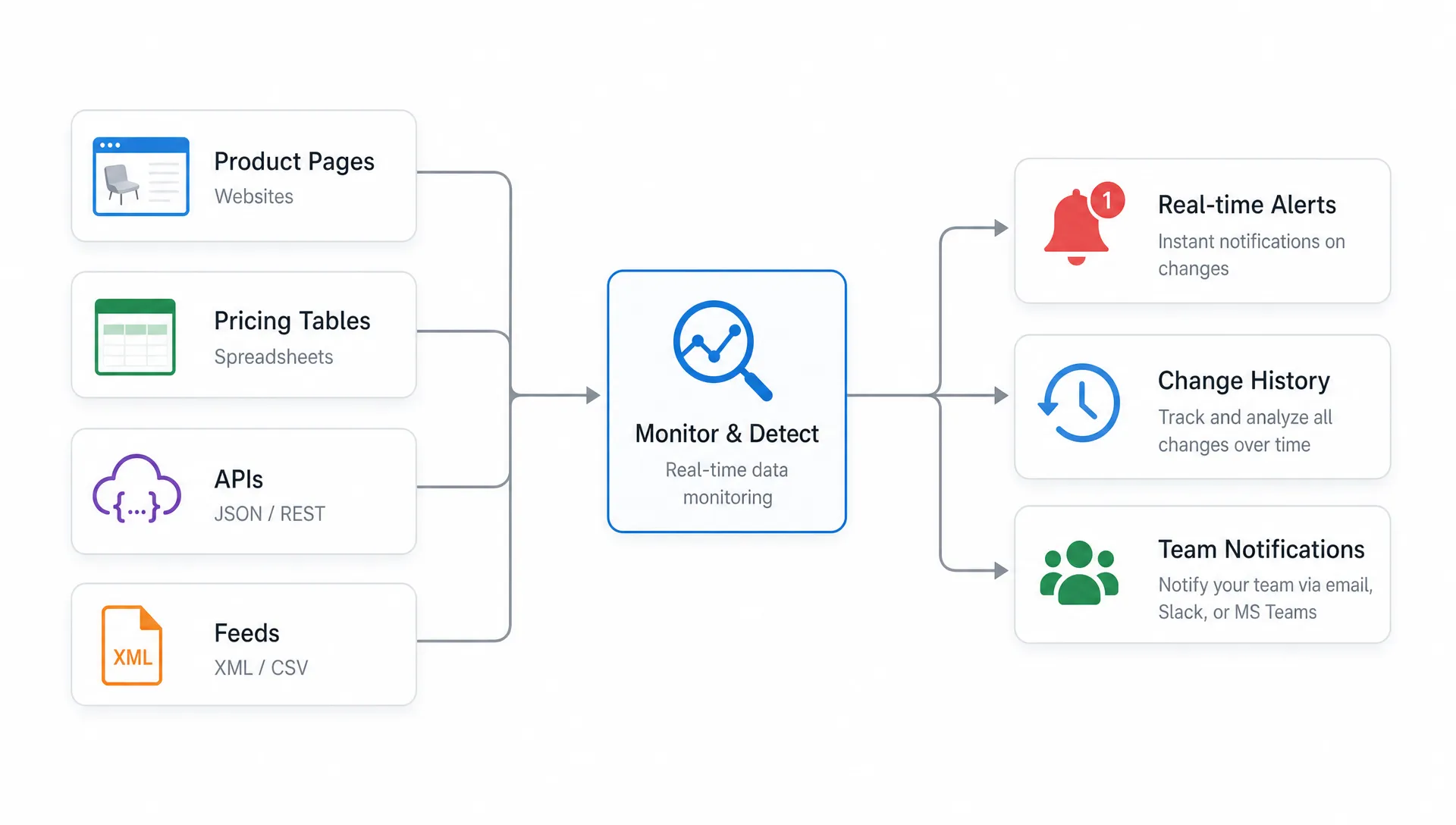
Start by mapping all public and semi-structured surfaces where price data appears. Include pages you control, competitor pages you watch, reseller listings, partner portals, feeds, APIs, and pages that indirectly affect pricing, such as terms, cancellation rules, refund policies, and regional disclaimers.
| Price source | Common examples | Why it matters | Best monitoring approach |
|---|
| Pricing pages | SaaS plan tables, comparison pages, “plans and pricing” pages | Changes affect conversion, sales enablement, and competitor response | Track specific price elements, plan names, CTAs, and feature rows |
| Product detail pages | Ecommerce PDPs, marketplace listings, service pages | Prices, discounts, availability, and shipping fees can change frequently | Monitor price blocks, promo sections, stock status, and seller fields |
| Price lists | HTML tables, PDF-linked lists, category pages, rate cards | Bulk changes can be easy to miss manually | Track row-level changes and extract structured values where possible |
| Feeds and APIs | JSON, XML, CSV, partner feeds, marketplace APIs | Downstream systems may depend on machine-readable prices | Compare parsed fields, not only raw text |
| Checkout and quote flows | Cart totals, fees, plan selectors, tax or region logic | Customer-facing totals may differ from marketing prices | Monitor stable steps carefully and respect authentication boundaries |
| Policy pages | Refund terms, cancellation pages, discount eligibility, regional terms | Policy wording can change the effective price or risk profile | Watch defined sections and keep full change history |
If this sounds like a lot, start with the pages closest to revenue. Your first inventory does not have to be perfect. It does need an owner, a priority level, and a reason each source is monitored.
For teams beginning with public web pages, this guide on how to track web page price changes automatically covers the basics of moving from manual checks to automated alerts.
Decide what “real time” should mean for each product
Real time does not mean every source needs the same polling frequency. A competitor’s flash-sale page may need fast detection. A regulated policy page might change rarely, but when it does, the alert must be accurate and well documented. A product API may need closer monitoring than a static HTML page because it feeds internal workflows.
Think in terms of business latency. How long can a price be wrong, stale, or unnoticed before it creates a problem?
For revenue-critical products, minutes can matter. If a competitor drops the price of a flagship plan, your sales team may need to adjust objection handling the same day. If your own pricing page accidentally displays an outdated discount, marketing and support need to know before customers start quoting it. If a partner feed changes a wholesale price, operations may need to update internal systems before orders are affected.
For lower-risk pages, real-time monitoring may simply mean reliable same-day detection with instant alerts once the change is confirmed. The right cadence depends on volatility, risk, and response time, not vanity speed.
Monitor the element, not just the page
A full-page screenshot or text diff can tell you that something changed, but it often cannot tell you whether the change matters. Product pages are noisy. They include reviews, recommendations, cookie notices, personalization, A/B tests, timestamps, ads, and dynamic modules.
To monitor prices reliably, isolate the important parts of the page. Track the price itself, the plan name, the billing unit, the discount label, the “was” price, the CTA, and any nearby eligibility or limitation language. This reduces false alerts and makes each notification more actionable.
When structured data is available, use it. APIs, JSON-LD, feeds, and embedded product metadata can be cleaner than rendered page text. But do not assume structured data always matches what customers see. For critical products, compare the machine-readable value with the visible page when possible.
For price lists, row-level monitoring is especially important. A single page may contain hundreds of products. If you only alert that “the page changed,” someone still has to hunt for the changed row. A useful alert should identify the specific product, old value, new value, timestamp, and source.
That is where purpose-built change monitoring is different from a generic uptime check. Uptime tells you whether a page is reachable. Price monitoring tells you whether the commercial facts on that page changed.
Normalize prices before you alert
Raw price text can be messy. The same price may appear as “$49/mo,” “$49 per month,” “USD 49,” “from $49,” or “$588 billed annually.” If your monitoring system treats every formatting difference as a critical event, your team will start ignoring alerts.
Normalize values before deciding whether to notify someone. Convert price text into comparable fields such as amount, currency, billing period, unit, region, plan, and promotion status. This helps you distinguish a real price move from a wording change.
A strong monitoring setup can separate:
- A formatting change, such as “$99 / month” becoming “$99 per month.”
- A packaging change, such as a feature moving from Pro to Enterprise.
- A commercial change, such as $99 becoming $119.
- A promotional change, such as “20% off” becoming “30% off.”
- A visibility change, such as a public price being replaced by “Contact sales.”
The last example is often overlooked. Removing a price can be just as important as changing it. It may signal repositioning, enterprise packaging, supply constraints, or a pricing experiment.
Set alert rules that match business impact
Once you can detect price changes, decide which changes deserve alerts. Not every difference should create the same level of urgency.
A good rule system uses thresholds, context, and routing. A one-cent change caused by rounding should not page the revenue team. A 15 percent competitor price drop on a core product might deserve an immediate Slack alert. A legal wording change that affects refund eligibility should go to compliance, not the entire company.
| Alert trigger | Example | Primary owner | Recommended priority |
|---|
| Exact price change | Pro plan changes from $79 to $99 | Pricing, revenue, sales | High if core product, medium otherwise |
| Discount change | Promo moves from 10% to 25% | Marketing, ecommerce, sales | Medium to high |
| Price removed | Public price replaced by “Contact sales” | Product marketing, sales | High for competitors or own pages |
| Unit or billing change | Monthly price becomes annual-only | Revenue operations, finance | High |
| Feed mismatch | API price differs from visible PDP price | Operations, engineering | High |
| Policy affects cost | Refund, cancellation, or eligibility wording changes | Legal, compliance, support | Medium to high |
| Competitor repricing | Key competitor changes a major plan | Competitive intelligence, sales | High for strategic accounts |
The best alerts are specific enough that the recipient knows what happened without opening five tabs. Include the changed value, the previous value, the source URL, the detected time, the affected product, and a link to the change history.
If your main concern is monitoring pricing pages rather than broad product catalogs, you may also want a focused workflow for monitoring pricing pages without manual checks.
Route price alerts into the workflows teams already use
Real-time detection only creates value if the right person sees the alert quickly. Email may be enough for low-priority changes. High-impact price changes often need Slack notifications, webhooks, ticket creation, or workflow automation.
A practical routing model looks like this:
- Revenue and sales receive competitor pricing changes, packaging changes, and price removals.
- Marketing receives promotion, messaging, CTA, and offer changes.
- Finance receives fee, billing period, tax, and margin-sensitive changes.
- Legal and compliance receive policy, eligibility, and regulated wording changes.
- Engineering or operations receive feed, API, and data mismatch alerts.
Do not send everything to everyone. Broadcast alerts feel transparent at first, then they become background noise. Instead, assign owners by product line, page type, severity, and geography.
This is one reason DiffHook supports Slack and email notifications, webhook and workflow integrations, full change history, SSO and role access, and an EU hosting option. Price monitoring is not just a detection problem. It is an operational handoff problem.
Keep a change history you can trust
When a price changes, the first question is “What changed?” The second is usually “When did it change?” The third may be “Who needs to know, and can we prove what was shown?”
A reliable history helps answer those questions. It gives revenue teams context for competitive moves, lets support understand customer confusion, and gives compliance teams evidence when policy language changes. For internal pages you control, a history can also reveal accidental regressions, broken experiments, or inconsistent regional pricing.
Change history should capture the before and after state, timestamp, source, and alert delivery record. For critical pages, screenshots or rendered captures can complement structured diffs, especially when visual placement matters. If a banner changes the effective offer but not the core price element, a visual record may be the easiest way to understand the customer experience.
Audit trails also improve accountability. If a pricing page changed at 2:14 p.m. and the alert reached the correct Slack channel at 2:15 p.m., teams can evaluate response processes instead of debating whether anyone noticed.
Scale from a few pages to every web product price
The path to full coverage is usually phased. Trying to monitor every URL on day one can create unnecessary complexity. A better approach is to prioritize, template, then expand.
Start with the products where a price change would have the greatest impact. These are usually your highest-revenue products, the competitor products most often mentioned in sales calls, key marketplace listings, and feeds that power operational decisions.
Then group similar pages together. Ecommerce product pages often share templates. SaaS plan pages often share price blocks. Marketplace listings often expose consistent fields. Once a monitoring rule works for one template, you can apply it across many products with less configuration.
As coverage grows, review alert quality. A monitoring program that creates hundreds of low-value notifications will not survive. Track which alerts triggered action, which were ignored, and which rules need refinement. Smart noise filtering is not a one-time setup. It is part of operating the system.
For broader system design, DiffHook’s article on what a modern web system needs to catch change fast explains how source coverage, filtering, delivery, and reliability work together.
Common mistakes to avoid
Many price monitoring programs fail for predictable reasons. The technology may detect changes, but the workflow does not create business value.
| Mistake | Why it causes problems | Better approach |
|---|
| Monitoring the whole page only | Dynamic content creates noisy alerts | Track specific price and offer elements |
| Treating every change equally | Teams become desensitized | Use severity levels and owner-based routing |
| Ignoring feeds and APIs | Machine-readable prices may change before pages do | Monitor pages, feeds, and APIs together |
| Forgetting policies and eligibility | Effective price can change without a price number changing | Track terms, fees, refund rules, and coverage language |
| No historical record | Teams cannot prove what changed or when | Preserve before and after states with timestamps |
| Manual review as the main process | Human checks do not scale and are easy to skip | Automate detection and reserve humans for decisions |
The most damaging mistake is thinking of price monitoring as a research task. It is an operational control. When it works, teams make faster decisions, reduce surprises, and catch issues before customers or competitors define the narrative.
A practical implementation checklist
If you are ready to monitor every web product price in real time, use a simple rollout plan. Keep it narrow enough to launch, but structured enough to scale.
- Define what counts as a price, including fees, discounts, billing units, eligibility, and policy language.
- Build an inventory of pricing pages, product pages, price lists, feeds, APIs, partner listings, and policy pages.
- Assign each source an owner, priority level, and acceptable detection window.
- Monitor specific elements and structured fields instead of relying only on full-page diffs.
- Normalize values by amount, currency, unit, billing cadence, region, plan, and promotion status.
- Create alert rules based on business impact, not just text differences.
- Route alerts to the right team through Slack, email, webhooks, or workflow tools.
- Preserve full change history so teams can audit what changed and when.
- Review false positives and missed changes regularly, then tune filters and thresholds.
The checklist is intentionally operational. The value of real-time monitoring is not only knowing that a price changed. It is knowing fast enough, with enough context, to take the right next action.
Frequently Asked Questions
How often should I monitor web product prices? It depends on business risk. High-volume ecommerce pages, competitor offers, and APIs may need very frequent checks, while lower-risk pricing pages may only need reliable same-day detection. The alert should arrive as soon as a meaningful change is confirmed.
Can I monitor prices inside feeds and APIs, not just web pages? Yes. In many businesses, feeds and APIs are the source of truth for product prices. Monitoring them alongside visible web pages helps catch mismatches before they affect customers, partners, or internal systems.
How do I avoid false price alerts? Track specific elements, normalize values, set thresholds, and filter dynamic page content such as reviews, ads, personalization, and timestamps. Alerts should be based on meaningful commercial changes, not every small text difference.
Should I monitor competitor prices or only my own prices? Both can be valuable. Monitoring your own prices helps catch mistakes and inconsistencies. Monitoring competitor prices helps sales, marketing, and revenue teams respond faster to market changes.
What should a price change alert include? A useful alert should include the product or page name, source URL, old price, new price, detected time, severity, and a link to the change history. For critical pages, screenshots or rendered captures can add helpful context.
Monitor web product prices before they affect revenue
Every important price change creates a window of risk or opportunity. The teams that see it first can respond with context. The teams that find out later are left explaining what happened.
DiffHook helps teams monitor pages, prices, policies, feeds, and APIs in real time, with smart noise filtering, fast alerts, workflow integrations, and full change history. If web product prices affect your revenue, compliance, or operations, automated monitoring turns scattered web changes into actionable signals.