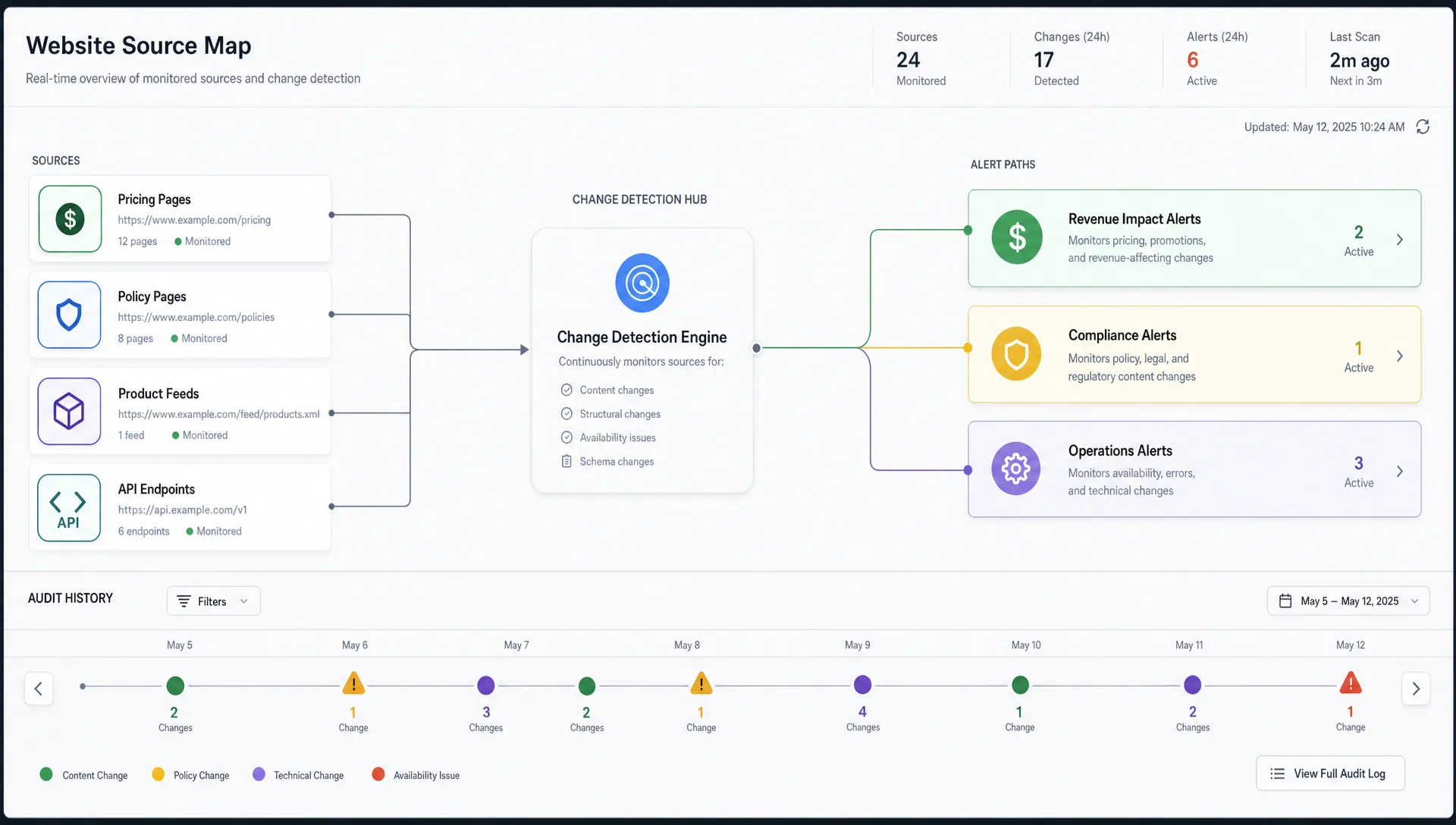
The riskiest website modifications are not always big redesigns. They are often the small edits no one announces: a pricing table that changes overnight, a policy paragraph that disappears, a product feed field that breaks, or an API response that starts returning different values.
For revenue, compliance, and operations teams, those changes can create real damage before anyone notices. A competitor adjusts a public price and your sales team keeps quoting outdated positioning. A vendor updates terms and your legal team finds out during an audit. A documentation page changes and support agents give customers the wrong answer.
That is where website modification tracking becomes operationally important. It is not just about knowing that a page changed. It is about catching the changes that matter, routing them to the right people, and preserving a reliable record of what happened.
What counts as a critical website modification?
A critical modification is any online change that can affect revenue, customer experience, legal exposure, security, compliance, or day-to-day operations. The page itself may look ordinary, but the business impact can be significant.
Teams often start by monitoring obvious pages, such as homepages or product pages. That is useful, but it is not enough. Important modifications can also happen in structured feeds, terms pages, checkout flows, API responses, help centers, job postings, partner portals, and competitor pricing pages.
A practical way to define critical changes is to ask: if this changed without warning, who would need to act?
| Area to monitor | Example modification | Why it matters | Likely owner |
|---|
| Pricing and packaging | Price, discount, plan limit, or feature tier changes | Impacts sales strategy, margin, and competitive positioning | Revenue, sales, product marketing |
| Policies and legal pages | Terms, privacy, SLA, refund, or compliance language changes | Creates audit, customer commitment, or regulatory risk | Legal, compliance, security |
| Checkout and onboarding | Form fields, payment copy, CTA text, or eligibility rules change | Can reduce conversion or create customer confusion | Growth, product, operations |
| Support and documentation | Setup steps, troubleshooting advice, or product instructions change | Affects support quality and customer trust | Support, customer success, product |
| Feeds and APIs | Schema, availability, metadata, status, or response values change | Can break downstream systems and workflows | Engineering, operations, data teams |
The goal is not to monitor every pixel on the internet. The goal is to identify the sources where a modification would require a decision, a response, or a record.
Why manual website checking fails
Manual reviews work only when changes are rare, obvious, and scheduled. Modern websites do not behave that way.
Content teams ship updates continuously. Pricing experiments run in different regions. Legal pages change as policies evolve. Product feeds update automatically. API responses can shift because of deployment, data, or third-party changes. Even if your own team has strong release discipline, vendors, competitors, partners, and regulators do not follow your internal calendar.
Manual checking also creates three recurring problems.
First, it is inconsistent. Someone may remember to check a page during a launch week, then forget for the next quarter. Second, it is slow. By the time a person notices a modification, customers or internal systems may already be affected. Third, it lacks evidence. A screenshot in a chat thread rarely provides the dependable change history needed for compliance, postmortems, or dispute resolution.
Automated website modification tracking closes those gaps by continuously watching the sources that matter and alerting teams when relevant changes occur.
Build a modification map around business risk
Before choosing alert rules, build a modification map. This is a simple inventory of the pages, feeds, and APIs that influence your business outcomes.
Start with revenue-critical sources. These include your own pricing pages, competitor pricing pages, plan comparison pages, checkout steps, promo pages, marketplace listings, product availability pages, and public partner pages. If a change could affect conversion, sales enablement, or positioning, it belongs on the map.
Then add compliance and operational sources. These include privacy policies, terms of service, data processing addenda, service level agreements, regulatory notices, vendor status pages, help centers, product documentation, feeds, and APIs used by internal workflows.
For companies that rely on many digital sources, the challenge is not one page. It is the system of pages, feeds, and APIs that collectively drive decisions. If you need a broader framework, DiffHook has a deeper guide on how to catch site changes across pages, feeds, and APIs without treating every source the same.
A good modification map should answer four questions:
- Which source are we monitoring?
- What type of change matters there?
- Who owns the response?
- How urgent is the alert?
That last question is important. A typo on a blog page and a price change on a competitor comparison page should not create the same level of escalation.
Track the specific parts that matter
One of the biggest mistakes in website modification tracking is monitoring too broadly. Full-page monitoring can be useful, but it can also create noise when headers, footers, timestamps, ads, recommendations, cookie banners, or rotating testimonials change.
Critical change detection is more effective when it focuses on meaningful page elements or structured values. On a pricing page, that may mean watching the dollar amount, billing period, plan names, usage limits, or add-on language. On a policy page, it may mean watching sections related to data retention, subprocessors, customer rights, or termination language. In an API response, it may mean tracking specific keys, values, status codes, or schema changes.
Different sources need different tracking methods.
| Source type | Better tracking method | Example of a meaningful change |
|---|
| Standard web page | Text or selector-based monitoring | A plan limit changes from 10 seats to 25 seats |
| Visual page | Visual comparison or key area monitoring | A promo banner appears on a competitor pricing page |
| Policy document | Section-level text comparison | A data retention clause is rewritten |
| Product feed | Field-level comparison | Inventory status changes from available to unavailable |
| API endpoint | Structured response monitoring | A field is removed, renamed, or returns a new value |
This is where real-time monitoring becomes more than a convenience. When the right element is tracked, teams get fewer alerts and better ones.
For page-specific setups, it helps to define what matters before turning on alerts. DiffHook explains this in more detail in its guide on how to monitor a web page for critical changes.
Reduce noise without missing risk
Alert fatigue is the enemy of change detection. If every small variation creates a notification, teams eventually ignore the system. But if filters are too aggressive, the changes that matter can be missed.
The right approach is not simply fewer alerts. It is smarter alerts.
Noise usually comes from dynamic or low-value elements: timestamps, ads, pagination, rotating modules, cookie banners, personalization blocks, tracking parameters, and minor formatting changes. These should often be ignored or filtered.
High-value changes, however, should always be captured. Examples include price changes, terms updates, product availability changes, API schema changes, compliance language edits, broken links in a checkout path, and changes to customer-facing commitments.
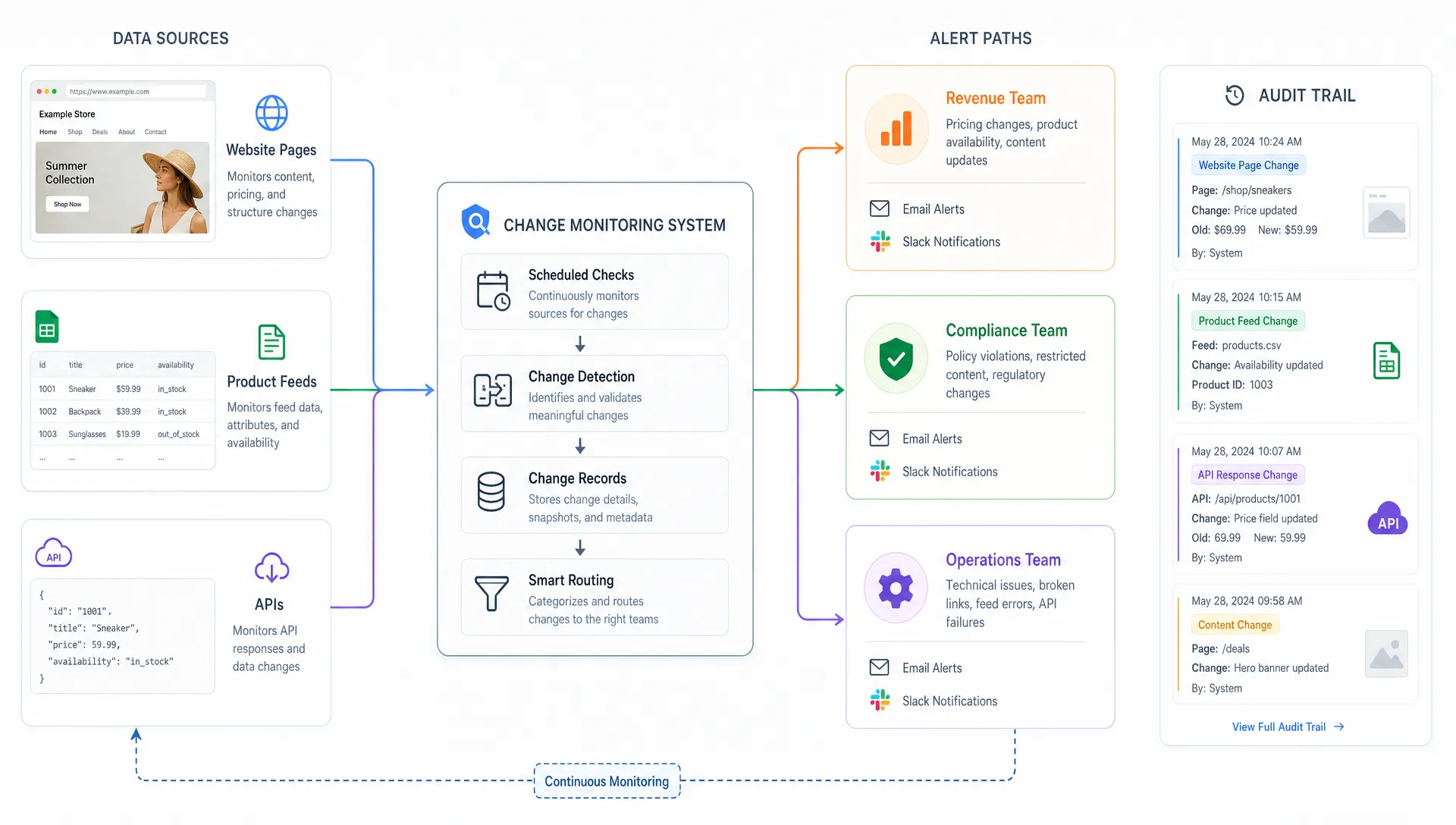
Smart noise filtering should preserve context. For example, if a pricing number changes, the alert should show the previous value, the new value, the source, and when the modification happened. That helps the recipient decide whether the change is expected, competitive, risky, or urgent.
Route alerts to the team that can act
A detected modification has value only if it reaches the right person quickly.
For low-priority changes, an email digest may be enough. For revenue-impacting or compliance-sensitive changes, Slack alerts, email notifications, or webhook-based workflows can help teams respond faster. DiffHook supports Slack and email notifications, along with webhook and workflow integrations, so alerts can fit into the tools teams already use.
Routing should be based on ownership, not just source type. A price change on your own site may belong to product marketing or RevOps. A competitor price change may belong to sales enablement. A privacy policy update may belong to legal or compliance. A feed structure change may belong to engineering or operations.
A simple severity model helps keep routing clear.
| Severity | When to use it | Typical response |
|---|
| Low | Informational change with no immediate business impact | Review in a daily or weekly digest |
| Medium | Change may affect messaging, documentation, or internal process | Assign an owner and review within a business day |
| High | Change may affect revenue, compliance, customer experience, or operations | Notify the responsible team immediately |
| Critical | Change may create legal exposure, outage risk, or major revenue loss | Escalate through incident or response workflows |
This model also helps teams avoid treating every alert as urgent. The clearer the escalation rules, the more likely people are to trust and act on notifications.
Keep a full change history for audits and investigations
Real-time alerts answer the question: what changed right now?
Change history answers a different question: what changed over time, and what evidence do we have?
That history matters when teams need to reconstruct events. A sales leader may need to know when a competitor changed packaging. A legal team may need to prove what a policy said on a specific date. An operations team may need to investigate when a feed started producing unexpected values. A support team may need to understand when documentation changed and whether customers received outdated instructions.
A reliable history should include the source, timestamp, previous version, new version, and alert record. For regulated or audit-sensitive environments, role access, SSO, and dependable delivery records also matter because they support accountability.
This is especially relevant for compliance teams. Website policies, notices, vendor terms, and public commitments often change outside traditional document management workflows. DiffHook covers this topic more deeply in its article on why website changes history matters for compliance.
Change monitoring can also complement broader compliance automation. For example, teams that want to connect external change detection with regulatory risk assessment, remediation actions, tailored policies, and automated evidence collection may benefit from an AI-powered compliance workflow automation platform alongside their website monitoring process.
Use website modification tracking for competitive intelligence
Competitor monitoring is one of the clearest use cases for website modification tracking. Public pages reveal strategic movement long before formal announcements do.
Pricing changes may signal a shift in target market. New comparison pages may reveal who a competitor is trying to displace. Feature matrix edits may show which capabilities they want buyers to notice. Job postings can hint at expansion into new markets, compliance needs, or product priorities. Documentation changes may reveal new functionality before it is marketed.
The key is to avoid collecting noise. Competitive intelligence works best when monitoring is tied to specific questions, such as:
- Did a competitor change pricing, packaging, or usage limits?
- Did they launch a new integration, product line, or market page?
- Did they change claims about security, compliance, or performance?
- Did they update migration pages, comparison pages, or customer proof?
When these modifications are tracked consistently, sales, product marketing, and leadership teams can respond with facts rather than anecdotes.
Use website modification tracking for internal quality control
Not every critical change happens outside your company. Your own website can change in ways that affect customers and internal teams.
A CMS update can alter legal copy. A pricing page edit can remove a key qualifier. A checkout change can break a conversion path. A documentation update can create mismatch between support scripts and public instructions. A deployment can change an API response that downstream teams depend on.
Internal monitoring gives teams an independent safety net. It can catch accidental changes, unapproved edits, incomplete releases, and unexpected output from automated systems. This is especially valuable when many teams publish to the same website or when important pages are managed across marketing, product, legal, and operations.
DiffHook is built for this kind of monitoring across pages, prices, policies, feeds, and APIs. With smart noise filtering, fast alert delivery, full change history, SSO and role access, and EU hosting options, teams can watch the web sources that influence their business without relying on manual checks.
What a strong tracking workflow looks like
A practical website modification tracking workflow does not need to be complicated. It needs to be explicit.
Begin by selecting high-impact sources, not every possible URL. Define the exact change types that matter for each source. Choose the right monitoring method for the source format. Filter predictable noise. Route alerts based on ownership and severity. Review change history regularly so the system improves over time.
A strong workflow has these characteristics:
- It watches pages, feeds, and APIs that influence real decisions.
- It distinguishes cosmetic changes from business-critical modifications.
- It alerts the right team through the right channel.
- It keeps a history that supports audits, investigations, and postmortems.
- It is reviewed as products, vendors, competitors, and regulations change.
The best systems become part of everyday operations. Teams stop asking whether something changed and start asking what action to take.
Frequently Asked Questions
What is website modification tracking? Website modification tracking is the process of monitoring web pages, pricing, policies, feeds, and APIs for changes, then alerting the right people when important modifications occur.
Which website modifications should teams monitor first? Start with changes that can affect revenue, compliance, operations, or customer trust. Pricing pages, terms, privacy policies, checkout flows, product documentation, feeds, and API responses are common high-impact sources.
How is website modification tracking different from uptime monitoring? Uptime monitoring checks whether a site or service is available. Website modification tracking checks what changed in the content, structure, values, or responses, even when the site is still online.
How can teams reduce false alerts? Teams can reduce false alerts by tracking specific elements or structured fields, filtering dynamic page sections, ignoring cosmetic changes, and defining severity rules before alerts are routed.
Does change history matter if alerts are real time? Yes. Real-time alerts help teams respond quickly, but change history provides evidence for audits, investigations, compliance reviews, competitive analysis, and post-incident learning.
Catch critical website modifications before they become problems
Critical changes rarely wait for a quarterly review. They happen across pricing pages, policy documents, product feeds, APIs, and customer-facing pages every day.
DiffHook helps teams monitor those changes in real time, filter out noise, send alerts through the right workflow, and keep a full history of what changed. If website modifications can affect your revenue, compliance, or operations, tracking them is not optional. It is part of running a reliable business online.