workflow web
How to Build a Workflow Web Monitoring Teams Trust
Trustworthy web monitoring is not just about detecting changes faster. It is about sending the right alert to the right owner with enough context to act.
Published June 28, 2026
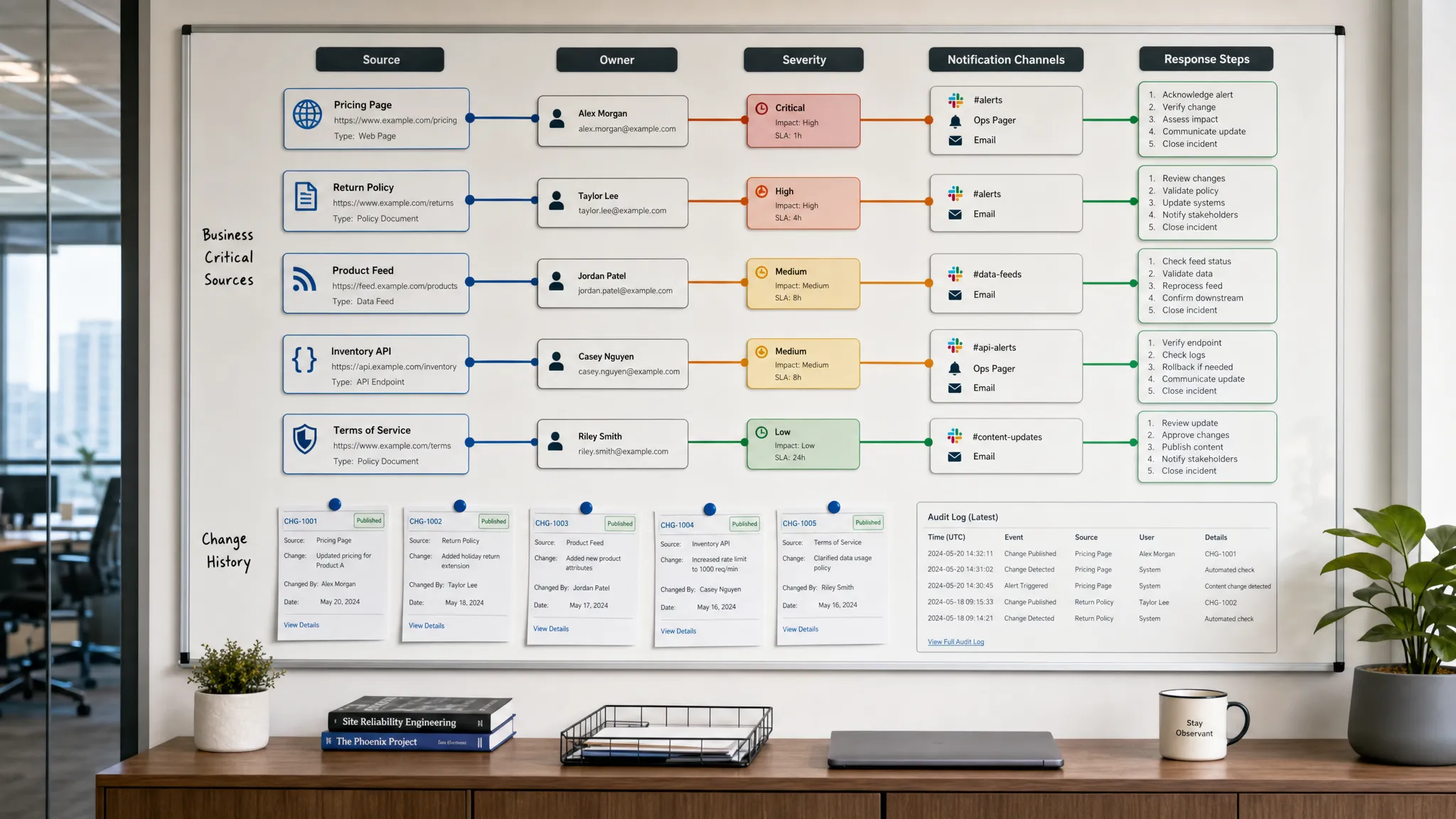
Trustworthy web monitoring is not just about detecting changes faster. It is about sending the right alert to the right owner with enough context to act.
Published June 28, 2026
Teams rarely stop trusting monitoring because it missed a minor typo. They stop trusting it when alerts arrive late, point to changes nobody owns, or fire so often that people start muting them.
That is the central challenge of workflow web monitoring. Detection is only the first step. To earn trust, monitoring has to fit the way revenue, compliance, operations, product, and marketing teams actually work. A useful system answers four questions quickly: what changed, why does it matter, who owns it, and what should happen next?
The best setup is not a giant net that catches every possible diff. It is a focused operating layer for the web surfaces your business depends on, from pricing pages and policy documents to feeds, APIs, partner portals, and competitor pages.
Trust is not just uptime or speed. A monitoring workflow becomes trusted when people believe alerts are relevant, timely, accurate, and actionable. If any one of those is missing, teams go back to manual checks, private spreadsheets, or Slack messages that nobody can audit later.
| Trust factor | What it means in practice | What happens when it is missing |
|---|---|---|
| Relevance | Alerts map to a business workflow, not just a page diff | Teams receive noise and start ignoring notifications |
| Accuracy | The alert reflects a real change, not a banner, timestamp, or layout flicker | People waste time validating false positives |
| Speed | The right owner finds out while the change is still actionable | Revenue, compliance, or operational risk grows unnoticed |
| Context | Alerts show what changed, where, when, and why it matters | Teams have to investigate from scratch every time |
| Accountability | There is an owner, escalation path, and change history | Incidents get lost across channels or handoffs |
A monitoring tool can be technically impressive and still fail operationally. The difference is whether it becomes part of the workflow rather than another inbox.
If you begin by monitoring every URL you can find, you will create volume before value. A better starting point is to list the decisions and processes that depend on web changes.
For a revenue team, that might include competitor pricing pages, discount terms, checkout flows, reseller listings, or affiliate offers. For compliance, it might include privacy policies, terms of service, vendor legal pages, or regulatory guidance pages. For operations, it could be supplier feeds, inventory availability, documentation portals, or API responses. Marketing teams may care about landing pages, campaign URLs, comparison pages, partner messaging, and high-value content updates. Teams that pair monitoring with campaign planning can also use AI-driven marketing techniques and resource libraries to decide which competitor, SEO, and landing-page signals deserve attention.
This workflow-first approach keeps monitoring tied to business impact. If you are still deciding which surfaces deserve priority, it helps to study how quiet website updates can impact revenue and risk before building your monitoring map.
| Team | Web sources to monitor | Meaningful change | Likely action |
|---|---|---|---|
| Revenue | Pricing pages, discount pages, reseller listings | Price, packaging, promotion, or availability changes | Update positioning, notify sales, adjust offers |
| Compliance | Policies, terms, vendor notices, regulatory pages | Legal wording, effective dates, obligations, exclusions | Review internally, create evidence, escalate if needed |
| Operations | Supplier pages, feeds, APIs, status pages | Stock, delivery, documentation, endpoint, or SLA changes | Replan work, update systems, notify stakeholders |
| Product | Docs, release notes, API references, competitor features | Feature claims, endpoint behavior, deprecations, integrations | Inform roadmap, update enablement, open technical review |
| Marketing | Landing pages, comparison pages, campaign pages | Messaging, offer, CTA, SEO title, or page structure changes | Refresh campaigns, update briefs, capture insights |
The goal is not to watch the whole web. The goal is to watch the parts of the web that can change your next decision.
A signal is a change that matters enough for someone to act. An alert is only the delivery mechanism. Teams often reverse that order, turning on notifications first and defining importance later. That is how alert fatigue begins.
Before setting up a monitor, define the change contract. Write down the source, the exact element or data point that matters, the threshold for importance, the owner, and the expected response. A vague alert such as pricing page changed is much less useful than competitor added annual discount to Pro plan or vendor privacy policy changed effective date.
Useful signal definitions usually answer these questions:
This is especially important for pages with lots of dynamic content. Cookie banners, timestamps, rotating testimonials, recommendation widgets, and ad slots can all create noise. If the monitor is not focused on the meaningful part of the page, people will not trust the output. For tactical examples, DiffHook’s guide on how to monitor a web page for critical changes walks through ways to separate important updates from routine page movement.
Modern business workflows rarely depend on simple static pages alone. Some signals live in HTML. Others live in structured feeds, API responses, scripts, JSON payloads, or authenticated portals. A monitoring system teams trust should reflect that reality.
| Surface | What to watch | Why it matters |
|---|---|---|
| Public web pages | Pricing tables, policy sections, product copy, CTAs, documentation | These are often the first place customers, competitors, and regulators see changes |
| Feeds | Product availability, content updates, inventory, listings | Feeds can change faster than manually reviewed pages |
| APIs | Response fields, schemas, endpoint behavior, status values | Operational workflows may break before a human notices the page |
| Partner or vendor pages | Notices, terms, integrations, delivery information | Third-party changes can create internal obligations or customer impact |
| Internal or controlled pages | Published docs, support content, configuration pages | Teams need evidence of what changed and when |
This is where workflow web monitoring becomes more than page watching. A platform such as DiffHook can track pages, prices, policies, feeds, and APIs, which allows teams to align monitoring coverage with the sources their workflows already depend on.
Noise is the fastest way to destroy trust. If people receive ten irrelevant alerts before one meaningful alert, they will treat the meaningful one with skepticism too.
Filtering should happen before notification, not after. Teams should identify stable page sections, ignore known dynamic elements, set thresholds for numerical changes, and deduplicate repeated alerts caused by the same underlying update. For policy and documentation pages, this may mean focusing on specific sections rather than the entire page. For pricing, it may mean tracking values, plan names, discount language, and availability separately.
A practical severity model can also prevent every change from feeling urgent.
| Severity | Use when | Example route |
|---|---|---|
| Critical | A change can affect revenue, compliance, customer experience, or operations immediately | Slack or email to the owner, webhook into an incident or workflow tool |
| High | A change needs review soon but may not require immediate intervention | Team channel, assigned owner, same-day review |
| Normal | A change is useful context or evidence but not urgent | Digest, searchable history, weekly review |
| Ignore | A change is expected or irrelevant | Suppressed by filters or rules |
Smart noise filtering is not about hiding information. It is about protecting attention so that important changes get acted on.
A trusted alert has a destination. If alerts go to a shared inbox with no owner, they become background noise. If they go to the wrong team, they create delays and blame. Routing should reflect the workflow that depends on the change.
Slack notifications are useful for rapid collaboration, especially when several people need to see the same change at once. Email works well for stakeholders who need a durable record. Webhooks and workflow integrations are useful when alerts should create tickets, update internal systems, trigger automations, or feed another operational process.
The routing rule should be simple enough that everyone understands it. Pricing changes go to revenue operations or sales enablement. Policy changes go to legal, compliance, or the responsible business owner. API changes go to engineering or technical operations. Vendor availability changes go to supply, support, or customer operations.
Routing is also where escalation matters. If a critical alert is not acknowledged, the system should have a clear next step. That may be a second notification, a different channel, or a designated backup owner.
The best alerts reduce investigation time. They do not simply say a page changed. They provide enough context for a person to decide what to do next.
A self-explanatory alert should include:
This context turns monitoring from a notification stream into an operational record. It also helps new team members understand why a specific source is monitored in the first place.
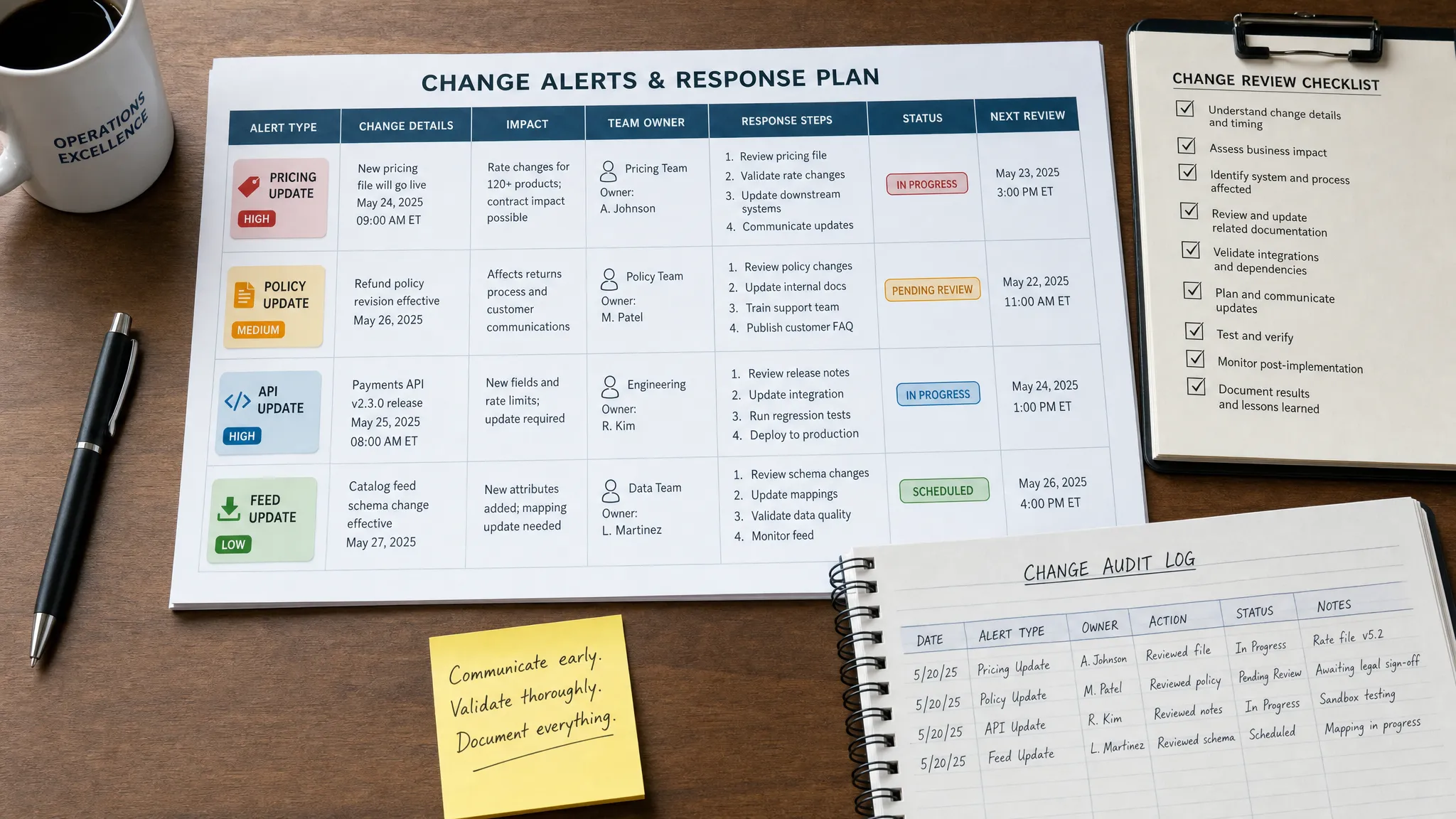
Even accurate alerts can fail if nobody knows what to do with them. A response playbook does not need to be complicated. It should define the first action, the decision owner, the escalation path, and the evidence that should be kept.
| Trigger | First owner | First response | Escalation |
|---|---|---|---|
| Competitor changes public pricing | Revenue operations | Validate the change, notify sales, update competitive notes | Sales leadership if it affects active deals |
| Vendor updates terms or policy | Compliance or legal owner | Review changed language, capture history, assess obligations | Legal leadership if new risk is introduced |
| API response or schema changes | Engineering or technical operations | Confirm behavior, check dependent workflows, open issue if needed | Incident process if customers are affected |
| Supplier feed changes availability | Operations owner | Confirm source, adjust internal plan, notify affected teams | Customer operations if delivery dates change |
| Landing page or offer changes | Marketing owner | Verify campaign impact, update tracking, notify demand team | Growth leadership if paid campaigns are affected |
Playbooks should be short enough to use during a busy day. The point is not to document every possible scenario. The point is to remove ambiguity when a meaningful change arrives.
Monitoring becomes more valuable as more teams depend on it, but scale creates governance needs. Not everyone should be able to change rules for business-critical monitors. Not everyone needs access to every monitored source. For compliance and enterprise teams, identity, permissions, and historical evidence matter.
This is where role access, SSO, full change history, reliable delivery, and audit trails become part of the trust equation. They help teams answer who configured a monitor, what changed, when the alert was sent, and how the organization responded.
Data location can matter too. If your organization has regional hosting requirements, an EU hosting option may be relevant to the buying process. The key is to treat monitoring governance as part of operational resilience, not as an afterthought.
A monitoring program is working when people act on alerts and reduce manual checking. If the same employees still maintain private watchlists, the system has not earned trust yet.
Track metrics that show both technical reliability and human adoption.
| Metric | What it reveals | Healthy direction |
|---|---|---|
| Alert precision | Share of alerts that led to a useful review or action | Increasing over time |
| False positive volume | Amount of noise reaching teams | Decreasing over time |
| Time to acknowledge | How quickly the owner sees and accepts the alert | Shorter for critical workflows |
| Time to resolve | How long it takes to complete the response playbook | More predictable over time |
| Missed critical changes | Important changes found outside the monitoring system | Approaching zero |
| Coverage of critical workflows | Share of priority workflows with defined monitors | Increasing intentionally |
| Manual check reduction | Whether teams stop relying on repetitive manual reviews | Increasing over time |
Review these metrics regularly with the teams who receive alerts. Trust improves when users can say which alerts helped, which were noisy, and which sources need better rules.
A trusted system is usually built in stages. Starting small helps you prove value, refine filters, and create internal champions before expanding coverage.
This phased approach keeps adoption grounded in real outcomes. It also prevents the common mistake of buying a monitoring tool, adding hundreds of sources, and then wondering why teams ignore the alerts.
Many monitoring programs fail for predictable reasons. Most are not caused by lack of technology. They are caused by unclear intent.
| Mistake | Symptom | Better approach |
|---|---|---|
| Monitoring everything | High alert volume and low confidence | Prioritize workflows with revenue, compliance, or operational impact |
| Sending alerts to generic channels | Nobody knows who owns the response | Route each alert to a named team or role |
| Treating all changes equally | Urgent and minor updates look the same | Use severity levels and response expectations |
| Ignoring feeds and APIs | Teams miss changes that never appear as obvious page updates | Monitor the actual source used by the workflow |
| Skipping history | Teams cannot prove what changed or when | Keep full change history and audit trails |
| Never tuning filters | False positives keep repeating | Review signal quality and adjust rules regularly |
The fix is usually simple: narrow the scope, clarify the signal, assign ownership, and make the alert easier to act on.
What is workflow web monitoring? Workflow web monitoring is the practice of tracking web pages, prices, policies, feeds, and APIs in a way that connects each important change to a business process, owner, and response action.
How is it different from basic website change detection? Basic website change detection tells you that something changed. Workflow-focused monitoring tells the right team what changed, why it matters, and what to do next.
How can teams reduce false alerts? Teams can reduce false alerts by monitoring specific page sections or data fields, ignoring dynamic elements, setting thresholds, deduplicating repeated updates, and reviewing alert quality regularly.
Who should own web monitoring alerts? Ownership should follow the workflow. Pricing alerts usually belong to revenue or sales teams, policy alerts to legal or compliance teams, API alerts to technical owners, and supplier or feed alerts to operations.
Does workflow web monitoring help with compliance? Yes, when configured carefully. Monitoring policy pages, vendor terms, regulatory pages, and documentation can help teams detect relevant changes quickly and keep a history of what changed and when.
If your team still relies on bookmarks, spreadsheets, or occasional manual checks, important web changes can slip through at the worst time. A trusted workflow web monitoring system gives every critical source an owner, every alert a purpose, and every response a record.
DiffHook helps teams monitor pages, prices, policies, feeds, and APIs in real time, with smart noise filtering, Slack and email notifications, webhook and workflow integrations, full change history, role access, SSO, and an EU hosting option. Build the monitoring layer your revenue, compliance, and operations teams can actually trust.