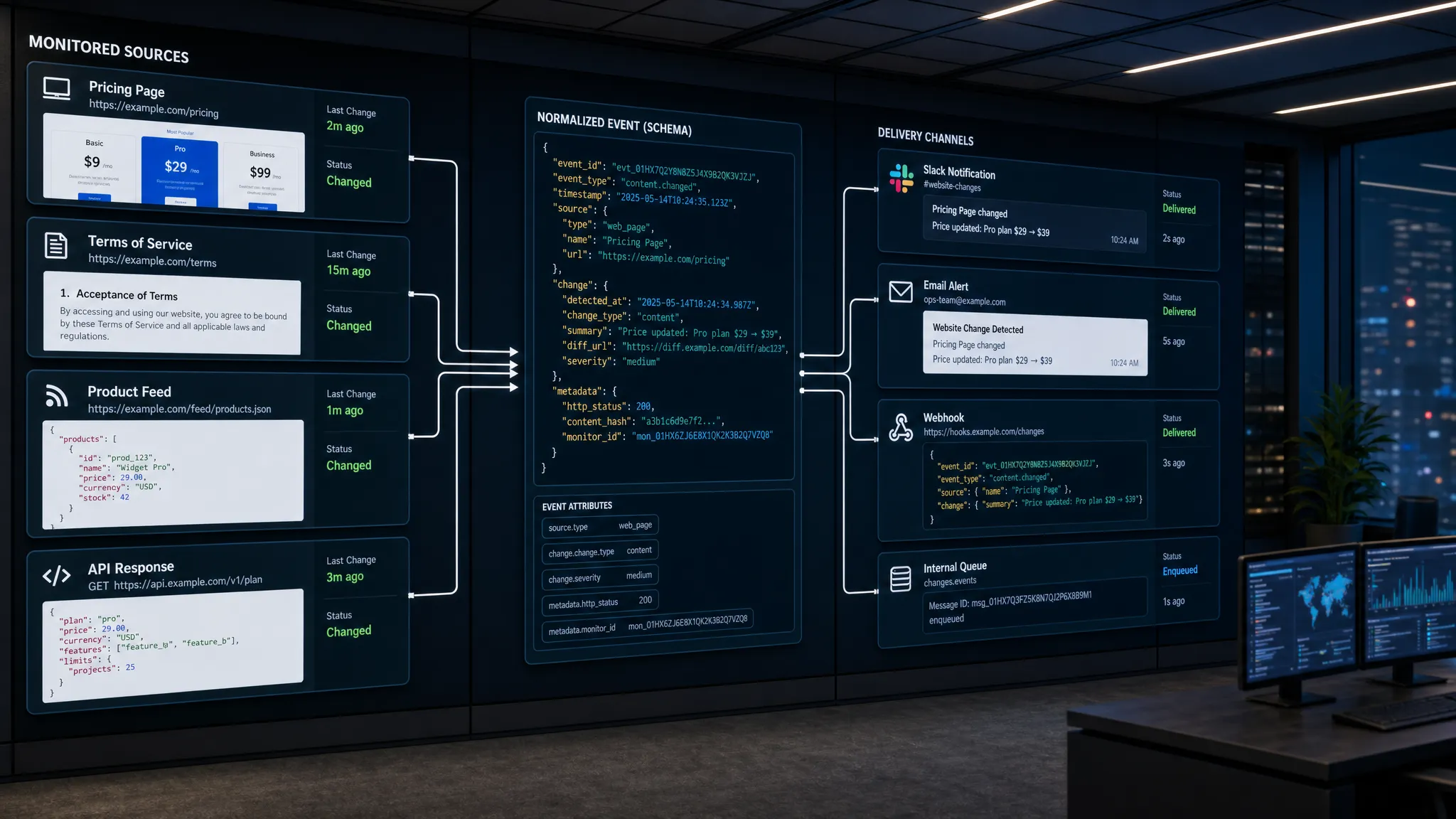
If an important web page changes and nobody sees it until a customer, regulator, partner, or competitor reacts, the monitoring system has failed. Traditional website alerts help, but many teams now need something more operational: a way to turn web changes into structured events that can flow into internal tools, queues, dashboards, and workflows.
That is the core idea behind website to API monitoring. You monitor pages, prices, policies, feeds, and APIs, then deliver the meaningful changes as API-readable payloads instead of relying only on screenshots or inbox alerts.
Done well, this gives revenue, compliance, legal, product, and operations teams a shared signal layer. Done poorly, it creates noisy notifications, fragile scrapers, and automation nobody trusts. This guide walks through a practical setup that keeps the workflow reliable from the first monitored URL to the receiving API endpoint.
What website to API monitoring means
Website to API monitoring does not mean every website magically becomes a stable, official API. If a vendor or partner offers a documented API that gives you the data you need, use it. It will usually be more reliable, easier to govern, and clearer from a legal and operational standpoint.
The real use case is different: many critical business signals still live on public web pages, product pages, pricing pages, documentation, marketplace listings, policy pages, RSS feeds, JSON endpoints, XML feeds, and semi-structured pages that were never designed for your systems. Website to API monitoring turns changes in those sources into structured events.
| Monitoring style | Best for | Output | Limitation |
|---|
| Human-only alerts | Low-volume review and manual decisions | Email or Slack message | Hard to automate and measure |
| Visual change monitoring | Layout, copy, screenshots, and policy changes | Diff view or snapshot | Can be noisy without filtering |
| Structured extraction | Prices, availability, terms, fields, tables | Normalized values | Requires clear selectors or parsing rules |
| Website to API workflow | Operational automation and system updates | Webhook or API payload | Needs schema, routing, and governance |
A good setup combines these approaches. Some changes should go to humans for review. Others should create tickets, update internal records, trigger a revenue workflow, or notify a downstream service immediately.
Start with the decision, not the URL
The fastest way to create a brittle monitoring setup is to begin with a giant list of URLs. A better starting point is the decision your team needs to make when something changes.
Ask: if this page changes, who acts, how quickly, and what information do they need?
For example, a revenue team might monitor competitor pricing pages because a price drop should trigger a sales enablement update. A compliance team might monitor vendor policy pages because new wording could affect customer commitments. A product operations team might monitor API documentation because a deprecated field could break an integration.
Strong website to API monitoring starts with a business signal such as:
- A competitor changes a public price, plan limit, or packaging term
- A vendor updates a privacy policy, SLA, acceptable use policy, or security page
- A marketplace listing adds, removes, or changes a product
- A feed publishes a new record that should enter an internal workflow
- An API response changes in a way that affects downstream systems
Once the decision is clear, the technical setup becomes easier. You know what to extract, how often to check, which changes are noise, and where the resulting event should go.
Build a source map across pages, feeds, and APIs
Most teams discover that their monitoring landscape is wider than expected. A single business process may depend on a pricing page, a documentation page, a status page, a JSON endpoint, and a partner feed.
Create a source map before configuring alerts. At minimum, capture the URL, owner, source type, business reason, expected change frequency, and required response time. This prevents monitoring from becoming a collection of disconnected checks.
| Source type | Example signal | Recommended monitoring approach | Typical destination |
|---|
| Pricing page | Plan price or discount changes | Price extraction plus page diff | Revenue channel or CRM workflow |
| Policy page | Legal wording or effective date changes | Text diff with noise filtering | Compliance review queue |
| Product page | Availability, features, or specs | Structured field tracking | Ops or sales alert |
| RSS or XML feed | New item or removed item | Feed monitoring | Content or catalog workflow |
| API endpoint | Field, status, or response change | API response monitoring | Engineering or incident workflow |
If you need a broader framework for organizing sources, DiffHook’s guide on catching site changes across pages, feeds, and APIs is a useful companion to this setup process.
The key is to avoid treating all sources equally. A high-impact pricing page may need fast detection and automated routing. A low-risk blog feed may only need a daily summary. A policy page may need full change history and human review before any action is taken.
Define the event schema before you monitor
The receiving API should not get a vague message that says, “something changed.” It should receive a structured event with enough context to act.
A practical event schema usually answers five questions: what changed, where it changed, when it was detected, how important it is, and what should happen next.
| Field | Purpose |
|---|
event_id | Unique identifier for deduplication and auditability |
source_url | The monitored page, feed, or endpoint |
source_type | Page, feed, API, price, policy, or custom category |
change_type | Price change, text change, item added, item removed, response changed |
old_value and new_value | Structured before and after values, when available |
detected_at | Timestamp for operational response and reporting |
severity | Business priority such as low, medium, high, or critical |
diff_reference | Link or identifier for reviewing the full change history |
owner | Team or system responsible for the next step |
Here is a simplified payload example:
{
  "event_id": "chg_20260630_184522",
  "source_url": "https://example-source.com/pricing",
  "source_type": "pricing_page",
  "change_type": "price_change",
  "detected_at": "2026-06-30T18:45:22Z",
  "old_value": "$99/month",
  "new_value": "$89/month",
  "severity": "high",
  "owner": "revenue_ops"
}
Not every source will produce every field. A policy page change may have a text diff instead of an old and new price. An API endpoint may include a changed JSON path. The point is to define the contract early so downstream systems can process events consistently.
Configure monitoring rules that separate signal from noise
Website pages change constantly. Cookie banners, timestamps, rotating testimonials, personalization, tracking parameters, stock photos, ads, and A/B test variants can all create false positives.
Noise filtering is what makes website to API monitoring usable. Without it, teams stop trusting alerts and automation gets disabled.
Good filtering usually includes several layers. First, monitor the most relevant part of the page instead of the entire DOM when possible. Second, normalize formatting changes such as whitespace, capitalization, or currency formatting when they are not meaningful. Third, apply thresholds so tiny copy edits do not trigger high-severity workflows. Fourth, debounce repeated changes so one unstable page does not flood your receiving API.
This is especially important for operational workflows. A Slack notification can be ignored if it is noisy. An API event might create a ticket, update a record, or trigger a downstream process, so false positives have a real cost.
DiffHook is built around this kind of practical monitoring, including real-time change detection, page, feed, and API tracking, price change alerts, smart noise filtering, Slack and email notifications, webhooks, workflow integrations, and full change history.
Route alerts and API events differently
A common mistake is sending every change to every channel. Humans need context and prioritization. Systems need structured data and predictable delivery. Those are related, but not the same.
Use human alerts for review-heavy decisions, such as policy changes, legal wording updates, and high-impact competitor moves. Use API events or webhooks when the change should enter a workflow automatically, such as creating a ticket, updating a database, notifying an account owner, or starting an approval process.
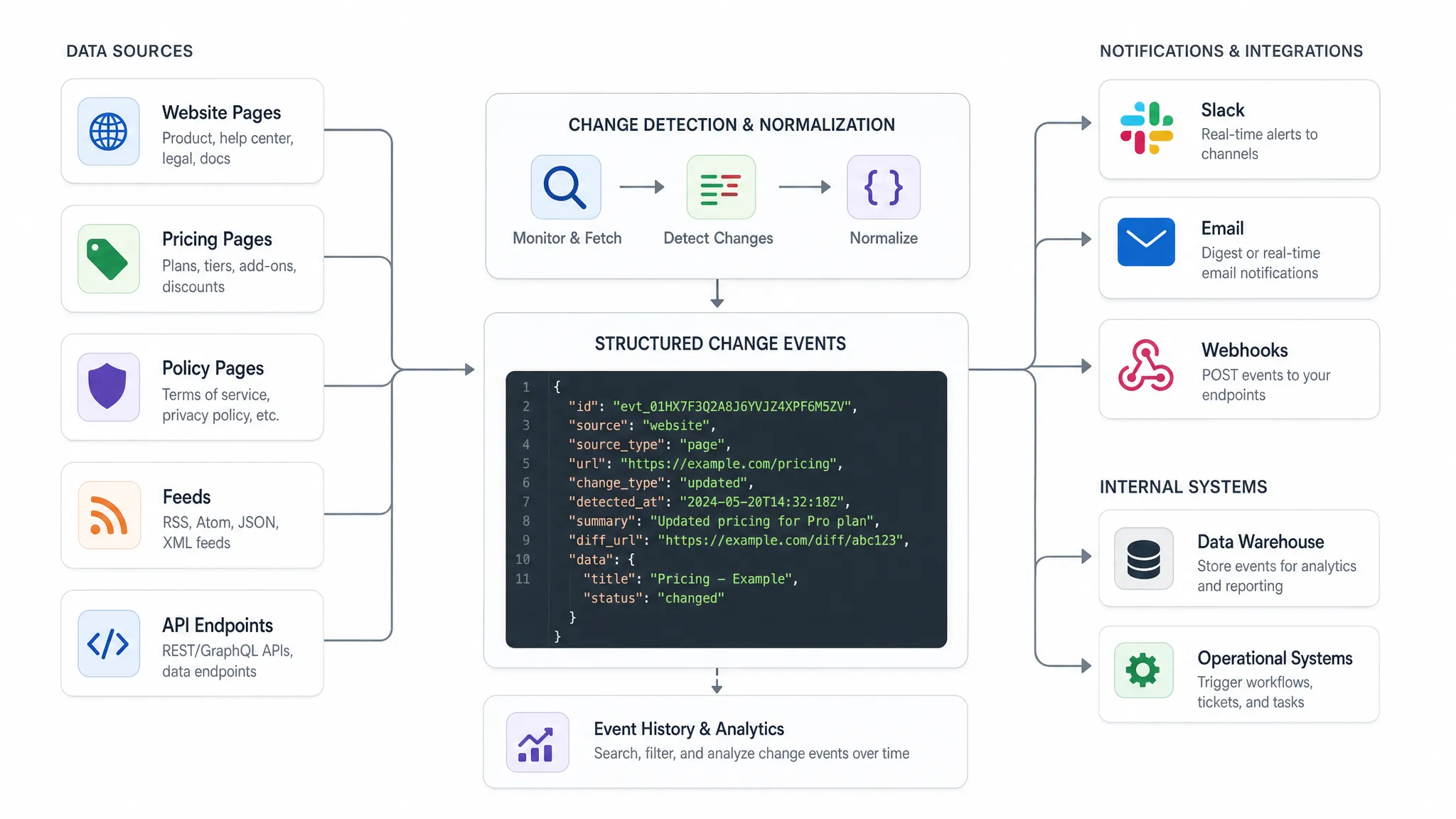
If you are deciding when alerts are enough and when you need structured delivery, DiffHook’s article on when you need an API for websites, not just alerts covers the decision point in more depth.
The practical rule is simple: if the recipient is a person, optimize for clarity. If the recipient is a system, optimize for schema, idempotency, and reliability.
Design the receiving endpoint for reliability
Once changes are delivered as API events, your receiving system becomes part of the monitoring workflow. Treat it like production infrastructure.
Your endpoint should accept only the payloads it understands, validate required fields, store the event before doing heavy processing, and return a success response only after the event is safely accepted. If downstream processing fails, the event should still be recoverable from your own queue or database.
Build for these reliability patterns:
- Idempotency, so the same event can be retried without creating duplicate tickets or records
- Authentication, using the security methods available in your monitoring and workflow tools
- Clear response codes, so delivery failures can be retried or investigated
- Logging, so every received event can be traced to a source and timestamp
- Versioned schemas, so you can add fields without breaking consumers
Also decide how failures are handled. If the receiver is down, should the monitoring platform retry? Should a human be notified after repeated failures? Should critical changes also go to Slack or email as a fallback? These decisions should be made before the first incident.
Test with controlled changes before going live
Do not wait for a real competitor price change or policy update to find out whether the workflow works. Run controlled tests before the monitoring setup becomes operational.
| Test | What to verify | Failure to watch for |
|---|
| Sample text change | The right section is monitored | Full-page noise triggers an alert |
| Sample price change | Old and new values are extracted correctly | Currency, discount, or formatting is misread |
| Duplicate delivery | Receiver handles retries safely | Duplicate tickets or records are created |
| Low-severity change | Routing matches priority | Every minor change becomes urgent |
| Endpoint outage | Failure handling works | Events disappear without review |
| Audit review | Change history is available | Teams cannot prove what changed |
Testing should include both technical and business users. Engineers can confirm delivery, schema validation, and retry behavior. Business owners can confirm whether the event contains enough context to make a decision.
Add ownership, governance, and audit trails
Website to API monitoring often starts as a tactical automation project. It becomes more valuable when it has ownership and governance.
Every monitored source should have a business owner. Every event type should have a destination. Every high-priority workflow should have a documented response path. Without that structure, monitoring becomes a collection of alerts that nobody feels responsible for.
Governance also matters for security and compliance. Teams that monitor policies, vendor pages, legal terms, or regulated content may need role-based access, audit history, and hosting options aligned with their data requirements. DiffHook supports SSO and role access, full change history, audit trails, and an EU hosting option for teams that need stronger controls.
You should also monitor the monitoring program itself. Track alert volume, false positive rate, time to review, time to action, failed deliveries, and sources with repeated noise. These metrics show whether the workflow is trusted or simply tolerated.
Example workflows for website to API monitoring
The same setup pattern can support many teams.
A revenue operations team can monitor competitor pricing pages, package names, discount language, and plan limits. When a meaningful price change is detected, the event can route to Slack for awareness and to a CRM or sales enablement workflow for follow-up.
A compliance team can monitor privacy policies, security pages, subprocessors pages, and terms of service. Instead of relying on someone to check manually, every relevant text change can enter a review queue with the source URL, timestamp, and diff history.
A product operations team can monitor partner documentation, changelogs, feeds, and API responses. If a field is deprecated or a response changes, the event can notify the integration owner before customers report a problem.
Legal and rights teams can also use this pattern when public web changes affect enforcement or licensing workflows. For example, music companies and rights holders working with AI-powered IP enforcement and licensing workflows may need structured monitoring signals from public pages, catalogs, or partner surfaces so evidence and follow-up actions do not depend on manual discovery.
The unifying principle is that monitoring should end where work actually happens, not where the web page changed.
Common setup mistakes to avoid
Even strong teams run into predictable issues when they move from alerts to API-driven monitoring.
| Mistake | Why it hurts | Better approach |
|---|
| Monitoring too much too soon | Creates noise and weakens trust | Start with high-impact sources and expand gradually |
| Sending vague events | Systems cannot act on them | Define a schema with source, change type, timestamp, and severity |
| Ignoring page structure | Minor layout changes break extraction | Use stable selectors and fallbacks where possible |
| Treating all changes as urgent | Teams become desensitized | Use severity and routing rules |
| Skipping audit history | Reviews lack evidence | Preserve before and after context |
| Forgetting source ownership | Alerts have no accountable responder | Assign a team owner for each source |
The best monitoring systems are not the ones with the most URLs. They are the ones that consistently detect meaningful changes and route them to the right place with enough context to act.
A simple rollout plan
Start with one workflow that has clear business value. Competitor pricing, vendor policy monitoring, or critical API response tracking are good candidates because the decision path is usually obvious.
Choose five to ten sources, define one or two event types, and route them to both a human channel and a test API endpoint. Run the workflow for two weeks. Measure false positives, missed context, delivery failures, and response times. Then refine selectors, thresholds, schema fields, and routing rules before adding more sources.
Once the first workflow is trusted, expand by source category rather than by random URL requests. Add pricing pages, then policy pages, then feeds, then APIs. This keeps the monitoring program coherent and easier to govern.
For more examples of how teams apply this pattern, explore the DiffHook website change monitoring use cases.
Frequently Asked Questions
What is website to API monitoring? Website to API monitoring is the process of detecting meaningful changes on web pages, feeds, or APIs and delivering those changes as structured events to another system through a webhook or API workflow.
Is website to API monitoring the same as scraping? Not exactly. Scraping usually focuses on extracting data from pages. Website to API monitoring focuses on detecting changes, filtering noise, preserving context, and routing structured change events to people or systems.
When should I use alerts instead of API events? Use alerts when a human needs to review and decide. Use API events when the change should reliably enter a downstream workflow, such as a ticketing system, CRM, database, or internal service.
How do I reduce false positives? Monitor specific page sections when possible, ignore dynamic elements, normalize minor formatting changes, set thresholds, and route low-severity changes differently from critical ones.
Can website to API monitoring include actual APIs? Yes. A strong setup can monitor web pages, feeds, and API responses together. This is useful when one operational workflow depends on several external source types.
Turn web changes into workflows your team can trust
Website to API monitoring works best when it is built around decisions, not raw URLs. Define the signal, map the source, filter the noise, structure the payload, test the receiver, and preserve the full history.
DiffHook helps teams monitor the web that drives revenue, compliance, and operations, including pages, prices, policies, feeds, and APIs. If you need fast alerts, webhook-driven workflows, smart filtering, and reliable change history, DiffHook can help you build a monitoring setup your team actually uses.