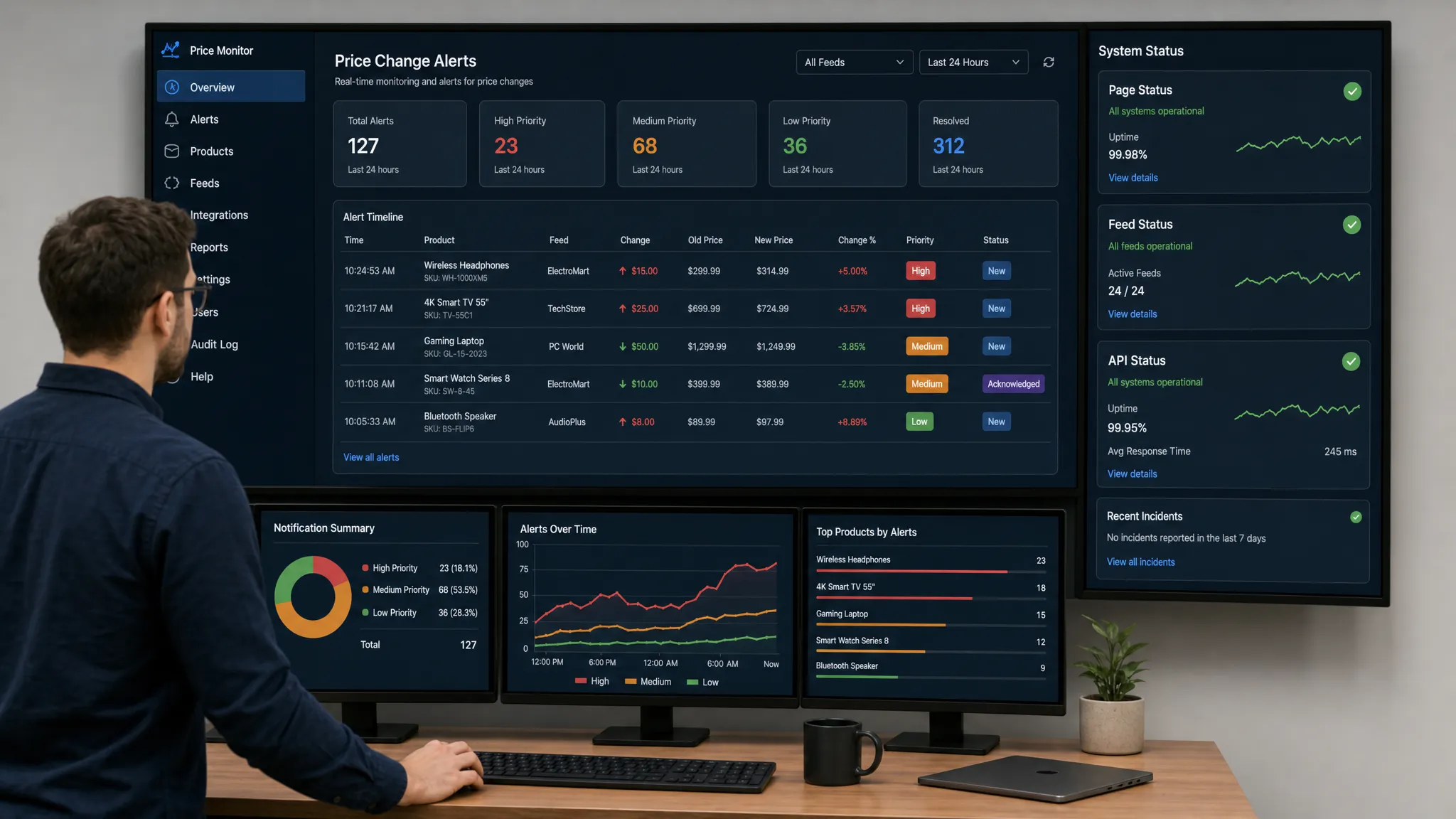
Prices on the web can change faster than a team can refresh a page. A competitor adjusts a product page overnight. A supplier updates a wholesale price without notice. A marketplace listing shows the wrong discount. A vendor quietly changes a subscription tier. If the change affects revenue, compliance, procurement, or customer trust, finding it days later is too late.
That is why teams increasingly use automated monitoring instead of manual checks. The goal is simple: track web page price changes automatically, filter out irrelevant noise, and alert the right person or system as soon as the price moves.
This guide walks through the practical setup, common pitfalls, and best practices for building a reliable price monitoring workflow.
What automated web page price tracking actually means
Automated price tracking is the process of watching a page, feed, or API for pricing changes and notifying your team when a relevant change occurs. Instead of asking someone to inspect the same pages every morning, a monitoring system checks the source continuously or on a defined schedule.
A price change can include more than the visible number next to a product name. Depending on your business, you may also want to monitor:
- List price, sale price, or subscription tier pricing
- Promotional discounts and coupon messaging
- Shipping fees, taxes, or fees that affect total cost
- Price per unit, bulk pricing, and minimum order quantities
- Currency changes, regional price variations, and localized pages
- Structured product data embedded in the page
- Feed or API values that power downstream systems
The best monitoring setup depends on the source. A simple retail product page may only require tracking one visible price element. A marketplace, SaaS pricing page, or procurement catalog may require monitoring multiple fields and routing alerts to several teams.
Why manual price checks fail
Manual checks work when you monitor one page once in a while. They break down when price changes are frequent, high-stakes, or spread across many sources.
The biggest problem is timing. If a competitor lowers a price for a short promotion, your team may never see it. If a vendor increases a rate and procurement misses the update, the impact may only appear on the next invoice. If your own web page price changes incorrectly because of a feed issue, customers may see the error before your team does.
Manual workflows also create inconsistent records. Someone may notice a price change, but they may not capture the previous value, timestamp, screenshot, or exact page state. For teams that care about auditability, this matters. Pricing claims and promotions can create legal risk if they are inaccurate or misleading. The FTC Guides Against Deceptive Pricing are one example of why teams should treat pricing changes as more than a marketing detail.
Automated monitoring helps teams move from occasional observation to operational awareness.
Common use cases for tracking web page price changes
Price monitoring is not only for ecommerce teams. Any team that relies on external or internal web data can benefit from automatic alerts.
| Use case | What to monitor | Why it matters |
|---|
| Competitive pricing | Competitor product pages, plan pages, promotions | React faster to market changes and protect margins |
| Procurement | Supplier catalogs, vendor pricing pages, rate cards | Detect cost increases before they affect budgets |
| Ecommerce operations | Your own product pages, feeds, marketplace listings | Catch pricing errors before they create revenue loss |
| Compliance | Promotional claims, discount messaging, policy-linked pricing | Preserve a record of pricing changes and reduce risk |
| Revenue operations | SaaS pricing pages, packaging pages, terms pages | Track how competitors or partners reposition offers |
| Marketplaces | Seller listings, shipping charges, availability plus price | Understand volatility and enforce internal rules |
The common thread is that teams need to know when a price changes, not after a weekly report, but when action is still possible.
Step 1: Decide which price changes deserve an alert
Before choosing a tool or building an automation, define the business event you care about. Not every change deserves a notification.
Start by separating informational changes from actionable changes. A one-cent fluctuation on a low-priority product may not matter. A 10% supplier increase, a competitor undercutting your flagship product, or a pricing table update on your own website probably does.
Clear alert criteria help reduce noise. Useful rules may include:
- Alert when a price increases or decreases by more than a specific percentage
- Alert when a product moves from regular price to sale price
- Alert when a pricing page changes anywhere in a key section
- Alert when the page removes a price, displays unavailable text, or changes currency
- Alert when a feed or API value differs from the visible page value
The more precise your criteria, the more useful your monitoring becomes. A good setup should help your team focus on meaningful price movement, not every layout shift or rotating banner.
Step 2: Choose the right source to monitor
A web page is not always the only source of pricing truth. Many organizations have multiple layers: a product page, a data feed, an internal API, and a marketplace listing. If those sources fall out of sync, the visible customer experience can be wrong even if one system is correct.
When possible, monitor the source that best matches your operational risk.
| Source | Best for | Watch out for |
|---|
| Public web page | Competitor tracking, customer-visible pricing, vendor pages | Dynamic content, regional variations, popups |
| Product feed | Ecommerce catalogs, marketplaces, high-volume SKUs | Feed latency, missing fields, format changes |
| API endpoint | Internal systems, partner data, structured price values | Authentication, schema changes, rate limits |
| Pricing page section | SaaS plans, rate cards, policy-linked pricing | Layout changes and A/B tests |
For competitive intelligence, public pages are often the only available option. For your own operations, you may want to monitor both the customer-facing page and the feed or API that powers it. That gives you an early warning when the displayed price and the data source diverge.
Step 3: Isolate the pricing element
The key to reliable web page price tracking is targeting the right part of the page. If your monitor watches the entire page, you may receive alerts for reviews, recommendations, ads, cookie notices, inventory badges, or unrelated design changes.
A cleaner approach is to track the specific element or section that contains the price. For a product page, that might be the price block near the product title. For a SaaS pricing page, it might be the plan card section. For a policy page that includes fees, it might be a table row or paragraph.
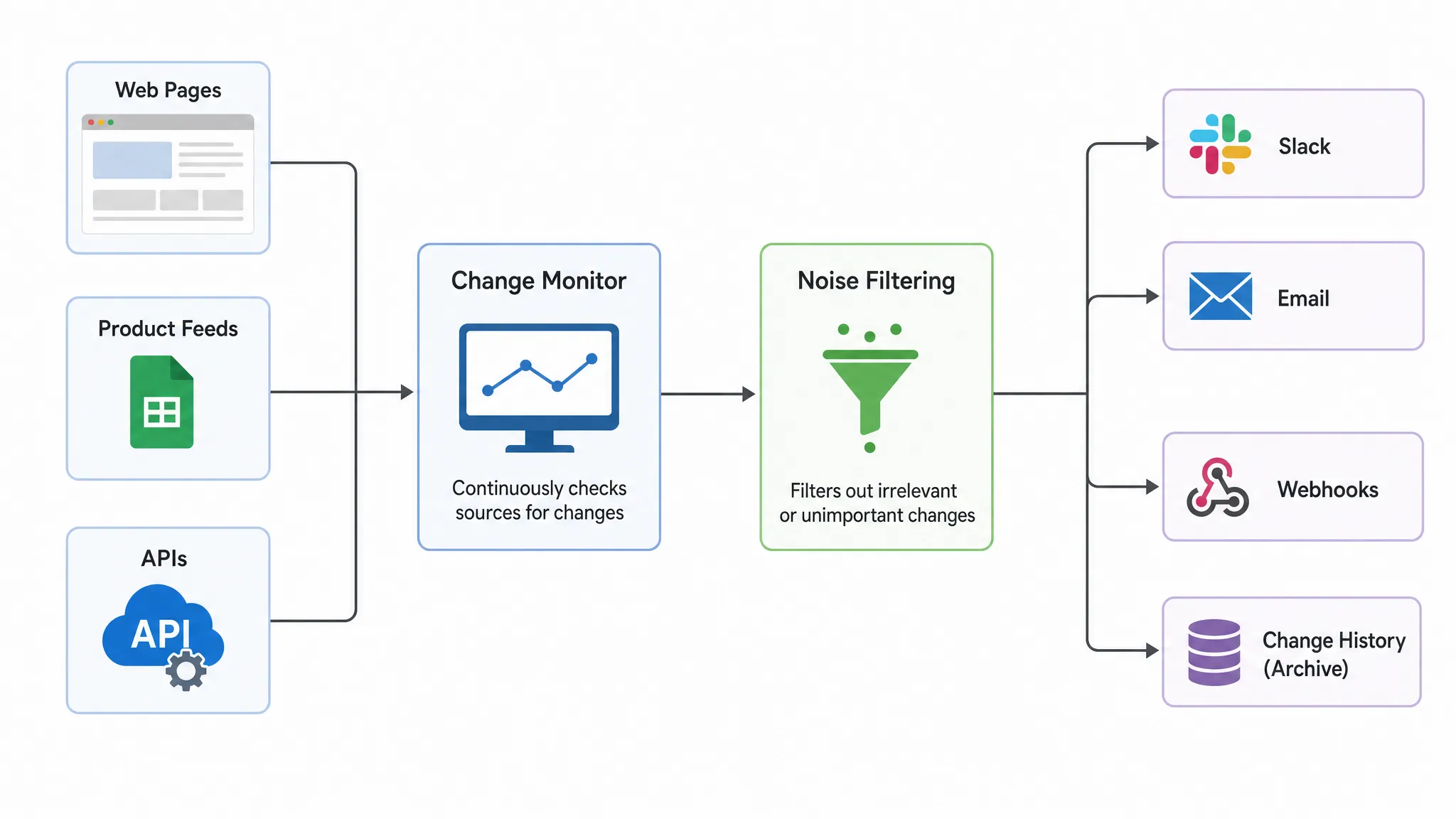
This is where noise filtering matters. Modern pages are full of content that changes without affecting the price. A smart monitoring workflow should ignore irrelevant movement and focus on the signals your team defined earlier.
For example, if you monitor a competitor pricing page, you may want to receive alerts when plan prices, feature limits, or discount labels change. You probably do not need an alert when a testimonial rotates or a chat widget reloads.
Step 4: Set the right monitoring frequency
Not every price needs the same monitoring cadence. The right frequency depends on how fast you need to act and how often the page changes.
High-value competitor pages, critical vendor pricing, and customer-facing checkout prices may need real-time or near real-time monitoring. Lower-risk reference pages may only need periodic checks.
A useful rule is to match monitoring frequency to response urgency. If your team would act immediately, monitor it closely. If the price only informs monthly planning, a less frequent cadence may be enough.
Also consider the technical and ethical side of monitoring. Respect site terms, avoid unnecessary request volume, and do not overwhelm external websites. A reliable monitoring platform should help you get timely alerts without creating avoidable load.
Step 5: Route alerts to the people who can act
An alert is only useful if it reaches the right workflow. Email may be enough for low-priority updates, but urgent price changes often belong in Slack, ticketing systems, incident workflows, or custom automations.
Think of each alert as the start of a response process. A competitor price drop may go to pricing strategy. A vendor increase may go to procurement. A mismatch on your own product page may go to ecommerce operations or engineering. A policy-linked fee change may go to legal or compliance.
The alert should include enough context to make the first decision quickly:
- What changed
- Previous value and new value
- Where the change happened
- When it was detected
- Which page, feed, or API was monitored
- Who received the alert or which workflow was triggered
Without context, teams waste time verifying the change manually. With context, they can decide whether to respond, escalate, or archive the update.
Step 6: Keep a full change history
Price monitoring is not just about instant notifications. Historical records are valuable for analysis, accountability, and compliance.
A full change history helps answer questions such as:
- When did this competitor first reduce the price?
- How often does this vendor change rates?
- Did our own page show the incorrect price before or after the feed update?
- Which team received the alert?
- What did the page say at the time of the change?
This record becomes especially important when multiple teams are involved. Revenue, legal, finance, and operations may all need to reference the same event later. Instead of relying on screenshots in chat threads, a central history gives everyone a clearer source of truth.
Step 7: Reduce false positives before scaling
A common mistake is adding hundreds of pages before validating the alert quality. If the first batch creates too much noise, teams start ignoring alerts. Once that happens, the monitoring program loses trust.
Start with a smaller set of high-value pages. Test whether the monitor detects the right changes, ignores irrelevant content, and delivers alerts with enough detail. Then expand to more products, competitors, suppliers, or regions.
Common sources of false positives include cookie banners, personalization, geolocation, A/B testing, rotating promotions, out-of-stock modules, and lazy-loaded content. If you sell or monitor internationally, regional pricing can also create confusion. A page viewed from the United States may not show the same price as one viewed from the European Union.
To reduce false positives, use targeted monitoring, consistent locations where relevant, and alert thresholds that reflect business impact. The goal is not to eliminate every non-actionable alert, but to keep signal quality high enough that teams trust the system.
Automated monitoring vs custom scrapers
Some teams consider building a custom scraper for price tracking. That can work for specialized use cases, especially when engineering resources are available. But for many business teams, the real challenge is not fetching a page. It is maintaining the workflow over time.
Pages change structure. Selectors break. Alerts need routing. Teams need permissions. Compliance may need history. Operations may need integrations. Engineering may not want to maintain a monitoring script for every competitor, supplier, or pricing page.
| Approach | Advantages | Limitations |
|---|
| Manual checking | Simple to start, no tooling required | Slow, inconsistent, no reliable history |
| Spreadsheet tracking | Easy to organize known prices | Still depends on manual updates or fragile imports |
| Custom scraper | Flexible for technical teams | Requires maintenance, alerting, logging, and error handling |
| Change monitoring platform | Built for alerts, history, filtering, and workflows | Requires setup and clear monitoring rules |
If your team only needs to check one page occasionally, manual review may be fine. If pricing changes affect revenue, compliance, or operations, a dedicated monitoring workflow is usually more reliable.
How DiffHook supports automated price change tracking
DiffHook is designed for teams that need to know the moment important web changes happen. For price monitoring, that means you can track pages, feeds, and APIs, then receive alerts when relevant changes occur.
Based on your workflow, DiffHook can support use cases such as competitor price alerts, vendor page monitoring, customer-facing pricing checks, and feed or API change detection. Teams can route updates through Slack, email, webhooks, or workflow integrations, so alerts reach the systems where work already happens.
DiffHook also provides smart noise filtering and full change history, which are critical for price tracking at scale. Noise filtering helps teams avoid alerts for irrelevant page movement. Change history helps preserve what changed and when, so teams can review events later instead of relying on memory or screenshots.
For organizations with governance needs, DiffHook also supports SSO and role access, and an EU hosting option is available. That makes it easier to involve multiple teams while keeping access and data residency requirements in mind.
Best practices for reliable web page price monitoring
Strong price tracking is part technical setup, part operational discipline. The teams that get the most value usually treat monitoring as an ongoing process, not a one-time configuration.
First, assign ownership. Someone should be responsible for deciding which pages matter, reviewing alert quality, and updating monitors when business priorities change. Without ownership, monitoring setups become stale.
Second, tag or group monitors by business purpose. For example, separate competitor pages from supplier pages and internal pricing checks. This makes routing, reporting, and escalation easier.
Third, document alert response rules. If a competitor lowers a price, who reviews it? If a supplier raises a fee, who validates the contract impact? If your own page shows the wrong price, who fixes it? The faster the handoff, the more valuable the alert.
Finally, review the historical data. Over time, price change history can reveal patterns that one-off alerts cannot. You may discover that certain competitors discount at predictable times, specific vendors change rates before renewals, or particular product categories have higher pricing volatility.
A simple setup checklist
Use this checklist before launching or expanding your price monitoring workflow:
- Identify the pages, feeds, or APIs that influence revenue, cost, compliance, or operations
- Define which price changes are actionable and which can be ignored
- Target the specific price element or pricing section where possible
- Choose alert thresholds that reflect business impact
- Send alerts to the correct team or workflow, not a generic inbox
- Keep a change history for audits, analysis, and accountability
- Review alert quality before scaling to a larger page set
- Revisit monitors when pages, products, competitors, or vendors change
This approach helps ensure that automated monitoring creates trust instead of noise.
Frequently Asked Questions
What is the easiest way to track web page price changes automatically? The easiest approach is to use a website change monitoring platform that can watch the relevant price element, filter unrelated page changes, and send alerts through email, Slack, or webhooks.
Can I monitor prices that load dynamically on a page? In many cases, yes, but dynamic pages require a monitoring setup that can capture the rendered content or the underlying feed or API. If the visible price comes from a data source, monitoring both the page and the source can improve reliability.
How often should I check for price changes? Match the frequency to the urgency of your response. Critical competitor pages, vendor pricing, and customer-facing prices may need real-time or near real-time alerts. Lower-priority pages can be checked less often.
How do I avoid false alerts when tracking prices? Focus monitoring on the specific price block, use thresholds for meaningful changes, and filter out unrelated page elements such as banners, recommendations, reviews, and rotating content.
Is price monitoring useful for compliance teams? Yes. A reliable change history can help teams understand when pricing, fees, discounts, or related policy language changed. This is useful for reviews, audits, and internal accountability.
Know when prices change, before they become a problem
Web page price changes can affect revenue, margins, compliance, and customer trust. Manual checks are too slow for teams that need to act quickly and keep a reliable record.
With DiffHook, teams can monitor pages, prices, policies, feeds, and APIs, then receive fast alerts through the workflows they already use. If pricing changes matter to your business, automated monitoring helps you catch them the moment they happen, not after the impact is already visible.