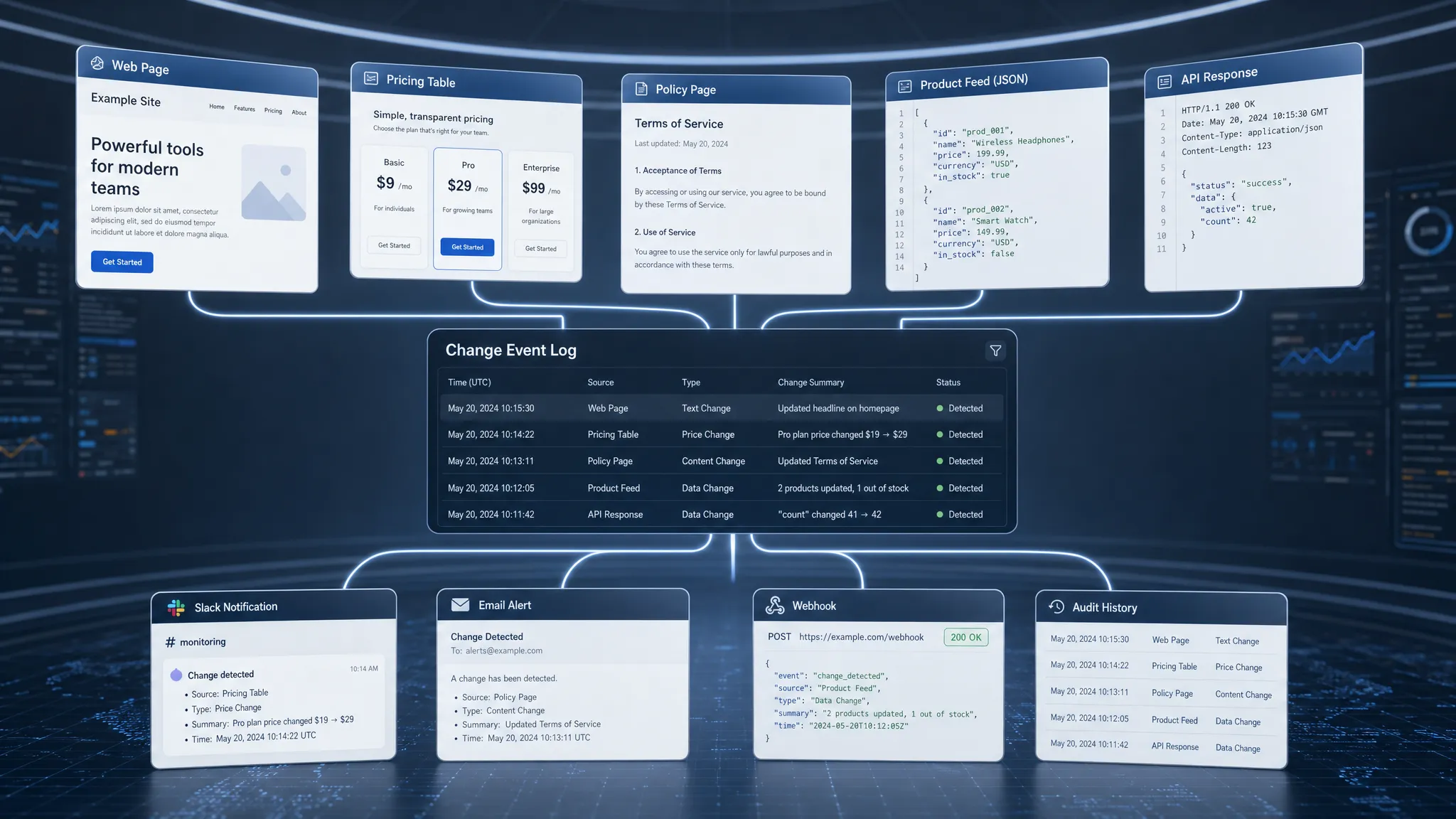
A page changes. A price drops. A policy paragraph is edited. An API response starts returning a new field. To a person, each of these might look like a small web update. To a monitoring and automation system, each one can become a change event, a structured signal that something meaningful happened and that a team, tool, or workflow may need to respond.
That distinction matters. Modern teams do not just need to know that “something changed.” They need to know what changed, where it changed, when it changed, whether it matters, who should be notified, and what automation should run next. Change events are the bridge between passive monitoring and active operations.
What is a change event?
A change event is a recorded instance of a detected difference in a monitored source. The source might be a web page, pricing table, policy page, product feed, RSS feed, JSON endpoint, or API response. The event is created when the monitoring system compares the latest observed state against a previous known state and determines that a relevant change has occurred.
A useful change event usually answers five questions:
- Where did the change happen? The monitored URL, feed, endpoint, or data source.
- What changed? The specific text, value, element, field, or response that is different.
- When was it detected? The timestamp of observation, and sometimes the previous check time.
- Why does it matter? The rule, threshold, keyword, selector, or condition that made the change important.
- What should happen next? The alert destination, workflow trigger, or automation path.
In simple consumer tools, a change event may only generate an email saying a page changed. In business-critical monitoring, the event should be structured enough to trigger reliable downstream action, such as notifying a Slack channel, creating a ticket, logging evidence, or sending a webhook to another system.
Change events vs. snapshots, alerts, and logs
The term “change event” often gets mixed up with related concepts. The differences are important when you are designing monitoring systems or automation workflows.
| Concept | What it is | Main purpose |
|---|
| Snapshot | A saved version of a page, feed, or response at a point in time | Provides a baseline for comparison |
| Diff | The actual difference between two snapshots | Shows what changed |
| Change event | A structured record that a meaningful change occurred | Triggers routing, alerting, and automation |
| Alert | A notification sent to a human or tool | Gets attention from the right recipient |
| Log entry | A historical record of system activity | Supports debugging, audits, and traceability |
A snapshot is evidence. A diff is explanation. A change event is the operational signal. An alert is one possible outcome.
This is why teams should avoid treating every tiny diff as an event worth acting on. A page may change because of a rotating banner, a timestamp, an ad slot, or a session-specific recommendation. Those differences may be real, but they are not necessarily meaningful. Good monitoring turns raw differences into clean, actionable change events.
Why change events matter for monitoring and automation
Change events are valuable because they make web monitoring machine-readable and workflow-ready. Instead of relying on someone to manually inspect pages or interpret screenshots, a system can detect the change, package it with context, and route it instantly.
That helps teams in several high-impact areas.
Revenue protection
Pricing, packaging, availability, checkout language, affiliate terms, and competitor offers can change without warning. If your team learns about those updates days later, you may lose margin, miss a campaign window, or make decisions based on stale assumptions.
A change event lets teams respond faster. For example, if a competitor changes a pricing page, the event can alert revenue operations, sales enablement, or product marketing with the exact section that changed. If you are focused specifically on pricing signals, this guide on how to track web page price changes automatically explains how to monitor prices without relying on manual checks.
Compliance and risk management
Policies, terms of service, privacy pages, vendor notices, and regulatory pages can all change in ways that affect legal or compliance obligations. A small wording change may create new requirements, remove a guarantee, or alter a dependency.
Change events help teams preserve a timeline of what changed and when it was detected. That history can be important for internal review, audit trails, vendor management, and incident response.
Operational awareness
Many operational issues start as external changes. A supplier feed adds a new field. A partner API changes response behavior. A documentation page updates an integration requirement. A status page quietly changes language before a wider incident becomes obvious.
When these updates become structured events, they can flow into operations channels and workflow tools instead of staying buried on the web.
Better automation design
Automation is only as good as its triggers. If a trigger is vague, noisy, or unreliable, the automation creates more work than it saves. Change events improve automation by giving each workflow a precise starting condition.
Instead of “run this workflow whenever the page changes,” a team can define rules such as “run this workflow only when the monthly price value changes,” “notify compliance only when privacy policy text changes,” or “send a webhook when the API response schema adds or removes a field.”
Common types of change events
Different sources create different kinds of events. The right monitoring strategy depends on what you are watching and what decisions depend on it.
| Change event type | Example signal | Typical owner |
|---|
| Page content event | A headline, product description, terms clause, or documentation section changes | Marketing, legal, product, compliance |
| Price event | A listed price, discount, plan limit, or fee changes | Revenue, sales, ecommerce, finance |
| Policy event | Privacy, terms, refund, SLA, or vendor policy language changes | Legal, compliance, procurement |
| Feed event | A product feed, RSS feed, or catalog entry changes | Operations, ecommerce, content |
| API event | A response value, schema, status, or endpoint behavior changes | Engineering, integrations, platform teams |
| Metadata event | Canonical tags, titles, robots directives, or structured data changes | SEO, growth, web teams |
The point is not to monitor everything equally. The point is to identify the web surfaces that influence revenue, compliance, customer experience, or operations, then convert meaningful changes into reliable signals.
If you are deciding which pages deserve attention first, DiffHook’s guide on how to monitor a web page for critical changes offers a practical way to separate important change signals from noise.
What a high-quality change event should contain
A change event should be detailed enough for a person to understand it and structured enough for a system to act on it. That does not mean every event needs a huge payload. It means the event should include the right context.
At minimum, a strong event record often includes:
- Source identifier: The monitored URL, feed, endpoint, or internal monitor name.
- Detection timestamp: When the change was observed.
- Previous and current values: The before-and-after data where possible.
- Change summary: A concise description of the difference.
- Severity or priority: A rule-based indication of importance.
- Matched rule: The keyword, selector, threshold, or condition that triggered the event.
- Delivery status: Whether notifications or webhooks were successfully sent.
- Historical reference: A link or record connecting the event to previous changes.
For automation, consistency is essential. A webhook receiver, ticketing system, or workflow automation tool should not have to guess what fields mean. Clear event structure reduces brittle integrations and makes it easier to build repeatable workflows.
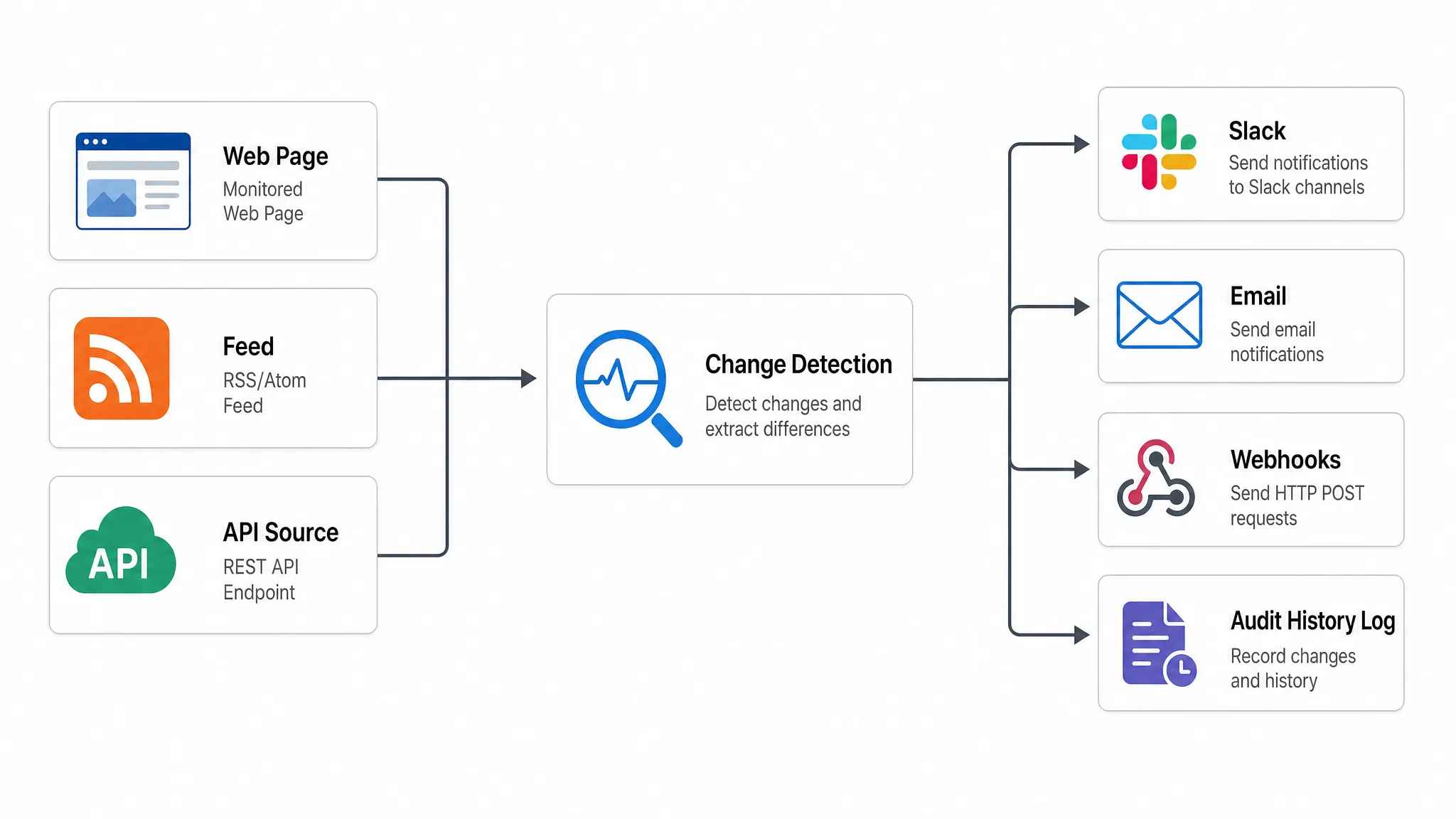
From detection to automation: the change event lifecycle
A change event is not just a notification. It is part of a lifecycle that starts with observation and ends with action or evidence.
1. Observe the source
The monitoring system checks a source at a defined cadence or through a real-time mechanism. The source could be a public web page, authenticated page, feed, or API endpoint, depending on the tool and setup.
2. Compare against a known state
The latest version is compared with the previous version. The system identifies differences in text, values, markup, fields, or responses.
3. Filter noise
This is where raw diffs become useful. Smart filtering removes irrelevant changes such as timestamps, rotating content, session-specific blocks, tracking parameters, or cosmetic updates that do not affect the business.
Filtering may rely on selectors, keywords, ignored regions, thresholds, data extraction rules, or change scoring. Without this step, teams quickly lose trust in alerts.
4. Create the event
When a change matches a meaningful condition, the system creates a change event. The event includes the source, summary, timestamp, before-and-after context, and any metadata needed for routing.
5. Route the event
The event is sent to the right destination. For humans, that may be Slack or email. For systems, it may be a webhook, workflow builder, ticketing platform, or internal service.
6. Preserve history
The event should remain available for later review. Full change history helps teams understand patterns, prove when something changed, and investigate downstream effects.
This lifecycle is also what separates a basic page watcher from a monitoring system designed for operations. If you want a broader view of the infrastructure required, this article on what a modern web system needs to catch change fast breaks down source coverage, filtering, delivery, and reliability in more depth.
Practical examples of change events in automation
The easiest way to understand change events is to look at what they can trigger.
Competitor pricing update
A SaaS company monitors competitor pricing pages. A plan price changes from $49 to $59. The monitoring system creates a price change event with the old value, new value, source URL, detected timestamp, and matched selector.
The event notifies the revenue team in Slack, sends a webhook to a competitive intelligence workflow, and preserves the before-and-after record for analysis.
Vendor policy change
A procurement team monitors a vendor’s data processing addendum and security policy. A clause about subprocessors changes. The event is routed to legal and compliance with the exact paragraph that changed.
The team can review the update quickly instead of discovering the change during a renewal, audit, or incident.
API response change
An engineering team monitors a partner API response. A required field disappears or a new enum value appears. The change event triggers an internal workflow that alerts the integration owner and creates an investigation task.
This kind of event can prevent silent failures, broken automations, and customer-facing defects.
Public transparency update
Change events are also useful outside commercial operations. In civic technology and public-sector contexts, monitored events can help surface changes to agendas, public notices, policy proposals, or participation tools. Initiatives focused on technology-driven participation and transparency show why timely access to public information can matter for communities, not just companies.
Designing change events that do not create alert fatigue
The biggest risk in change monitoring is not missing every possible difference. It is overwhelming people with low-value signals until they ignore the system.
Good event design starts with intent. Before creating a monitor, define what decision the event should support. A legal team may need every change to a specific clause. A sales team may only need competitor pricing shifts above a certain threshold. An SEO team may care about robots directives but not rotating testimonials.
A practical event design process includes a few core decisions:
- Define the business impact: Revenue, risk, customer experience, operations, SEO, or compliance.
- Choose the exact surface: The page section, feed field, API value, or policy area that matters.
- Set the action threshold: Decide what is worth alerting on and what should be ignored.
- Assign ownership: Every important event should have a person or team responsible for response.
- Review event quality: Tune filters and routing when alerts are too noisy or too quiet.
The goal is not fewer events at all costs. The goal is trustworthy events. Teams should believe that when a change event arrives, it deserves attention.
Change events and audit trails
Automation often focuses on speed, but change events are just as important for accountability. A well-kept event history lets teams answer questions such as:
- When did the monitored source change?
- What was the previous version?
- Who received the alert?
- Was the webhook delivered successfully?
- Did the change happen once or repeatedly over time?
This is especially important for compliance, vendor oversight, and incident analysis. If a policy changed three weeks ago and a customer issue appears today, historical change events may help connect the dots.
Auditability also improves trust in automation. If a workflow ran because of a change event, teams should be able to inspect the event that triggered it. That makes automated decisions easier to explain, debug, and improve.
Best practices for using change events
Change events become more powerful when teams treat them as operational infrastructure rather than one-off notifications.
Start with high-value surfaces. Pricing pages, checkout flows, policy pages, partner documentation, feeds, and API endpoints usually provide a stronger return than monitoring broad pages with no clear owner.
Use filters early. If a page contains dynamic content, isolate the relevant section or ignore recurring noise. This reduces false positives and protects team attention.
Route by responsibility. A pricing event should not go to the same place as a privacy policy event unless the same team owns both. Clear routing shortens response time.
Keep humans in the loop for judgment-heavy changes. Not every event should trigger a fully automated action. Some should create a review step, especially when legal, pricing, or customer-facing decisions are involved.
Preserve history. Even if the immediate alert is handled, the event record may become valuable later for reporting, audits, or root-cause analysis.
Where DiffHook fits
DiffHook helps teams turn important web changes into real-time alerts and automation-ready signals. It monitors pages, prices, policies, feeds, and APIs, then alerts teams when meaningful changes happen. With smart noise filtering, Slack and email notifications, webhook and workflow integrations, full change history, role access, SSO, and an EU hosting option, it is built for teams that need web change monitoring to support revenue, compliance, and operations.
The key is not simply knowing that the web changed. It is knowing the moment a change matters, with enough context to act.
Frequently Asked Questions
What are change events? Change events are structured records created when a monitored page, feed, API, price, policy, or other source changes in a meaningful way. They typically include context such as the source, timestamp, before-and-after values, and routing information.
How are change events different from alerts? A change event is the underlying signal that a meaningful change occurred. An alert is the notification sent to a person or system because of that event. One event may generate multiple alerts or workflow actions.
Why are change events important for automation? Automation needs reliable triggers. Change events provide structured, contextual triggers that can start workflows, send webhooks, create tasks, notify teams, or preserve audit records.
What makes a change event useful instead of noisy? A useful change event is specific, relevant, and actionable. It should focus on important page sections, values, fields, or rules while filtering out irrelevant changes like timestamps, ads, rotating banners, and cosmetic updates.
Can change events be used for compliance monitoring? Yes. Teams can use change events to track updates to policies, terms, vendor notices, security pages, and regulatory information. A historical record helps support reviews, audits, and investigations.
Turn critical web changes into actionable events
If your team depends on external pages, prices, policies, feeds, or APIs, manual checking is too slow and too easy to miss. DiffHook helps you monitor the web surfaces that matter, filter out noise, and deliver real-time alerts through the channels and workflows your team already uses.
Explore DiffHook to start turning critical web changes into change events your team can trust and act on.