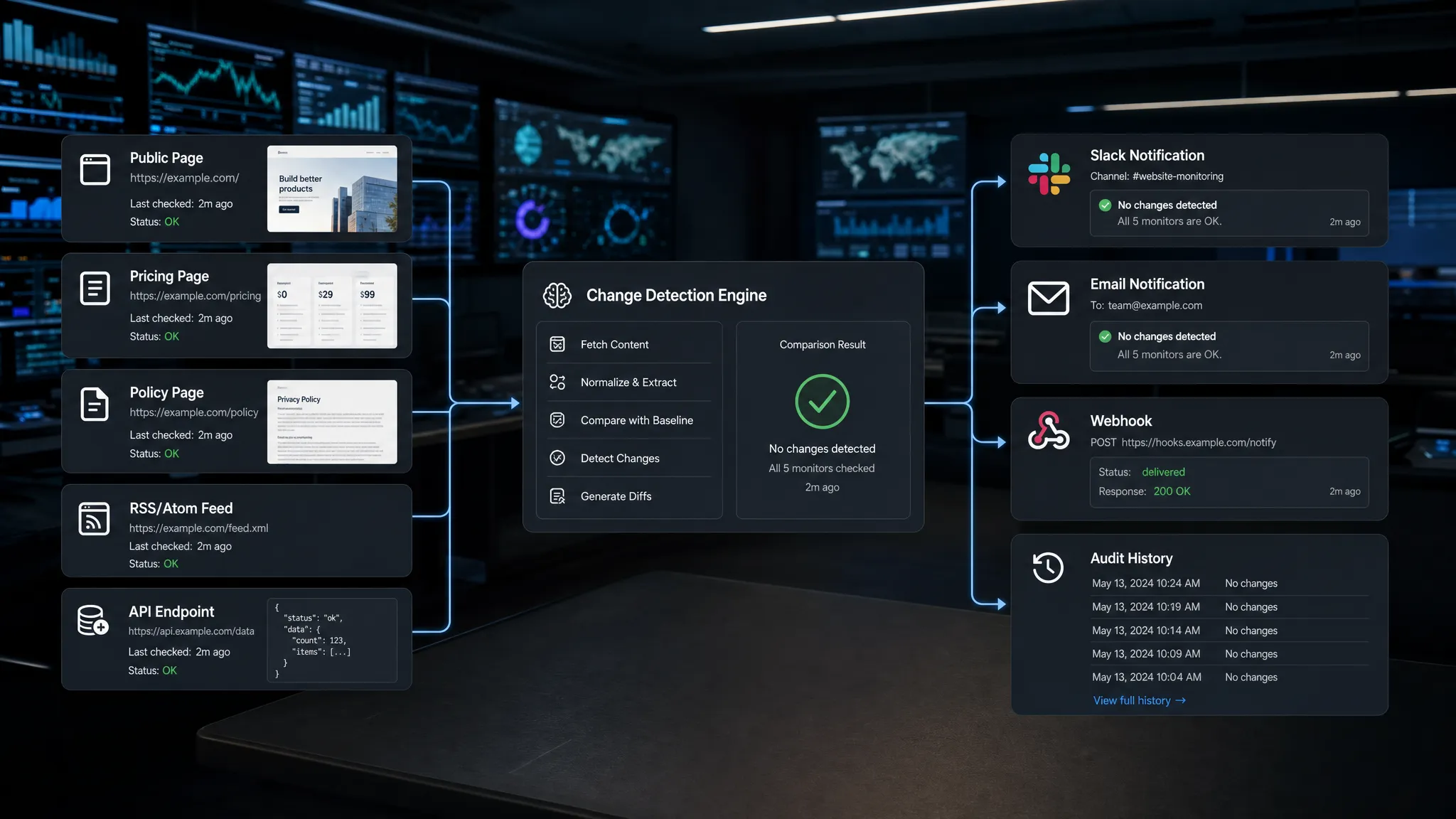
Real-time page checking is no longer a niche workflow for engineering teams. Pricing teams watch competitor offers, compliance teams track policy language, operations teams monitor supplier pages, and growth teams need to know when a landing page, checkout flow, or product feed changes without waiting for a weekly review.
The challenge is that “check the page” sounds simple until you try to do it reliably. A modern page may load content from APIs, rotate promotions, personalize copy by region, hide changes inside scripts, or update only one field in a large layout. If your system alerts on every timestamp, carousel refresh, or ad swap, people stop trusting it. If it checks too slowly, the alert arrives after the damage is done.
This guide explains how to check the page for changes in real time, what “real time” actually means on the web, how to reduce false alerts, and how to route the right changes to the right people.
What real-time page checking actually means
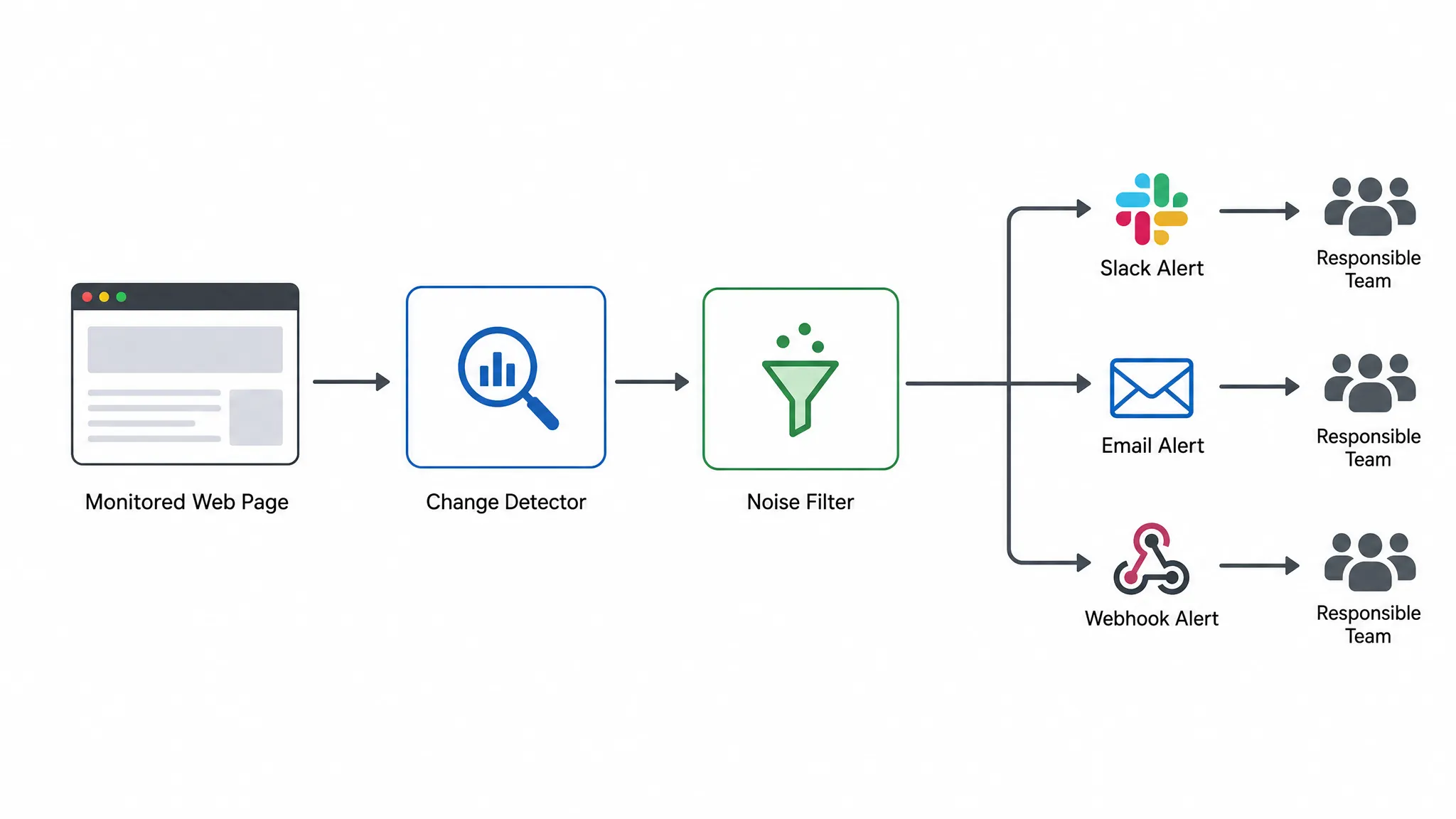
For normal web pages, real-time monitoring usually means frequent automated checks plus instant alert delivery when a meaningful difference is detected. A website does not usually “push” public page changes to every watcher. Instead, a monitoring system revisits the page at the right interval, captures the current state, compares it with the previous version, filters noise, and sends an alert as soon as the change matters.
For feeds, APIs, and some internal systems, real time can be closer to event driven monitoring because data sources may expose structured updates. For public pages, the practical goal is speed and reliability: detect important changes quickly enough that your team can respond before the change affects revenue, compliance, or operations.
A useful real-time setup has four parts:
- A clear definition of what part of the page matters.
- A reliable way to capture the page, including dynamic content if needed.
- A comparison method that separates signal from noise.
- A fast alert path to Slack, email, webhooks, or another workflow tool.
The difference between a toy monitor and an operational monitoring workflow is not just the crawler. It is the full pipeline from detection to action.
Start by defining the change you actually care about
Before choosing tools or alert rules, decide what kind of page change would require action. “Anything changed” is rarely a good alert condition. It creates too much noise and hides the updates that matter.
A pricing team may only care when a competitor changes a plan price, discount, trial length, or packaging detail. A compliance team may care about terms, refund policies, privacy language, eligibility requirements, or disclosures. An operations team may care about inventory status, lead times, supplier notices, API docs, or status updates.
| Page type | Changes worth monitoring | Why real-time detection matters |
|---|
| Pricing pages | Plan names, prices, discounts, feature limits, trial terms | Helps teams react to market moves before positioning or revenue is affected |
| Policy pages | Terms, privacy language, refund rules, compliance statements | Reduces legal and compliance blind spots |
| Product pages | Availability, shipping times, descriptions, ratings, promotions | Supports merchandising, procurement, and customer experience teams |
| Documentation | API parameters, endpoint behavior, deprecations, release notes | Prevents integration failures and support surprises |
| Landing pages | Headlines, claims, forms, CTAs, tracking snippets | Helps marketing and growth teams catch conversion-impacting edits |
| Feeds and APIs | Structured values, payload fields, status flags, timestamps | Gives teams machine-readable change signals for automation |
If you are not sure which updates deserve an alert, start with your business risks. Ask: if this changed and nobody noticed for 24 hours, what could go wrong? The answer usually points to your first monitoring targets.
For a deeper framework, DiffHook’s guide on how to monitor a web page for critical changes explains how to separate harmless updates from changes that affect revenue, compliance, customer experience, or operations.
Choose the right monitoring method for the page
Different pages require different checking strategies. A simple static HTML page can be monitored with a direct fetch and text comparison. A modern pricing page might require rendered page capture because key content is loaded after JavaScript runs. An API or feed should be monitored as structured data rather than treated like a visual page.
Full-page monitoring
Full-page monitoring compares the whole page. It is easy to set up and useful when you want broad visibility, such as tracking a competitor’s homepage, a supplier notice page, or a public policy page.
The downside is noise. Full pages often include rotating testimonials, timestamps, personalization, cookie banners, tracking scripts, ad slots, and other elements that change frequently but do not matter. Full-page monitoring works best when paired with smart noise filtering or when the page is relatively stable.
Section or selector monitoring
Selector-based monitoring checks a specific part of the page, such as a price block, terms section, CTA, inventory badge, or product description. This is usually better for high-signal alerts because the monitor ignores the rest of the page.
For example, instead of watching an entire pricing page, you might monitor only the plan cards and discount language. Instead of watching an entire terms page, you might track the refund section or data processing clause.
Visual monitoring
Visual monitoring detects layout or appearance changes. It is helpful when the visual state matters, such as a checkout button disappearing, a banner being added, or a page template changing. However, visual diffs can be noisy if the page includes animations, carousels, dynamic ads, or personalized elements.
Structured monitoring for feeds and APIs
When the source is a feed or API, monitor structured fields directly. This reduces ambiguity and makes automation easier. If a supplier API changes availability from in_stock to backordered, your workflow should not need to infer that from a rendered page.
DiffHook supports page, feed, and API tracking, which matters because many teams now need to monitor more than traditional web pages. Public content, structured data, and machine-to-machine updates often carry the same business risk.
Build the real-time page checking workflow
Once you know what matters and how the page should be captured, you can build a workflow that turns web changes into action. The core process is straightforward, but the quality depends on how carefully each step is configured.
- Add the source: Enter the URL, feed, or API endpoint you want to monitor. For pages behind authentication or region-specific content, confirm that your monitoring setup can access the same version your users or team cares about.
- Scope the watch area: Choose whether to monitor the full page, a specific section, a visual region, or structured data fields. Narrower scope usually produces better alerts.
- Capture a baseline: Save the current version so future checks have something to compare against. This baseline becomes your reference point.
- Normalize predictable noise: Exclude elements such as timestamps, session IDs, rotating ads, personalization blocks, or tracking parameters when they are not relevant.
- Compare new versions: Detect changes between the baseline and the latest captured version. A good system should identify what changed, not merely that something changed.
- Send the alert: Route the notification to the right destination, such as Slack, email, webhook, or another workflow integration.
- Store the history: Keep a record of changes over time so teams can investigate, audit, and prove what happened.
This is where “real time” becomes operational. The alert is only useful if it arrives quickly, includes enough context, and reaches someone who can act.
Filter noise before it reaches your team
The most common reason page monitoring fails is alert fatigue. If a monitor sends ten irrelevant alerts a day, people eventually ignore the one that matters.
Noise filtering should be part of the monitoring design from the beginning. Pages can change for many harmless reasons, especially if they include dynamic or personalized content. A reliable real-time monitor should help you ignore routine movement while preserving important differences.
Common noise sources include:
- Date and time stamps that update on every page load.
- Randomized IDs, tracking parameters, or session tokens.
- Rotating customer logos, testimonials, ads, or hero images.
- Cookie banners and popups that appear inconsistently.
- Personalization based on geography, device, referral source, or logged-in state.
- Small formatting changes that do not affect meaning.
Smart filtering does not mean hiding everything. It means deciding what should be considered operationally meaningful. A one-word change in legal policy may matter more than a full hero image swap on a marketing page. A price changing from $49 to $59 is more important than a color change in the pricing card.
A good practice is to classify alerts by severity. Some changes should go to a team channel immediately. Others can be grouped into a daily digest or sent to a lower-priority queue. This keeps urgent signals visible without overwhelming people.
Route alerts to the right workflow
A page change alert should not land in a generic inbox where nobody owns it. The destination should match the action required.
Pricing and competitive alerts often belong in a revenue, product marketing, or strategy channel. Policy and compliance alerts should go to legal, security, or risk owners. Operational changes may need to trigger a ticket, update a vendor workflow, or notify an on-call team. Engineering-related API and documentation changes may need to create an issue or trigger an automation.
The best alerts include enough context to act quickly: the page monitored, the time detected, the section affected, the before and after state, and a link to the change history. For automation, webhooks can pass change signals into workflow tools so downstream systems can create tasks, update records, or notify specific owners.
This is also where change monitoring can complement other tools in your stack. For example, teams that manage digital assets, AI summaries, and secure file sharing through chat may use Telegram-first AI file control alongside page monitoring, especially when a detected web change triggers follow-up work with documents, product files, or paid digital resources.
If your organization is turning detections into workflow triggers, it helps to think in terms of events rather than screenshots. DiffHook’s article on change events for monitoring and automation explains how page, pricing, policy, feed, and API changes can become structured signals for downstream tools.
Keep a full change history for audits and investigations
Real-time alerts help you respond quickly. Change history helps you understand what happened later.
This is especially important for compliance, pricing, procurement, and customer-facing workflows. If a supplier changes lead times, you may need to know exactly when the change appeared. If a competitor removes a feature from a plan, you may want to compare multiple historical versions. If policy language changes, legal teams may need a record of the before and after text.
A full change history turns monitoring from a notification tool into a source of operational evidence. It supports audits, incident reviews, market analysis, and internal accountability. It also helps teams tune their monitors over time because they can review which alerts were useful and which were noise.
Common mistakes when checking pages in real time
Even experienced teams can create brittle monitoring workflows if they move too quickly. Watch for these mistakes:
- Monitoring the entire page when only one section matters.
- Treating every visual or text change as equally important.
- Sending every alert to the same Slack channel or shared inbox.
- Forgetting to account for JavaScript-rendered content.
- Ignoring feeds and APIs when structured data is available.
- Failing to keep historical records of what changed.
- Setting up alerts without clear ownership for response.
The fix is usually not more monitoring. It is better monitoring. Focus on the pages and fields that connect directly to business impact, then tune your alerting so people trust what they receive.
How DiffHook helps teams check pages for changes in real time
DiffHook is built for teams that need to know the moment important web changes happen. It monitors pages, prices, policies, feeds, and APIs, then sends alerts when relevant changes are detected.
For teams checking pages manually today, the practical benefit is consistency. Instead of refreshing competitor pages, policy pages, supplier portals, or documentation by hand, DiffHook can track those sources continuously and notify the right people through Slack, email, webhooks, or workflow integrations.
DiffHook also supports smart noise filtering, full change history, fast alert delivery, SSO and role access, and an EU hosting option. Those details matter for organizations that need monitoring to fit into real operational, compliance, and security workflows rather than acting as a one-person browser utility.
If your team is evaluating broader monitoring architecture, the DiffHook guide on what a modern web system needs to catch change fast breaks down why speed depends on the whole detection pipeline, not only how often a page is fetched.
Practical checklist before you monitor a page
Before you turn on real-time checking, answer these questions:
- What exact page, section, feed, or API field needs monitoring?
- What change would require action from a human or system?
- Which changes should be ignored as noise?
- How quickly does the team need to know?
- Who owns the response?
- Where should alerts go?
- Do you need history for audits, reporting, or investigations?
If you can answer those questions, your setup is much more likely to produce useful signals instead of background noise.
Frequently Asked Questions
How can I check a page for changes in real time? Use an automated monitoring system that captures the page repeatedly, compares each new version to a baseline, filters irrelevant changes, and sends alerts through Slack, email, webhooks, or workflow tools when something important changes.
Is real-time page monitoring the same as uptime monitoring? No. Uptime monitoring checks whether a page or service is available. Page change monitoring checks whether the content, layout, pricing, policy language, feed, or API data has changed.
Can I monitor only one part of a page? Yes. In many cases, monitoring a specific section or selector is better than monitoring the entire page because it reduces false alerts from unrelated content such as ads, timestamps, or rotating banners.
How do I avoid false alerts? Scope the monitor to the most important content, exclude predictable dynamic elements, use smart noise filtering, and route low-priority changes differently from urgent ones.
Should I monitor APIs and feeds instead of pages? If structured data is available, monitoring APIs and feeds is often more precise. Many teams monitor both: pages for public user-facing changes and APIs or feeds for machine-readable operational changes.
Turn page changes into timely action
Checking pages manually is slow, inconsistent, and easy to forget. A real-time monitoring workflow gives your team a repeatable way to detect meaningful updates, filter out noise, and act before changes become missed revenue, compliance exposure, or operational surprises.
If you want to monitor pages, prices, policies, feeds, and APIs with fast alerts and full change history, explore DiffHook and start tracking the web changes that matter to your team.