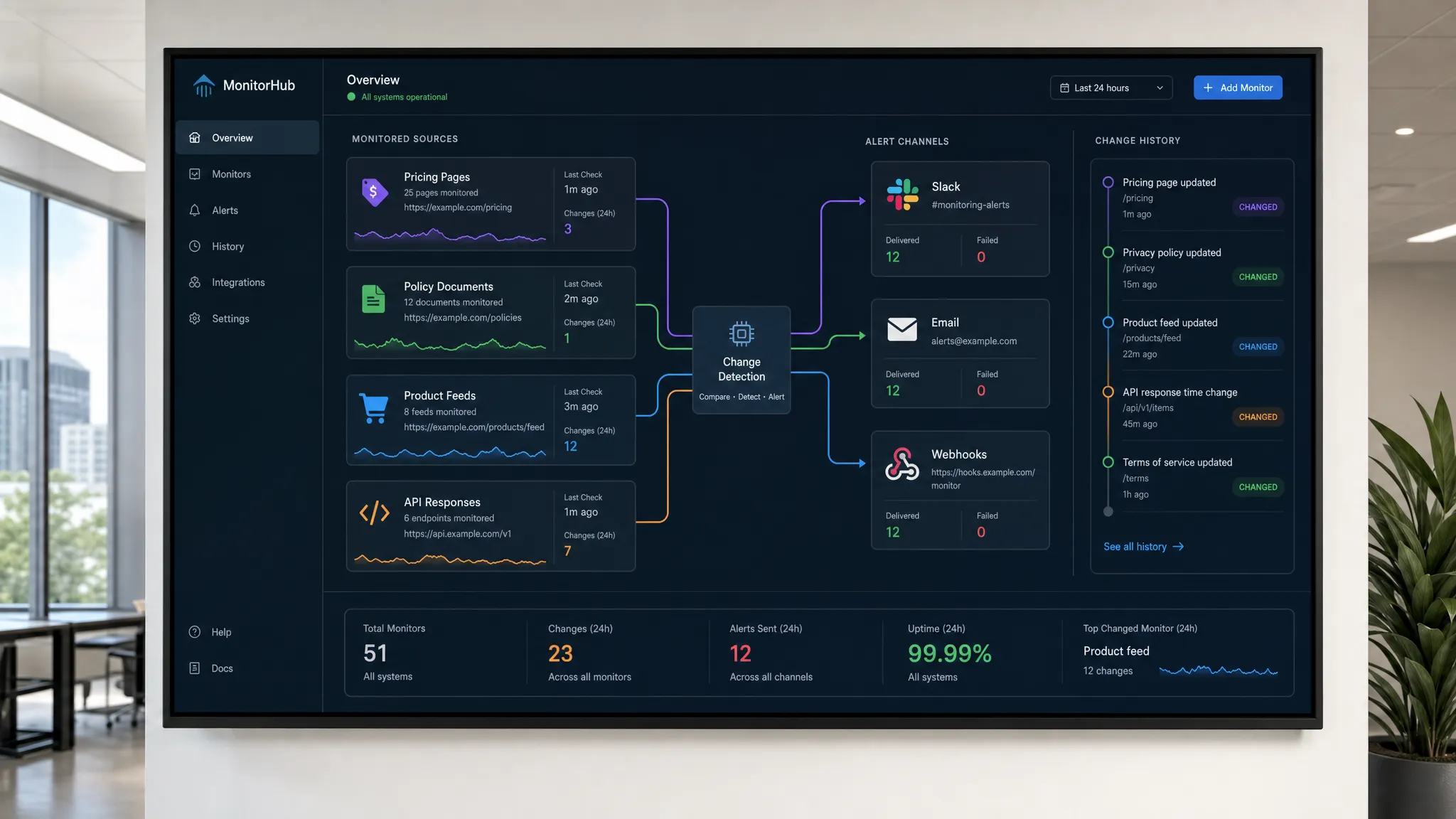
Web change monitoring used to mean checking whether a page looked different. In 2026, that definition is too narrow. Pricing pages, terms, product catalogs, competitor offers, API responses, RSS feeds, and policy documents can all change without a release note, and those changes can affect revenue, compliance, operations, and customer trust within minutes.
The best teams do not monitor everything with the same urgency. They build a web change monitoring program around business impact: what changed, why it matters, who needs to know, and what should happen next. That is the difference between a noisy alert system and an operational advantage.
Below are the best practices teams should use in 2026 to detect meaningful web changes faster, reduce false alarms, and turn change events into reliable action.
Start with business-critical change categories
The first mistake in web change monitoring is treating every page update as equally important. A button color change on a blog post is not the same as a pricing update on a competitor page, a regulatory clause changing on a vendor policy page, or a product availability change in a feed.
Before choosing tools or alert rules, define the categories of change that could create risk or opportunity. Common categories include pricing changes, availability changes, policy updates, compliance language, product descriptions, metadata, checkout copy, documentation, API responses, and partner pages.
A useful way to prioritize monitoring is to ask one question: if this changed and nobody noticed for 24 hours, what would happen? If the answer includes lost deals, customer confusion, legal exposure, broken workflows, or missed competitive intelligence, it belongs in your high-priority monitoring set.
For a deeper breakdown of how modern systems detect meaningful changes quickly, DiffHook has a useful guide on what a modern web system needs to catch change fast.
Build a source inventory, not just a page list
In 2026, important web changes do not only happen on traditional web pages. Many business-critical updates are exposed through structured sources such as APIs, feeds, sitemaps, JSON files, product databases, and documentation portals.
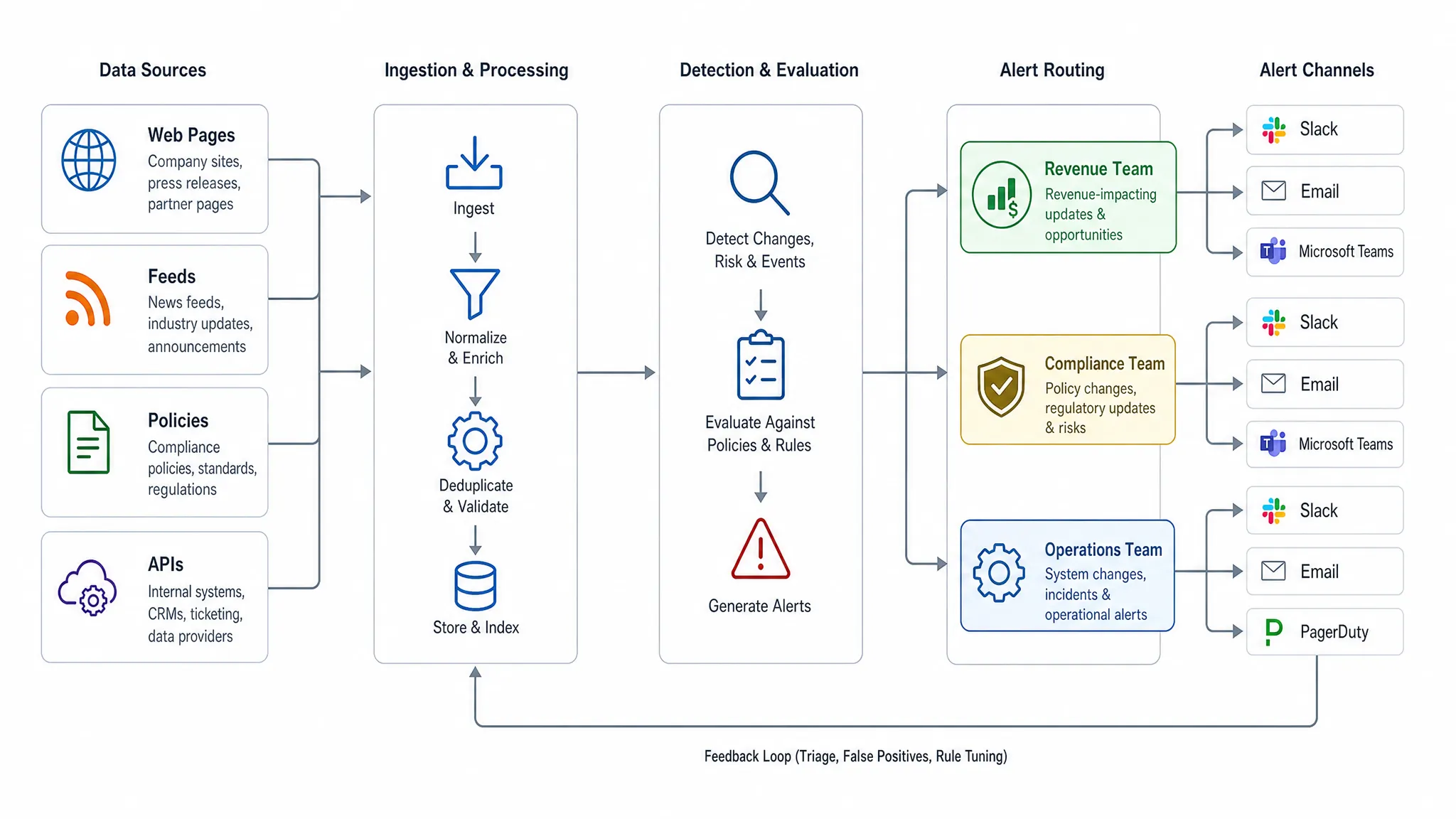
A mature monitoring program starts with a source inventory. This should include all places where change may affect decisions, workflows, or customers. For example, a revenue team may need to monitor competitor pricing pages, discount language, review pages, and product comparison pages. A compliance team may need to monitor vendor terms, privacy policies, subprocessors, security pages, and regulatory guidance. An operations team may need to monitor inventory feeds, API endpoints, logistics pages, and service status updates.
Your inventory should capture the owner, source type, monitoring frequency, change severity, and alert destination for each source. This keeps monitoring accountable and prevents forgotten alerts from becoming background noise.
| Source type | Example changes to monitor | Typical owner | Why it matters |
|---|
| Web pages | Pricing, terms, product copy, landing pages | Revenue, legal, marketing | Impacts offers, risk, and customer experience |
| Feeds | Inventory, listings, product availability | Operations, ecommerce | Affects fulfillment and merchandising decisions |
| APIs | Response fields, status values, limits | Engineering, ops | Can break workflows or downstream automation |
| Policies | Privacy, security, vendor terms | Legal, compliance | Creates contractual or regulatory exposure |
| Competitor pages | Offers, positioning, packaging | Sales, marketing | Supports faster market response |
This inventory does not need to be perfect on day one. Start with the highest-risk sources, then expand as teams identify recurring blind spots.
Define what counts as a meaningful change
A web change monitoring strategy is only as good as its signal definition. Without clear thresholds, teams get flooded with alerts about timestamps, tracking parameters, rotating banners, cookie notices, and minor layout adjustments.
The goal is not to detect every difference. The goal is to detect differences that matter.
For each monitored source, define the exact signal you care about. On a pricing page, that may be the price value, plan name, discount terms, billing interval, or feature limits. On a policy page, it may be specific clauses, dates, vendor names, or jurisdiction language. On an API, it may be a response field, error state, status code, or schema change.
This is where selector-based, structured, and rule-based monitoring become more valuable than simple full-page comparisons. A full-page diff can show that something changed, but a focused rule can tell you that the enterprise plan increased by 15 percent, a refund policy changed, or a field disappeared from an API response.
If you are still defining the basics, this guide on how to monitor a web page for critical changes explains how to separate important signals from cosmetic noise.
Use different monitoring methods for different risks
Not every source should be monitored the same way. A visual change detector may be useful for landing pages, but it is not ideal for structured pricing tables or API responses. A text diff may catch policy wording changes, but it may miss a visual element that affects conversion.
In 2026, teams should match the monitoring method to the risk profile of the source.
- Visual monitoring is useful for layout, design, CTA, and merchandising changes that affect customer experience.
- Text monitoring works well for policies, documentation, terms, help centers, and long-form content.
- Selector-based monitoring is ideal for specific fields such as price, stock status, headings, and product attributes.
- Structured monitoring is best for feeds, JSON, XML, APIs, and machine-readable sources.
- Hybrid monitoring combines multiple methods when both content and presentation matter.
For example, an ecommerce team tracking competitor pricing may monitor the exact price selector, the discount copy near the price, and the page screenshot. A compliance team monitoring privacy policies may focus on text changes and preserve a change history for audit purposes.
Reduce alert fatigue with smart noise filtering
Alert fatigue is the fastest way to ruin a web change monitoring program. If every minor variation creates a notification, teams will stop paying attention, and the critical alert will be missed when it matters most.
Noise filtering should be part of the setup, not an afterthought. Start by excluding dynamic elements such as timestamps, session IDs, ad slots, tracking scripts, rotating recommendations, and cookie banners. Then apply rules that focus alerts on important content areas or structured values.
Good filtering also includes severity levels. A spelling correction in documentation may be low priority. A pricing change on a strategic competitor may be high priority. A change to legal terms or an API field used in production may require immediate escalation.
The best systems let teams tune alerts over time. When a false positive appears, the fix should be easy to apply without rebuilding the entire monitor. This creates a feedback loop where alerts become more accurate as the program matures.
Route alerts to the people who can act
Detection is only half the job. A change alert becomes valuable when it reaches the right person in the right context at the right time.
Avoid sending every alert to a shared inbox. Instead, route alerts based on source type, severity, and owner. Sales teams may need Slack alerts for competitor price drops. Legal teams may prefer email summaries for policy changes. Engineering teams may need webhook delivery into incident or workflow systems when an API response changes.
A strong alert should include the source, the detected change, the previous value, the new value, the timestamp, the severity, and a link to the change history. Without context, recipients waste time investigating. With context, they can decide quickly whether to respond, escalate, or ignore.
This is especially important for teams using change data in automation. Webhooks and workflow integrations can turn monitored changes into downstream actions, such as opening a ticket, updating an internal record, notifying an account owner, or triggering a compliance review.
Keep a full change history for audits and analysis
Real-time alerts are valuable, but historical context is just as important. A full change history helps teams answer questions such as when a policy changed, how often a competitor adjusts pricing, whether a vendor updated security language, or which page version customers saw during a dispute.
For compliance and legal teams, change history supports auditability. For revenue teams, it reveals patterns in competitor behavior. For operations teams, it helps diagnose recurring issues across feeds, APIs, or vendor pages.
The history should be searchable, time-stamped, and connected to alert delivery records where possible. This creates a reliable record of what changed and when the organization was notified.
Monitor your own website as closely as competitors
Many teams monitor competitors but overlook their own public web presence. That is risky. Your own pricing pages, product pages, checkout flows, legal pages, help center articles, schema markup, and metadata can change through CMS edits, experiments, localization updates, integrations, or vendor tools.
Even small website updates can have outsized impact. A broken CTA, missing pricing detail, changed refund clause, or altered robots directive can affect customer acquisition, support volume, and compliance. DiffHook covers this risk in more detail in its article on website updates that quietly impact revenue and risk.
Marketing and SEO teams should pay special attention to title tags, meta descriptions, canonicals, internal links, schema, indexability signals, and landing page copy. If your growth depends on organic search, monitoring these elements can help catch accidental changes before rankings, conversions, or lead quality suffer. For businesses that rely heavily on local search, a specialist such as SEO Bridge’s SEO agency in Cheshire can help with ranking strategy, while change monitoring helps ensure key pages and metadata stay intact.
Set monitoring frequency by urgency
Real-time monitoring is powerful, but not every source requires the same cadence. Monitoring frequency should reflect business urgency, volatility, and response time.
High-impact sources may need near real-time detection. Examples include pricing pages, checkout pages, competitor offers during sales periods, API responses that power operations, and legal pages tied to active obligations. Lower-risk sources may only need periodic checks, such as weekly documentation reviews or monthly vendor page monitoring.
A practical frequency model looks like this:
| Priority | Suggested cadence | Example sources |
|---|
| Critical | Real time or near real time | Pricing, APIs, checkout, critical policies |
| High | Hourly or several times daily | Competitor pages, product availability, feeds |
| Medium | Daily | Documentation, help center pages, landing pages |
| Low | Weekly or monthly | Reference pages, archived content, low-risk vendor pages |
The key is to avoid both extremes. If everything is monitored in real time, costs and noise may rise unnecessarily. If everything is checked too slowly, critical issues may remain invisible until customers or regulators notice.
Create ownership and escalation rules
Web change monitoring often fails when nobody owns the response. An alert arrives, several people see it, and everyone assumes someone else will handle it.
Every monitored source should have a named owner or team. Every severity level should have an expected response path. Critical alerts may require immediate acknowledgement. High-priority alerts may need review within business hours. Low-priority alerts may be summarized in a daily or weekly digest.
Ownership rules should answer four questions:
- Who receives the first alert?
- Who decides whether the change matters?
- Who takes action if a response is needed?
- Where is the decision recorded?
This does not need to be bureaucratic. A simple owner field, alert channel, and escalation policy can prevent confusion and make monitoring operationally useful.
Test monitors before relying on them
A monitor is not reliable until it has been tested. Before depending on any alert for revenue, compliance, or operations, validate that it detects the intended signal and ignores predictable noise.
Testing should include known changes, expected false positives, page load variations, authentication requirements, rendering behavior, and alert delivery. If the monitored source is behind a login or uses dynamic rendering, confirm that the monitor sees the same content your team expects.
Teams should also review monitors after major website redesigns, CMS migrations, vendor updates, and API version changes. A selector that worked last quarter may fail after a template update. A monitoring program needs maintenance just like any other operational system.
Use monitoring data to improve strategy, not just react
The most advanced teams use web change monitoring data for more than alerts. They analyze patterns over time.
Revenue teams can track how often competitors adjust prices, which offers appear seasonally, and how messaging changes around launches. Compliance teams can see which vendors update policies frequently and which changes require contract review. Product teams can watch documentation, changelogs, and API updates across the tools they depend on.
This turns change monitoring into a decision-support system. Instead of reacting to isolated alerts, teams can identify trends, prepare responses, and build better processes.
For example, if a competitor changes pricing every Friday afternoon, sales enablement can prepare weekly updates. If a vendor repeatedly changes security language, procurement can flag it during renewal. If your own high-converting landing pages experience frequent unplanned edits, marketing operations can tighten publishing controls.
Choose a platform that fits operational workflows
A good web change monitoring platform should do more than detect differences. It should support the way your team works.
For 2026, look for capabilities such as real-time monitoring, support for pages, feeds, and APIs, price change alerts, noise filtering, Slack and email notifications, webhook integrations, reliable delivery, change history, role access, and hosting options that match your organization’s requirements.
This matters because web changes often cross departments. A pricing change may affect sales, finance, and marketing. A policy update may affect legal, procurement, and customer success. An API change may affect engineering and operations. The platform should make cross-functional routing and auditability easier, not harder.
Frequently Asked Questions
What is web change monitoring? Web change monitoring is the practice of automatically tracking websites, pages, feeds, policies, prices, and APIs for important updates. The goal is to detect meaningful changes quickly and notify the right people before the change creates risk or missed opportunity.
What should companies monitor in 2026? Companies should monitor any external or internal web source that affects revenue, compliance, operations, or customer experience. Common examples include pricing pages, competitor pages, legal policies, product pages, documentation, feeds, APIs, and high-value landing pages.
How do you reduce false alerts in web change monitoring? Reduce false alerts by defining meaningful change rules, excluding dynamic page elements, using selector-based or structured monitoring where possible, assigning severity levels, and reviewing false positives regularly to improve filters.
Is real-time monitoring always necessary? Real-time monitoring is best for critical sources such as prices, checkout pages, API responses, and policy updates with legal or operational impact. Lower-risk pages can often be monitored daily, weekly, or monthly depending on urgency.
Who should own web change monitoring? Ownership depends on the source. Revenue teams may own competitor and pricing alerts, legal teams may own policy monitoring, engineering may own API monitoring, and marketing may own SEO and landing page monitoring. The important thing is to assign clear owners and response paths.
Turn web changes into timely action
Web change monitoring in 2026 is not about watching pages for curiosity. It is about protecting revenue, reducing risk, and helping teams act before important changes become expensive surprises.
DiffHook helps teams monitor pages, prices, policies, feeds, and APIs in real time, with smart noise filtering, Slack and email notifications, webhooks, workflow integrations, full change history, role access, and EU hosting options. If the web drives your revenue, compliance, or operations, make sure you know the moment it changes.