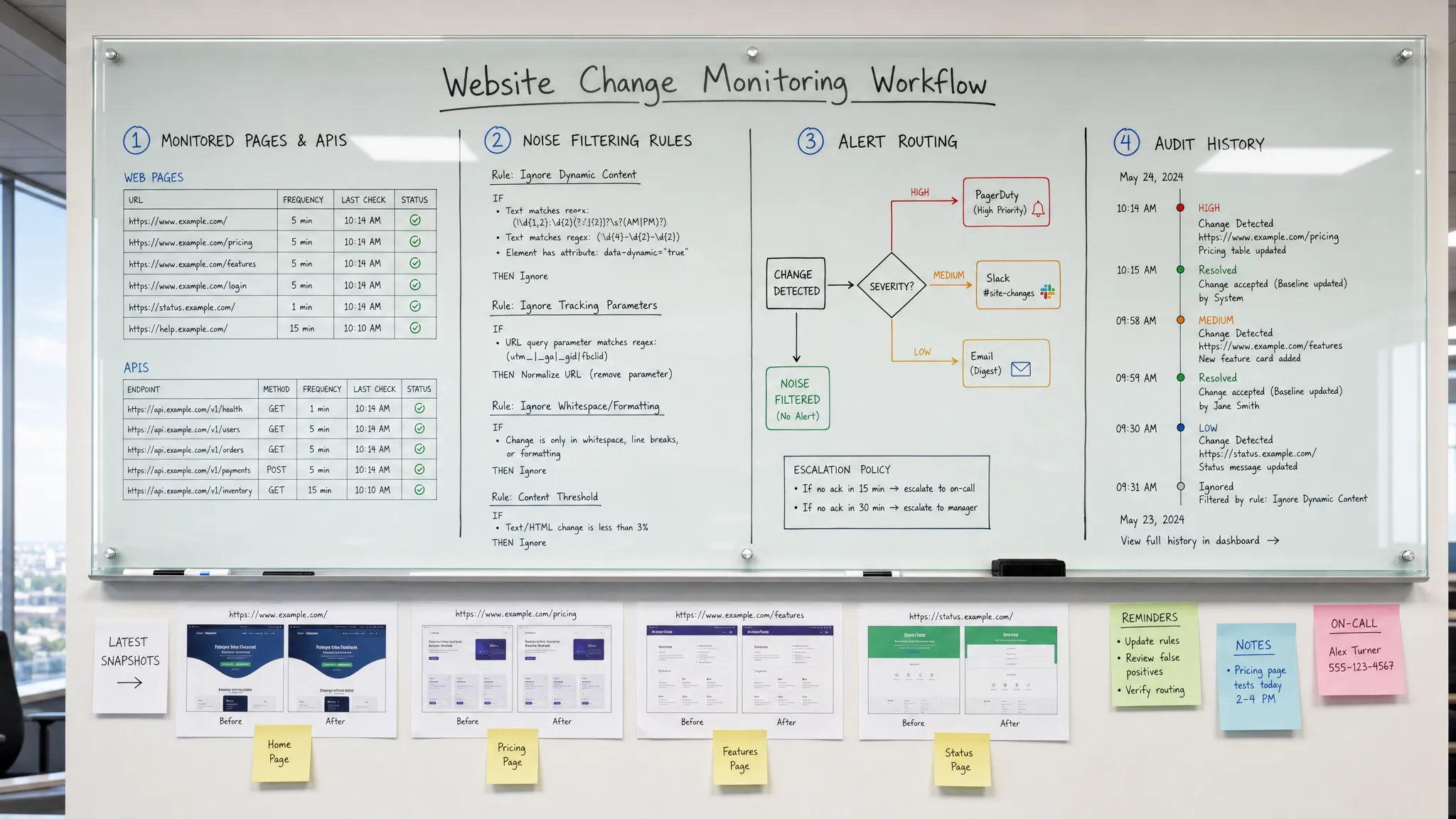
A website rarely fails in one dramatic moment. More often, a pricing line changes without notice, a checkout message disappears, a vendor policy shifts, a competitor updates a plan, or a feed returns a new value that quietly breaks an assumption inside your business.
If the first person to notice is a customer, prospect, partner, or regulator, the cost is already higher. Support tickets start. Sales teams explain mismatched pricing. Compliance teams investigate after the fact. Operations teams scramble to understand what changed and when.
To detect website changes before customers do, you need more than a tool that says “this page changed.” You need a monitoring workflow that knows which changes matter, checks the right sources at the right speed, filters out noise, and sends actionable alerts to the people who can respond.
What “before customers do” really means
Detecting changes early is not only about speed. Speed matters, especially for pricing, policy, checkout, availability, and partner data, but it is only one part of the system.
A practical early-warning workflow should close two gaps:
- The detection gap, meaning the time between a change happening and your team knowing about it.
- The response gap, meaning the time between your team knowing and the right owner taking action.
Many teams focus only on the first gap. They set up a monitor, receive too many alerts, and eventually stop trusting them. The better approach is to treat website change detection as an operational control. Every alert should answer: what changed, why it matters, who owns it, and what happens next?
That starts with choosing the right surfaces to monitor.
Map the web surfaces customers depend on
Not every page deserves the same attention. A typo on an old blog post rarely has the same urgency as a pricing mismatch on a plan page or a change to refund terms. The best way to start is to inventory the surfaces that influence revenue, compliance, customer experience, or operations.
| Surface to monitor | Examples | Why it matters | Typical owner |
|---|
| Pricing and packaging pages | Plan names, list prices, discounts, usage limits | Customers compare, buy, and challenge invoices based on this copy | Revenue operations, product marketing |
| Checkout and signup paths | CTA text, form fields, payment notices, availability | Small changes can reduce conversion or create support issues | Growth, web operations |
| Legal and policy pages | Terms, privacy policy, refund policy, SLA language | Changes may create compliance or contractual risk | Legal, compliance |
| Product docs and help content | Setup steps, feature availability, migration notes | Outdated instructions increase tickets and customer frustration | Support, product |
| Vendor and partner pages | Supplier terms, marketplace listings, partner docs | External changes can affect delivery, margins, or obligations | Operations, partnerships |
| Feeds and APIs | Inventory, rates, partner feeds, status values | Structured changes can break downstream workflows | Engineering, operations |
This mapping step is where many monitoring programs succeed or fail. If everything is “critical,” teams drown in alerts. If only homepage copy is monitored, the highest-risk changes are missed.
For a deeper framework on prioritizing business-critical surfaces, DiffHook’s guide on how to monitor a web page for critical changes is a useful companion to this workflow.
Define what counts as an important change
A raw diff is not the same as a useful signal. Modern pages change constantly. Timestamps update, ads rotate, inventory widgets refresh, personalization modules swap content, and recommendation blocks move around.
Before you set up monitoring, define what should trigger action. For example, a pricing team may care about a dollar amount, a percentage discount, or a phrase such as “annual plan only.” A compliance team may care about a policy effective date, consent language, or jurisdiction-specific wording. An operations team may care about a vendor’s delivery window, minimum order size, or API field value.
Good change criteria are specific enough to reduce noise but broad enough to catch unexpected risk. Instead of “alert me when the pricing page changes,” a better rule is “alert the revenue team when plan names, prices, billing periods, discount terms, or included limits change.”
For APIs and feeds, define changes in terms of structure and values. A new field may be harmless. A missing field, changed status code, renamed attribute, or shifted value range may break a workflow. The same principle applies to pages: a new testimonial is usually low priority, while a removed cancellation clause may be urgent.
Choose the right detection method for each source
The phrase “detect website changes” covers several different technical patterns. A public HTML page, a JavaScript-rendered pricing table, a PDF policy, an RSS feed, and an API endpoint all require different handling.
| Source type | Practical monitoring approach | What to watch for |
|---|
| Static pages | Track text, HTML, or specific page sections | Copy changes, removed sections, changed links |
| Dynamic pages | Monitor rendered content or stable page elements | JavaScript-loaded prices, forms, CTAs |
| Pricing blocks | Track exact values and key terms | Price changes, billing periods, discount conditions |
| Policy pages | Track section-level text and effective dates | Terms updates, privacy changes, refund language |
| Feeds and APIs | Compare responses, fields, status codes, and payload values | Schema changes, missing data, unexpected values |
Manual checks cannot handle this reliably. They are slow, inconsistent, and easy to skip when teams are busy. Browser bookmarks and spreadsheets may work for a handful of pages, but they do not provide fast alerts, history, or routing.
Automated monitoring should match the source. For a policy page, text comparison may be enough. For a pricing page, you may need to isolate the plan table and ignore unrelated layout changes. For an API, you need to monitor the response itself, not just whether the endpoint is up.
If your use case depends on speed, this guide to checking a page for changes in real time explains why real-time detection requires more than simply refreshing a URL.
Match monitoring frequency to business risk
Some pages should be monitored in real time. Others do not need constant checks. The key is to align monitoring speed with the cost of being late.
Pricing, checkout, critical policies, high-value vendor pages, and APIs that feed customer-facing systems usually deserve the fastest alerts. A delayed notice can lead to lost revenue, incorrect quotes, broken workflows, or avoidable customer escalations.
Lower-risk pages, such as general marketing copy or evergreen documentation, may not need the same urgency. They still benefit from change history, but they may not require immediate escalation.
A simple severity model can help:
| Severity | Example change | Alert timing | Response expectation |
|---|
| Critical | Public price mismatch, checkout break, policy clause removed | Immediate | Owner investigates now |
| High | Competitor pricing change, vendor terms update, API field change | Fast | Owner reviews same day |
| Medium | Help article update, non-critical page copy change | Scheduled | Review during normal workflow |
| Low | Layout tweak, image replacement, minor metadata change | Digest or history only | No immediate action |
This avoids the common trap of treating every change as an emergency. The goal is not to create more alerts. The goal is to create earlier, more trustworthy signals.
Filter noise before it reaches people
Noise is the enemy of early detection. If a monitor alerts on every cookie banner variation, rotating hero image, timestamp, or personalized block, people will mute it. Once alerts are ignored, the monitoring system stops protecting the business.
Useful filters depend on the page and team. You may want to ignore navigation, footers, ads, related content, session IDs, tracking parameters, or blocks that change on every load. For pricing, you may want alerts only when numeric values or plan terms change. For policy pages, you may want section-level diffs rather than full-page noise.
Smart filtering should not hide risk. It should remove predictable, low-value changes so that meaningful changes stand out. The right test is simple: would the alert help someone make a decision? If not, refine the monitor.
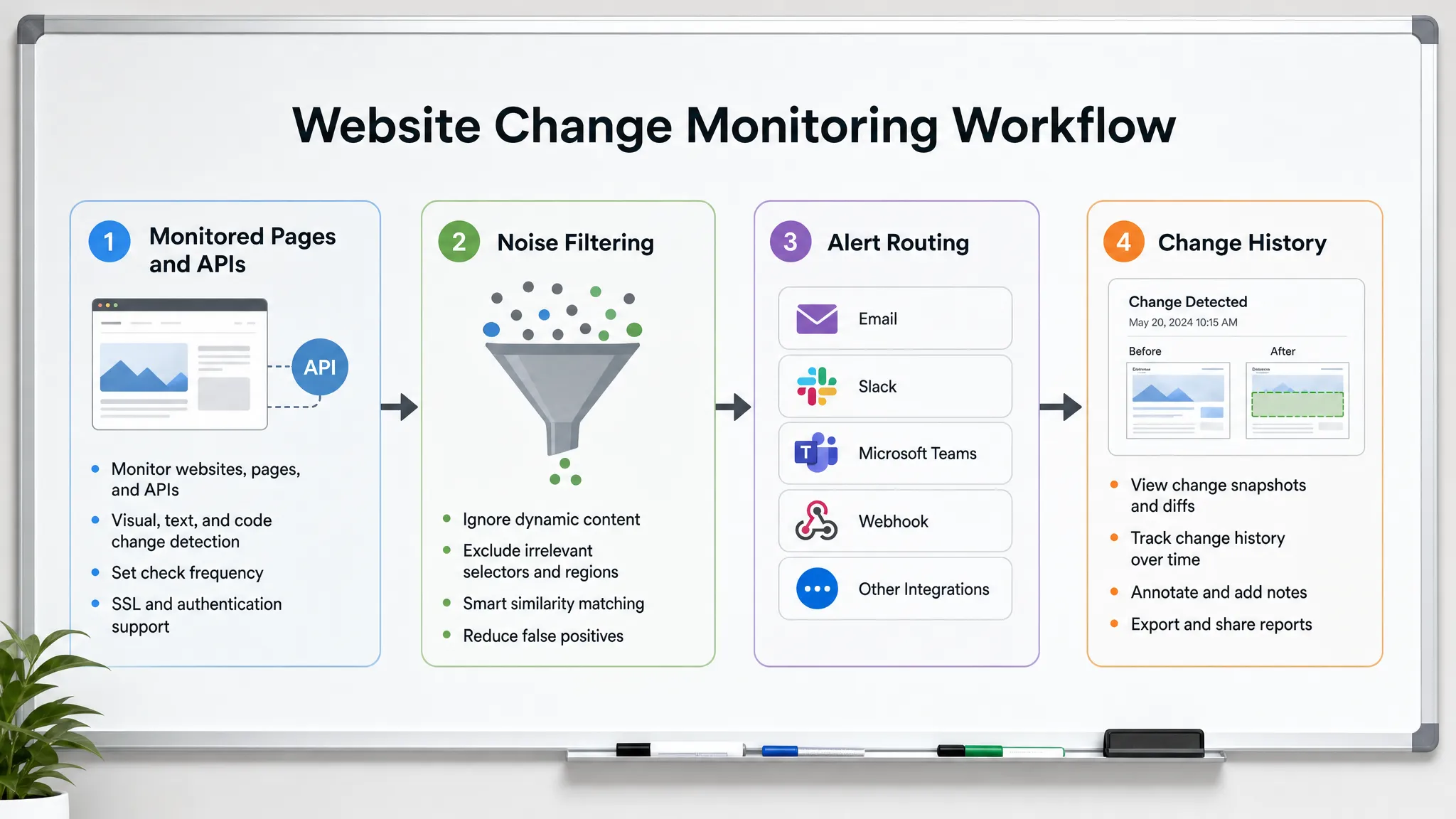
Route alerts to the person who can act
A change detected quickly but sent to the wrong inbox is still a delayed response. Alert routing should reflect ownership.
Pricing alerts should go to revenue operations, product marketing, or the person who owns packaging. Legal language changes should go to legal or compliance. API and feed changes should go to engineering or operations. Competitor or marketplace changes may belong to sales, strategy, or partnerships.
The best alerts include enough context to reduce back-and-forth:
- The monitored URL, feed, or API endpoint.
- The exact before-and-after change.
- The time the change was detected.
- The severity or business category.
- The owner or channel responsible for review.
- The next step, such as validate, revert, escalate, or update internal systems.
For teams with more complex operational stacks, alerts may need to trigger workflows in CRMs, ERPs, ticketing systems, or internal automation. If website change signals need to connect into broader back-office processes, working with specialists in AI automation and NetSuite consulting can help align detection with the systems teams already use to run the business.
Slack and email alerts are useful for visibility. Webhooks and workflow integrations are useful when a change should create a ticket, update a record, notify a downstream system, or start a review process automatically.
Keep a history of every meaningful change
Fast alerts help you respond in the moment. Change history helps you understand what happened later.
A full history is valuable when teams need to answer questions such as:
- When did this price first appear?
- What did the policy say before the latest update?
- Did the vendor page change before the customer complaint?
- Which API field changed before the workflow failed?
- Was this a one-time issue or part of a recurring pattern?
Without history, teams rely on screenshots, memory, and chat threads. That makes incident reviews slower and less reliable. With an audit trail, teams can reconstruct events, compare changes over time, and improve monitoring rules after each incident.
History is especially important for compliance-sensitive teams. The goal is not only to know that a page changed, but to preserve evidence of what changed and when it was detected.
Test the workflow before a real incident
Do not wait for a customer complaint to find out whether your monitoring works. Run controlled tests.
For internal pages you control, make a small test change in a low-risk area and confirm that the right alert fires. For external pages, use known low-risk pages to validate that your monitoring detects the type of content you care about. For APIs, test expected changes in a staging or safe environment where possible.
Then review the full path. Was the change detected quickly enough? Did the alert include the right context? Did it go to the right owner? Was the severity correct? Did the team know what to do next?
Testing also reveals over-monitoring. If a test generates five alerts in three channels with no clear owner, the workflow needs refinement. A good detection system should make response easier, not create another operational burden.
A practical rollout plan for the first week
You do not need to monitor the entire web on day one. Start with the pages and sources that would create the most pain if customers noticed first.
| Day | Action | Outcome |
|---|
| 1 | List revenue, compliance, and operations-critical pages | A focused monitoring inventory |
| 2 | Assign owners and severity levels | Clear response responsibility |
| 3 | Configure monitors for the top-priority pages, feeds, and APIs | Early coverage for the highest-risk surfaces |
| 4 | Add filters for known noisy elements | Fewer false positives |
| 5 | Route alerts to Slack, email, or webhooks | Faster action by the right team |
| 6 | Run test changes or validation checks | Confidence that alerts work |
| 7 | Review alert quality and expand coverage | A repeatable monitoring process |
Once the first set works, expand by category. Add more pricing pages, more policy pages, more vendor pages, or more API endpoints. Scaling should be deliberate. Every new monitor should have a clear reason, owner, and response path.
If pricing is your highest-risk category, DiffHook’s article on how to track web page price changes automatically goes deeper into pricing-specific signals, thresholds, and alert routing.
How DiffHook helps teams detect website changes earlier
DiffHook is built for teams that need real-time alerts when important web changes happen. It monitors pages, prices, policies, feeds, and APIs so teams can catch changes that affect revenue, compliance, and operations.
Instead of relying on manual checks, teams can use DiffHook to track critical sources continuously, filter noise, and send alerts through Slack, email, webhooks, and workflow integrations. Full change history helps teams review what changed over time, while role access, SSO, and an EU hosting option support operational and governance needs.
The strongest use case is not “tell me when anything changes.” It is “tell the right team when something important changes, fast enough for us to act before customers are affected.”
Frequently Asked Questions
What is the best way to detect website changes before customers do? Use automated monitoring for your most business-critical pages, feeds, and APIs. Define which changes matter, filter predictable noise, and route alerts to the team that can act quickly.
Which website changes should I monitor first? Start with pricing, checkout, signup flows, policy pages, product documentation, vendor pages, partner feeds, and APIs that affect customer experience or operations. These are the surfaces where late detection is most expensive.
How do I avoid false positives in website change alerts? Ignore dynamic elements such as timestamps, ads, rotating recommendations, and session-specific content. Track stable sections, key text, structured values, or thresholds that directly map to business risk.
Can website change detection monitor APIs and feeds too? Yes. For many teams, feeds and APIs are just as important as web pages. Monitor response values, status codes, schema changes, missing fields, and unexpected payload changes.
How often should critical pages be checked for changes? Match frequency to risk. Pricing, checkout, policies, and operational APIs often need real-time or very fast alerts. Lower-risk marketing pages may be fine with scheduled checks or digest-style review.
Detect important changes before they become customer problems
Customers should not be your monitoring system. By the time they report a mismatch, broken flow, or surprising policy change, your team is already reacting under pressure.
With DiffHook, you can monitor the web surfaces that matter, receive fast alerts, reduce noise, and preserve a clear history of every important change. Start with your highest-risk pages and build an early-warning system your teams can trust.